 Abbos Mirzaev


Set Origin Tool
Author: Abbos Mirzaev
Version: 1.0.1
Blender Compatibility: 3.0 and above
Category: Object
Location: 3D Viewport > Sidebar > Set Origin Tab
Hotkey: Ctrl + Alt + Z (Pie Menu)
✨ What is Set Origin Tool?
Set Origin Tool is a powerful Blender addon that gives you full control over how and where to place the origin (pivot) of your objects. With an intuitive UI and fast pie menu access, you can streamline your modeling, rigging, and layout workflow.
🔧 Key Features
- The Top Panel only works in Object Mode.
The Quick Origin Tools can work in Object Mode & Edit Mode. -
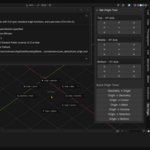
3x3 Origin Grid Interface
Quickly place origins to the top, center, bottom, left, right, or corners of your object’s bounding box with an intuitive symbol-based layout.
-
Quick Origin Tools
One-click access to frequently used origin operations:
- Geometry → Origin
- Origin → Geometry
- Origin → 3D Cursor
- Origin → Center of Mass
- Origin → Center of Volume
- Origin → Selection
- Origin → Bottom
-
Pie Menu Access
Call up a pie menu anytime with
Ctrl + Alt + Zto set origins without leaving the viewport. -
Non-Destructive & Undoable
All changes are reversible with Blender's undo system.
-
Supports Mesh and Curve Objects
Compatible with both Mesh and Curve object types, including automatic mode switching for safe transforms.
Your feedback means a lot to me — thank you for your support!