 Graffinity




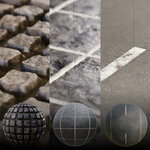

Introducing Shadeguard V.3 - Blender extension with 102 procedurally generated materials for dynamic, detailed and realistic texturing in Blender 3D.
FREE FUTURE UPDATES!
Key Features
Procedural Materials allows you to:
Dynamically adjust any material property
Create different material variations
Add materials without seams & tiling
Have very high resolution
Use some materials without UV Unwrapping
Make Animated Materials and Effects
Application
The applying process is very easy, just drag and drop the material from the Asset library to the mesh object and the material will do the rest.
Customization
You can use the properties to control and adjust the material. This way you have the full control over the material’s appearance and behavior.
Attention to Detail
All materials are designed to deliver high details even when it comes to close up renders.
Tags & Searching
All Materials are tagged with a specific keywords based on their condition, apperance, property, or cathegory for optimized searching. (e.g. Nature, Wood, Damadged...)
Descriptions
Each material has its own nodegroup with properties that you can use to adjust the material. Each property has its own description, which makes the navigation easier, even for those who never worked with procedural materials before.
Installation Process
Here’s how to install the Shadeguard Library to your asset manager, so you can access them everytime you open a new project
Create new asset folder in your computer (In case you don't have one already)
Copy the Shadeguard Library Blender file into that folder
Open new blender project (MUST BE BLENDER 4.3 OR HIGHER!)
Go to Edit > Preferences > File Paths and add new asset library by clicking ion the + icon. Then locate the asset folder you just created
Close preferences, open the asset manager, choose the "Shadeguard Library" or the "Current File" and you will be able to see the materials
Just drag the material and drop it on any object
-
Enjoy!