 dubCUT



Shot Handler 4
Fast, dependable shot management for Blender artists who need multiple scene states to switch cleanly and stay under control.
Shot Handler is a production-focused shot management addon for Blender.
Store complete shot states directly inside one scene, then switch cameras, naming, render settings, frame ranges, collection states, action assignments, custom properties, and overscan instantly and predictably. It is built to reduce manual setup, cut avoidable mistakes, and keep complex scenes organized without splitting work into duplicate files.

Save and restore nearly any Blender property per shot. From render output and file formats to material controls, Geometry Nodes values, and custom properties, Shot Handler turns a single scene into a dependable shot-state system.
NEW VERSION 4
Completely rebuilt with a redesigned workflow.
Faster to use, easier to read, and far more capable in real production scenes.
And now more affordable than ever.

Built for scenes with real shot complexity
When one Blender file needs to carry multiple shots, look variants, animation states, or delivery outputs, Shot Handler keeps those states organized and recallable. Each shot can restore its own technical setup, making iteration safer and reducing setup drift as a project grows.

Shot List / Core Workflow
Create, duplicate, reorder, and switch shots from one central list. Shot Handler keeps the core workflow fast as shot counts grow. Managing variations stays simple instead of turning into manual scene organization.
Enable Auto Save for fast changes.
You can also export simple .bat files for background rendering directly from the shot list.

Camera Module

Assign a camera per shot and store key camera-related settings with it. Motion Blur and depth-of-field setup, background images, and other camera state can stay consistent across shot variations without manual resetting.

Naming / Output Module
Reliably build cleaner output paths per shot with structured naming controls. Root paths, versions, tags, filename overrides, and compositor file output settings can all be stored with the shot to reduce export mistakes and keep deliveries consistent.

Resolution Module
Store resolution settings per shot using presets or custom values. It is ideal for shots that need different crops, aspect ratios, or delivery specs without forcing you to maintain separate scene files.

Frames Module
Store frame start, frame end, and frame step per shot. Each shot can keep its own timing range for previews, playblasts, and final renders without constant timeline cleanup.

Notes Module
Add lightweight production notes directly to shots, including status and reminders. It is a simple way to track approvals, warnings, and work-in-progress details without leaving Blender.

Collection Snapshot Module
Save collection visibility and view layer states per shot, including viewport, render, selection, holdout, and indirect-only controls. Switch between scene variants quickly without rebuilding collection setups by hand.

Action Snapshot Module
Save and restore action assignments and action-slot states for animated objects. This helps keep animation variants organized per shot and makes switching between setups far more dependable in animation-heavy scenes.
Custom Properties
Store and restore custom properties per shot across objects, bones, materials, nodes, and scene data. Rig switches, shader controls, Geometry Nodes values, and tool-specific settings can all return in the exact state each shot needs. Right-click any supported property directly in Blender and use the context menu to save it to all shots at once, which makes capturing shot-specific custom properties much faster during lookdev, rigging, and shot setup.
Overscan Module
Use advanced overscan controls with separate values for each side in pixels or percent. Shot Handler includes a full overscan workflow with camera and background-image handling, metadata export, and helper scripts for compositing.
A more controlled way to manage shot work
Shot Handler gives Blender artists a structured way to manage many shot states inside one file. If your project needs multiple cameras, output variations, scene variants, or technical presets that must switch reliably, it gives you a faster and safer way to manage that work.
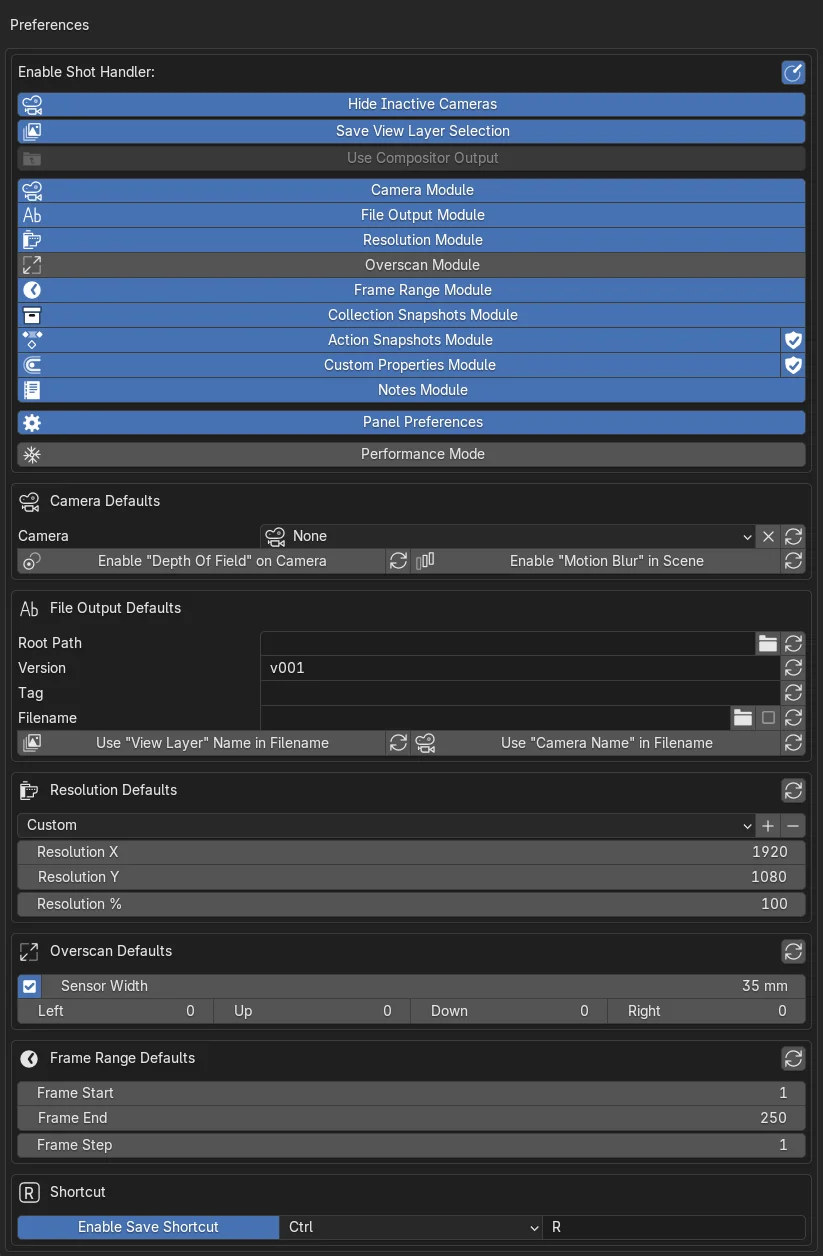
Preferences
Extensive preferences and default values let you tailor the workflow to your pipeline, reduce repetitive setup, and keep new shots consistent across projects.