 ZibadMend







Smart Scene Organizer - Official Documentation
Version: 1.0 | Author: Zibad Mend | Support: Blender 4.x & 5.0+
1. Introduction
Welcome to Smart Scene Organizer! This add-on uses a sophisticated hybrid Artificial Intelligence engine (combining Geometric Decision Trees, Poly-density mapping, and Proximity Context) to automatically analyze, rename, organize, and prep your 3D scenes.
2. Installation
- Download the provided
.zipfile. - In Blender, navigate to Edit > Preferences > Add-ons (or Extensions in Blender 5.0).
- Click on Install (or Install from Disk), and select the
.zipfile. - Enable the add-on by checking the box.
- In the 3D Viewport, press
Nto open the right sidebar and look for the Scene Organizer tab.
3. User Interface Overview
The add-on is divided into three main workspaces accessible via the top tab menu:
This is where you run the AI analysis and execute batch renaming or organization operations. It contains the core tools for daily cleanup tasks.
Here you can teach the AI to recognize entirely new object categories by defining ideal dimensions, geometric properties, and naming keywords. The AI database is stored globally, meaning the AI learns across all your Blender projects.
Manage your architectural material database. Assign prices per square meter (m²) or cubic meter (m³) to automatically calculate the estimated cost of your 3D project.
4. Core Tools & Operations
AI Context Analysis
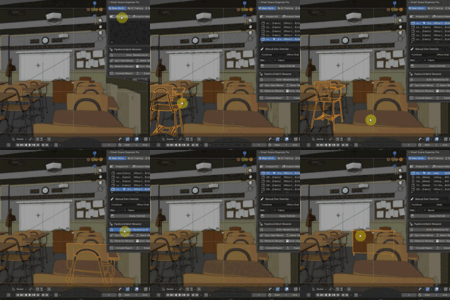
- Analyze Selected / Analyze All: The engine will deeply scan objects (penetrating Empty groups and Collection Instances). It identifies what an object is based on its name, dimensions, poly-count, and what objects are around it.
- Manual Override: Select an item from the list, change its Category, Sub-type, or Material manually, and click Apply Override.
Pipeline & Batch Renamer
- Auto-Rename by AI: Automatically renames all analyzed objects in the scene based on their detected type (e.g., changes
Cube.001toDining_Chair_01). - Sync Data Names: Copies the Object name to the Mesh Data name. Essential for game engine exports (Unreal/Unity). (Safely skips Read-Only data in Blender 5.0+).
-
Game-Ready (SM_): Adds the
SM_prefix to objects and theM_prefix to materials. - Hierarchy Rename: Select a parent object (e.g., "Car") and it will rename all its children sequentially (e.g.,
Car_Child_01). - Auto-Organize Collections: The ultimate cleanup tool. It creates standardized Collections (like
Col_Furniture) and moves analyzed objects into them automatically.
5. How to Train the AI
If the AI fails to recognize a specific custom prop (e.g., a "Sci-Fi Crate"), you can teach it:
- Go to the 🧠 AI Training tab.
- Set the Name (e.g., Sci-Fi Crate) and Category (e.g., Props).
- Add Keywords separated by commas (e.g., crate, scifi, box).
- Set the Minimum and Maximum tolerances for Height (Z), Length (X/Y Max), and Width (X/Y Min).
- Select the expected Poly Density (Low, High, or Any).
- Click Save / Update Profile. The AI will now recognize these objects forever!
6. Reports & Export
After your scene is analyzed and materials are assigned, you can generate a Bill of Quantities (BOQ):
- Console Report: Prints the total estimated cost in the Blender System Console.
- Export CSV: Generates a
Project_Report.csvfile in the same folder as your.blendfile, containing detailed dimensions, categories, materials, and individual costs.
-
$18
1 User
-
$78
5 Users
-
$148
10 Users
 Included
Includes 12 months of
- Support from ZibadMend
- Product updates
Extend this product’s Support Period +12 months: 50% of product price
Have questions before purchasing?
Login to message
| Blender Extension Compatible | Yes |
| Published | 4 months ago |
| Blender Version | 4.1 - 5.1 |
| Extension Type | Add-on |
| License | GPL |
Discover more products like this
kitbash Blender outliner collection-organizer cost estimator scene organizer auto rename batch-rename ArchViz blender addon unity pipeline unreal-pipeline outliner-cleanup