 Hisoka852




📖 Overview
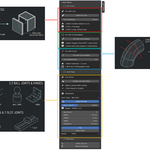
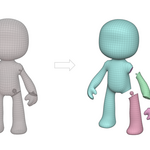
Split Helper is a Blender add-on designed to simplify mesh cutting and joint creation. It provides precise tools for dovetail, ball, hinge, peg, and T-slot joints, along with advanced boolean operations and auto-sizing features.
📦 What it Includes
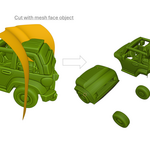
Mesh cutting utilities (line, thickness, surface cuts)
Automatic dovetail joint generation with customizable parameters
Support for ball joints, hinge joints, pegs, and T-slot connectors
Auto-size calculation based on contact area
Boolean union operations applied safely without context errors
Curve-based cutting operator for clean splits
⚙️ Installation
Download the .zip file from SuperHiveMarket.
In Blender, go to Edit > Preferences > Add-ons > Install.
Select the .zip file and enable Split Helper in the add-ons list.
🔍 Where to Find It
Once installed, you’ll find Split Helper in the 3D View > N-Panel > Split Helper section.
🛠 Recommended Workflow
Select two mesh objects to analyse contact areas.
Choose your joint type (Dovetail, Ball, Hinge, Peg, T-slot).
Adjust parameters such as width, height, depth, taper, clearance, and auto-size percentage.
Generate male and female keys automatically.
Apply boolean operations if desired, or keep keys as visible mesh objects.
⚠️ Safety Notes
Always save your project before applying boolean operations.
Use orthographic view when performing curve-based cuts.
Ensure meshes are properly selected to avoid context errors.
💻 Compatibility
Blender version: 4.2.0 and above
Works with mesh and curve objects
Supports both Fast and Exact boolean solvers
👤 Author
Created by Hisoka852
Have questions about this product?
Login to message
| Blender Extension Compatible | Yes |
| Published | about 2 months ago |
| Blender Version | 4.2 - 5.2 |
| Extension Type | Add-on |
| Render Engine Used | Blender-Internal |
| License | GPL |