 Pluglug



🧬 Build names, not type them.
Structured Renamer is a Blender add-on designed to simplify and accelerate your naming workflow by organizing names into clear, reusable components. Unlike basic search-and-replace tools, Structured Renamer provides semantic control, ensuring consistency across your projects.
🎯 Why Structured Renamer?
Structured Renamer turns naming from a tedious task into an intuitive and efficient process, perfect for:
- 🎪 Character Rigging: Precise naming for complex bone hierarchies
- 📱 VRM/VTuber Creation: Clear asset organization
- 🏗️ Architectural Visualization: Systematic naming conventions
- 🎮 Game Development: Unity and Unreal Engine standards
- ⚙️ Hard Surface Modeling: Technical naming consistency
- 🎬 Animation Studios: Team-wide naming clarity
Perfect for names that include:
- 🔄 Symmetrical parts (
.L/.R,.Fr/.Bk,.Top/.Bot) - 📊 Sequential numbering (01, 02, 03...)
- 🏷️ Type identifiers (DEF_, CTRL_, SK_)
- 📁 Hierarchical relationships (Body/Arm/Hand)
- 🎨 Material or variant indicators (Wood, Metal, Clean, Dirty)
- 📏 Location or position markers (Ground, Upper, Lower)
✨ Core Features
🧩 Semantic Name Construction
Define names using intelligent, reusable elements:
- Text Elements: Prefixes, suffixes, and descriptive parts
- Position Elements: L/R, Left/Right handling for symmetrical objects
- Counter Elements: Sequential numbering with customizable padding
- Custom Separators: Underscore, dash, dot, space, or camelCase formatting
📦 Factory Preset Library
Structured Renamer excels at handling complex, systematic naming patterns that would be tedious or error-prone to manage manually:
| Preset | Perfect For | Example Output |
|---|---|---|
| Character Rigging | Hierarchy for Rig Mechanisms |
DEF_Arm-01.L, CTRL_Leg_IK-02.R
|
| UE5 Standard | Unreal Engine assets |
spine_01, foot_r
|
| Unity Humanoid | Game character rigs |
LeftUpperArm, RightThumbProximal
|
| VRM Avatar | VTuber/Avatar creation |
leftUpperArm, rightThumbProximal
|
| PMX (MikuMikuDance) | MMD character prep |
全ての親, 右ひざ
|
| Architecture | Room/component relationships | House_F-02_Bedroom_Wall_Wood.008 |
| Hard Surface | Technical part organization | Mech_Wheel.R.06 v-Old |
🎯 Universal Target System
Rename supported Blender object types:
- Objects: Meshes, armatures, lights, cameras, empties
- Bones: Edit bones, pose bones with automatic hierarchy respect
- Future Support: Outliner items, nodes, sequences, materials (coming soon)
🔄 Smart Conflict Resolution
Say goodbye to uncontrolled .001 suffixes!
Structured Renamer intelligently prevents naming conflicts before Blender adds its default .001, .002 extensions:
- 🔍 Pre-emptive Detection: Scans for potential conflicts before applying names
- 🎯 Smart Counter Resolution: Uses your counter format (e.g.
-01,-02,-03...) instead of Blender's.001 - 📊 Pattern-Aware: Automatically increments counters while maintaining your naming convention
- 🔄 Namespace Management: Respects object/data relationships and prevents cross-contamination
Example: Instead of DEF_Arm.L.001, get DEF_Arm-02.L - clean, consistent, and meaningful!
👥 Team Collaboration Ready
- 📤 Export/Import: Share naming patterns as JSON files
- 🔧 Custom Patterns: Create organization-specific standards
- 📋 Pattern Validation: Ensures consistency across team members
- 💾 Auto-Backup: Never lose your carefully crafted patterns
🎬 How It Works - Simple as 1-2-3
Step 1: Basic Renaming ⚡
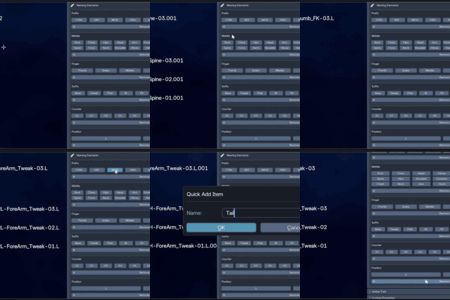
Select objects → Choose elements → Done!
- Select any objects in your 3D viewport (meshes, bones, lights, cameras...)
- Open the Structured Renamer panel in N-Panel (Tool tab)
-
Click text elements like
DEF,Arm, position elements like.L, and counters like01 -
Watch names update instantly:
Bone→DEF_Arm-01.L
That's it! No typing, no manual counting, no mistakes.
Step 2: Use Factory Presets 📦
Instant industry-standard naming
- Click the Import button in the Naming Patterns section
- Browse to the presets folder (opens automatically)
-
Select presets like
unity.json,character.json, orarchitecture.json - Switch between patterns instantly from the dropdown
- Apply to your objects with one click
Perfect for: Game dev pipelines, studio standards, and team consistency.
Step 3: Create Custom Patterns 🔧
Build your own naming system
- Click "Enter Edit Mode" to access the pattern editor
- Add elements: Text, Position, or Counter types
- Configure separators, items, and display order
- Preview your pattern with generated examples
- Export and share with your team
📖 Full Tutorial & Documentation →
🚀 What Makes It Different?
| 😞 Traditional Renaming | ✨ Structured Renaming |
|---|---|
| ❌ Find: "Bone" → Replace: "DEF_Bone" | ✅ Define pattern: [Prefix]_[Part]-[Counter].[Position] |
| ❌ Hope nothing breaks | ✅ Apply instantly: DEF_Arm-01.L, DEF_Arm-02.L, DEF_Arm-01.R |
| ❌ Repeat for every variation | ✅ Change prefix globally: CTRL_Arm-01.L, CTRL_Arm-02.L |
| ❌ Manual counter management | ✅ Automatic counter management |
| ❌ Inconsistent results | ✅ Perfect consistency every time |
🌱 Growing Together with Your Feedback
Your Voice Shapes the Future
Structured Renamer was developed with a dream: to serve diverse workflows across every corner of the 3D industry. While I'm proud of what we've built so far, I believe this tool is not yet perfect—and that's where you come in.
Why Your Opinion Matters
Every 3D artist works differently. Every studio has unique requirements. Every project brings new challenges. To make Structured Renamer truly universal, I need to hear from real users like you:
- 🎮 Game Developers: What naming conventions are missing from Unity/UE5 presets?
- 🎪 Riggers: Which bone hierarchies need better support?
- 🏗️ Arch-Viz Artists: What building component patterns would save you time?
- 📱 VTuber Creators: How can VRM workflows be streamlined further?
- ⚙️ Hard Surface Artists: What mechanical naming standards should be included?
- 🎬 Studio Teams: What collaboration features would improve your pipeline?
What I'm Looking For
Your feedback on:
- 📝 Usability: Is the interface intuitive for your workflow?
- 🔧 Customization: What pattern features are you missing?
- 📦 Presets: Which industry standards should be included?
- 🚀 New Features: What would make your work even more efficient?
- 🐛 Issues: Any bugs or unexpected behaviors?
Join the Community
This isn't just a tool—it's a collaborative project. Whether you're a seasoned professional or just starting out, your perspective helps make Structured Renamer better for everyone.
Together, we can build the naming tool that the 3D community truly deserves.
📞 Get Help & Share Ideas
- 📖 Documentation: Complete User Guide
- 💬 Bug Reports & Feature Requests: Blender Artists Thread