Stylized Outline
 Hisoka852


Overview
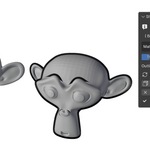
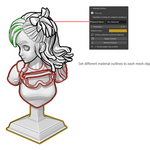
The Stylized Outline add-on provides a quick way to add bold, customizable outlines to selected mesh objects in Blender. It uses a secondary material combined with a Solidify modifier to generate rim outlines, good for toon shading, stylized renders, and concept art.
What It Includes
Outline creation/removal operators (Apply Outline, Remove Outline)
Custom rim material generator with emission shader setup
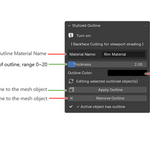
Dynamic UI controls for:
Outline thickness
Outline color
Rim material name
Automatic material management (adds rim material only when needed)
Safety checks (warns if no object is selected)
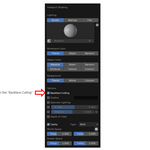
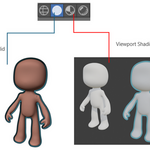
Viewport shading tips (backface culling recommended)
Installation
Save the script as Stylized Outline v0.7.zip
In Blender, go to Edit > Preferences > Add-ons > Install.
Select the file and enable the add-on.
The panel will appear in View3D > Sidebar > Outline.
Where to Find It
Open the 3D Viewport.
Go to the Sidebar (N key).
Navigate to the Outline tab.
Use the Stylized Outline panel to apply/remove outlines and adjust settings.
Recommended Workflow
1. Select Mesh Objects
Choose the mesh objects you want outlined.
Ensure objects are of type MESH
Multiple selections supported
2. Apply Outline
Use the panel operator to add rim outlines.
Click Apply Outline
Rim material and solidify modifier are added automatically
3. Adjust Thickness and Color
Fine-tune the outline appearance in real time.
Use Thickness slider (0–20)
Pick Outline Color from color picker
4. Remove Outline
Cleanly remove rim material and modifier.
Select outlined objects
Click Remove Outline
Materials with no users are auto-deleted
Safety Notes ⚠️
Works only on mesh objects.
Backface culling must be enabled for correct viewport shading.
Outlines are applied via the Solidify modifier; avoid stacking conflicting modifiers.
Removing outlines deletes unused rim materials to keep projects clean.
Compatibility
Blender 4.0 and above
Supports Principled BSDF and Emission-based rim materials
Designed for Object mode workflows
Tested with multiple selected meshes
Author
Name: Hisoka852
Version: 0.7.1
Category: Object Tools
Have questions about this product?
Login to message
| Blender Extension Compatible | Yes |
| Published | 3 months ago |
| Blender Version | 4.0 - 5.1 |
| Extension Type | Add-on |
| Render Engine Used | Cycles, Eevee |
| License | GPL |