 Agustin Honnun


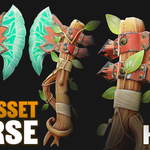
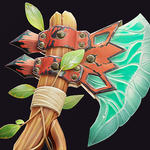
Learn today! With more than 20+ Hours of lessons, to make a Stylized Game-Ready Asset from Scratch, using Blender and Substance Painter. NO Timelapses, Everything Explained in Realtime step by step.
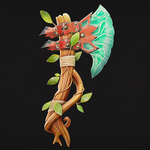
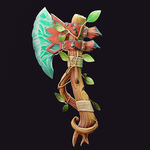
In this course you will learn the complete workflow used to create a stylized game-ready asset from start to finish. Using a stylized axe as the main project, you will follow the full production pipeline commonly used in game art, starting from a simple sketch or concept and developing the asset step by step while understanding the reasoning behind each stage.
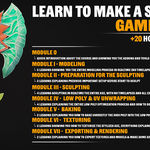
You will begin by modeling the axe in Blender based on a concept sketch, establishing the main shapes and preparing the model for sculpting. The course then moves into a real-time sculpting stage where design decisions are explained while refining the shapes and correcting forms directly during the process. After the high poly version is complete, you will create the optimized low poly model, preparing it to be game ready while building clean UVs and organizing the mesh properly.
Once the model is ready, you will learn how to bake the high poly details onto the low poly mesh in Substance Painter. The course then focuses on stylized texturing, explaining the full process step by step while creating materials, color variation, and surface detail. Finally, you will export textures prepared for Blender, Unity, and Unreal Engine, organize your project using proper naming conventions and folder structure, and create simple renders in Blender that you can use to present the final asset in your portfolio.
What you will learn in this course?
Learn the complete workflow for creating a stylized game-ready asset, from concept to final textured model
Model and sculpt in Blender, creating high poly and optimized low poly geometry with proper UV Unwrapping
Learn a complete baking workflow, transferring high poly detail to the low poly mesh with properly explained settings
Texture stylized assets in Substance Painter and export textures for Blender, Unity and Unreal Engine formats
Create simple portfolio renders in Blender & Photoshop to showcase your final game-ready asset
What are the requirements or prerequisites for taking the course?
Basic knowledge of 3D modeling in Blender (navigating the interface, using basic modifiers, and tools such as move, rotate, scale, and extrude).
Basic familiarity with Substance Painter (understanding the interface, the layer-based texturing system, and basic tools such as polygon fill, brush, eraser, and HDR rotation).
These fundamentals are important to follow the course smoothly. While many tools are explained in detail, prior basic knowledge of Blender and Substance Painter is required.
A computer capable of handling demanding tasks in Blender and Substance Painter, including modeling, sculpting, baking, and texturing.
A graphics tablet or pen display for sculpting is recommended but is not mandatory. It Will help you to sculpt easier.
-
Download and install the add-ons and resources used in the course (all of them are free, check the Addons & Resources lesson in Module 0 before starting).
The course is divided into modules. Make sure to download each module’s .zip file and organize them properly to follow the course in order.
Be sure to extract all .zip files, including the addons, resources, and layouts. Also, check the README files, and review Module 0 to understand how to install each resource.