 Studio156


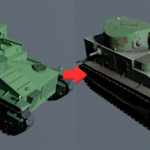
📦 Installation
Download the .zip file of the addon.
In Blender, go to Edit → Preferences → Add-ons → Install…
Select the .zip file and click Install Add-on.
Enable Surface Effects in the addons list.
🎨 Usage
1. Select any object with a material.
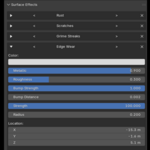
2. Go to the Material Properties panel → find the new Surface Effects tab.
3. Click + to add an effect.
Use the arrows < > next to the effect name to cycle between different effect types.
Use the X button to remove an effect — the material will return to its previous state.
4. Adjust the sliders and settings inside the effect to customize the look.
5. Add more effects and combine them for unique results!
💡 Tips
You can stack multiple instances of the same effect for layered results (e.g., two different types of scratches).
Effects don’t overwrite your material — they’re layered in procedurally.
If you want to refine further, open the Shader Editor: each effect is a node group that you can edit, mix, or even animate.
Edge Wear currently works only in Cycles because it relies on bevel node support.
Have questions about this product?
Login to message
| Blender Extension Compatible | Yes |
| Sales | 10 |
| Published | 12 months ago |
| Blender Version | 3.6 - 5.0 |
| Extension Type | Add-on |
| Render Engine Used | Cycles, Eevee |
| License | GPL |
Discover more products like this
egde wear pocedural surface effects procedural material surface effects dust wetness scratches texture Material Rust dirt