Tachyon Texture Tools
Every release, newest first
1.1.0 — 10 November 2026
Choose the file format. The ORM Packer and the ORM Unpacker used to save PNG only; now they save PNG, Targa, TIFF, Photoshop, JPEG, WebP or BMP, and in Batch any one material can be the exception.

Added
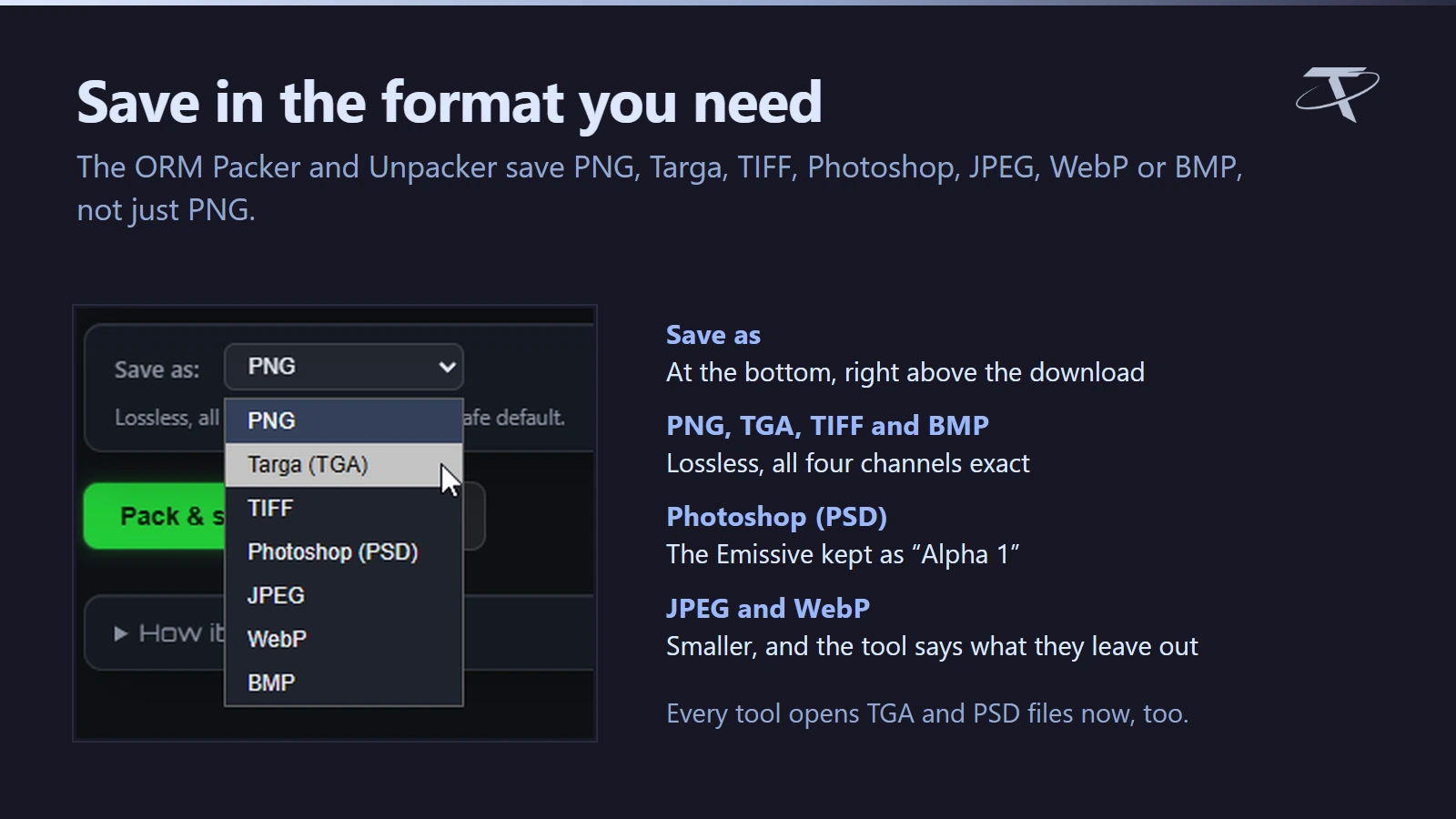
Save as, in the ORM Packer and the ORM Unpacker. Pick PNG, Targa (TGA), TIFF, Photoshop (PSD), JPEG, WebP or BMP at the bottom of the tool, right above the download in Single mode and right above Pack & download all / Unpack & download all in Batch. File names, the download button ("Download TGA") and the result panel follow your choice, and the line under the menu says what that format keeps and what it loses.

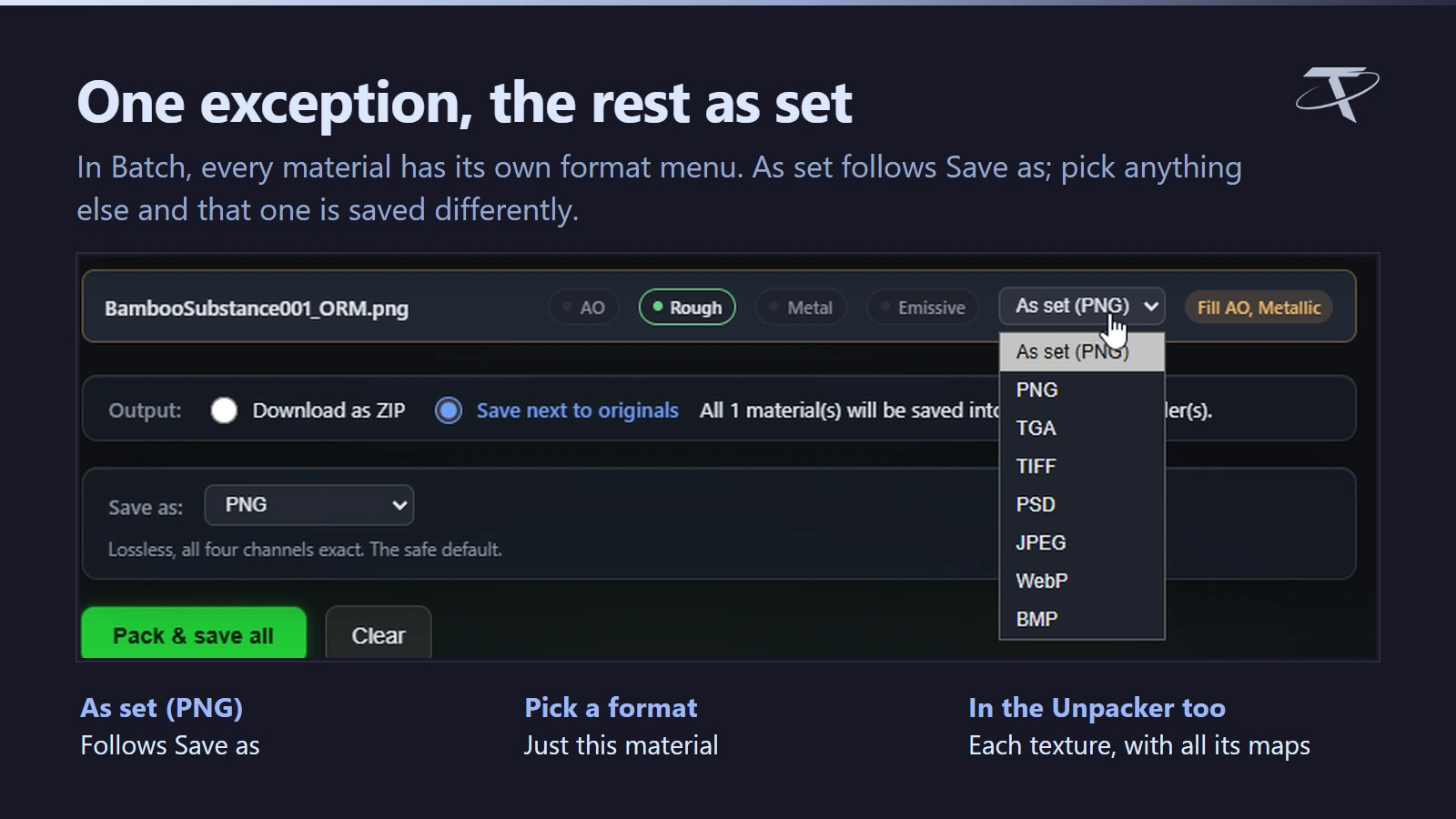
Exceptions in Batch. Every material in the Packer's batch list, and every texture in the Unpacker's, has its own format menu. As set follows Save as; pick anything else and that one is saved differently: one material as a JPEG while the rest stay PNG, say.
What each format keeps:
- PNG, TGA, TIFF and BMP keep all four channels of a packed texture exactly, including the AO, Roughness and Metallic under a transparent Emissive. Targa is RLE-compressed, like Blender's own.
- Photoshop (PSD) is flat and keeps the Emissive as an alpha channel ("Alpha 1"), the way game textures keep alpha in a PSD. Blender reads only a PSD's colour, and the menu says so.
- JPEG and WebP have no alpha here, so a packed Emissive is left out, and the tool tells you when it happens. JPEG starts at quality 100 in the Packer: below that its colour subsampling makes the three maps bleed into each other at their edges. WebP at quality 100 is lossless.
Targa and Photoshop everywhere. Rename / Resize / Convert can write TGA and PSD too, and every tool now opens TGA and PSD files, so a texture packed to Targa goes straight back into the Unpacker.
Changed
- Dropdown lists are easy to read. Every dropdown in the tool opened as a white list with near-white text; the lists are dark now, like the rest of the page.
- Converting without resizing is exact. A format change at the same size goes straight from the file's own pixels, so the colour under transparency comes through instead of being wiped.
- BMPs with alpha open in every Blender, 3.3 included: they are written the way Blender itself writes them.
A free Blender add-on. Everything runs on your own computer; nothing is uploaded.
Tachyon Texture Tools
Every release, newest first
1.0.0 — first release
Tachyon's Texture Tools page inside Blender, in a workspace tab of its own. Free, for Blender 3.3 to 5.2, in one zip.
Added
The Texture Tools tab. Sidebar ▸ Tachyon ▸ Open Texture Tools makes a Texture Tools workspace tab next to Layout; leave it and come back and it is exactly as you left it. It can also sit in any area or window through the Editor Type menu.
ORM Packer. AO, Roughness and Metallic into one PNG in ORM, RMA, MRO or AMR order, Emissive in alpha, missing maps filled with a constant; Single and Batch, with folders grouped into materials by name and everything that is not an ORM map skipped and listed.
ORM Unpacker. A packed texture back into separate maps, with the channel order read from the name on Auto.
Rename / Resize / Convert. Find → replace renaming with a live preview, optional resizing and optional conversion to PNG, JPEG, WebP, TIFF, BMP, RAW or SVG, for whole folders at once.
History that survives a restart, files included, and a browser fallback on macOS, Linux or without the WebView2 Runtime.

A free Blender add-on. Everything runs on your own computer; nothing is uploaded.
Discover more products like this
batch-rename Channel Packing gamedev unpack textures free convert PBR resize game assets Texture packing orm