Text Animation for Blender(Pack of 40)
 SM 3D


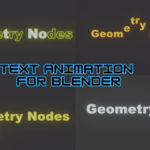


📌 How to Use:
1️⃣ Add to Asset Browser:
- Save the file as an asset in Blender.
- Open Blender’s Asset Browser and locate the tool.
2️⃣ Drag & Drop:
- Simply drag and drop onto any object in your scene.
https://youtu.be/YCBjR_gOOdc?si=seB_lP6emlMD-qgj
FONT CHANGE

Have questions about this product?
Login to message
| Dev Fund Contributor | |
| Published | over 1 year ago |
| Blender Version | 4.3 - 5.0 |
| Render Engine Used | Cycles, Eevee |
| License | Royalty Free |

Discover more products like this
#BlenderMotionDesign blendermarket #TextReveal 3danimation #TitleAnimation #madewithblender #ProceduralAnimation BlenderAssets #HorizontalText #TypographyAnimation blender3d #SlidingText #BlenderTemplates motiongraphics #KineticTypography blendercommunity #SmoothText #TextAnimation #LeftToRightAnimation blenderaddons