 SkyVFX
Install
- Download the zip for your system: windows_x64, macos_arm64 (Apple Silicon), macos_x64 (Intel Mac) or linux_x64. Do not unzip it.
- In the app: Edit › Preferences › Get Extensions, open the ⌄ menu at the top right, Install from Disk…, pick the zip. (Or drag the zip into the window.)
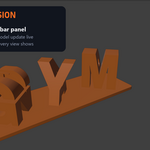
- Open the 3D Viewport sidebar (N) and click the Text Flip tab.
Requires 4.2 or newer. The add-on ships its own geometry and text-shaping libraries (manifold3d, HarfBuzz); nothing else to install. If the panel says Missing uharfbuzz / manifold3d, you installed the zip for another platform.
Quick start
- Choose a style (top dropdown) or a preset (the icon next to it).
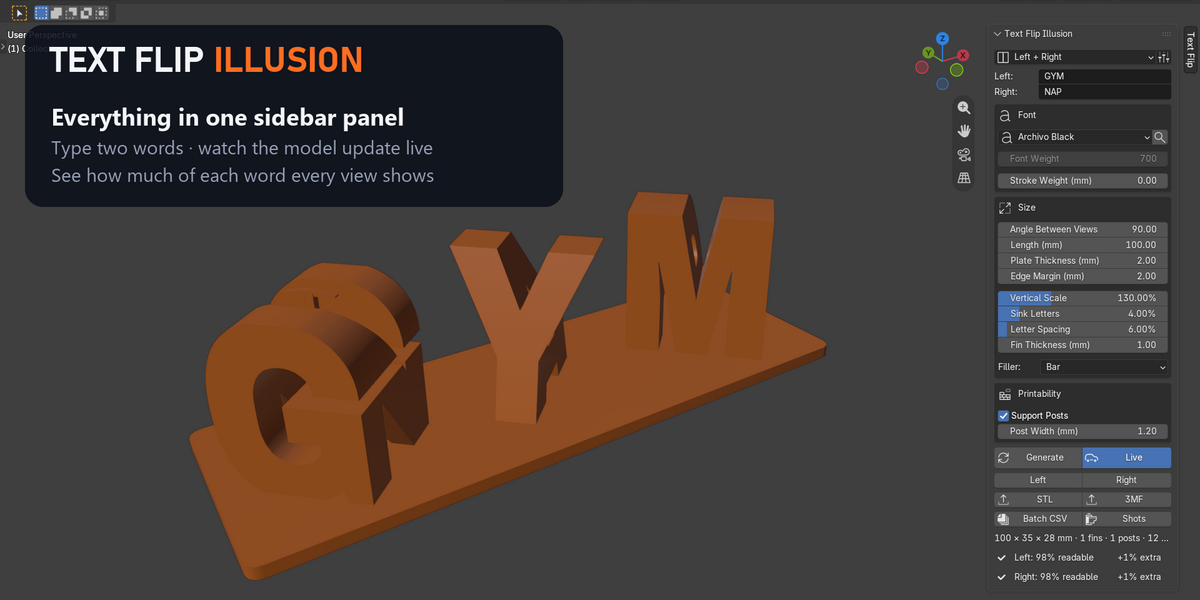
- Type your words. Labels show where each word reads from (Left / Right, Front / Side…).
- Pick a font. Heavy fonts read best (Archivo Black is the default).
- Watch the readability lines at the bottom: each view should show 90 %+ of its word.
- Click a view button (e.g. Left) to look from that side.
- STL or 3MF to export. Sizes are in millimetres; 1 unit = 1 mm.
Styles
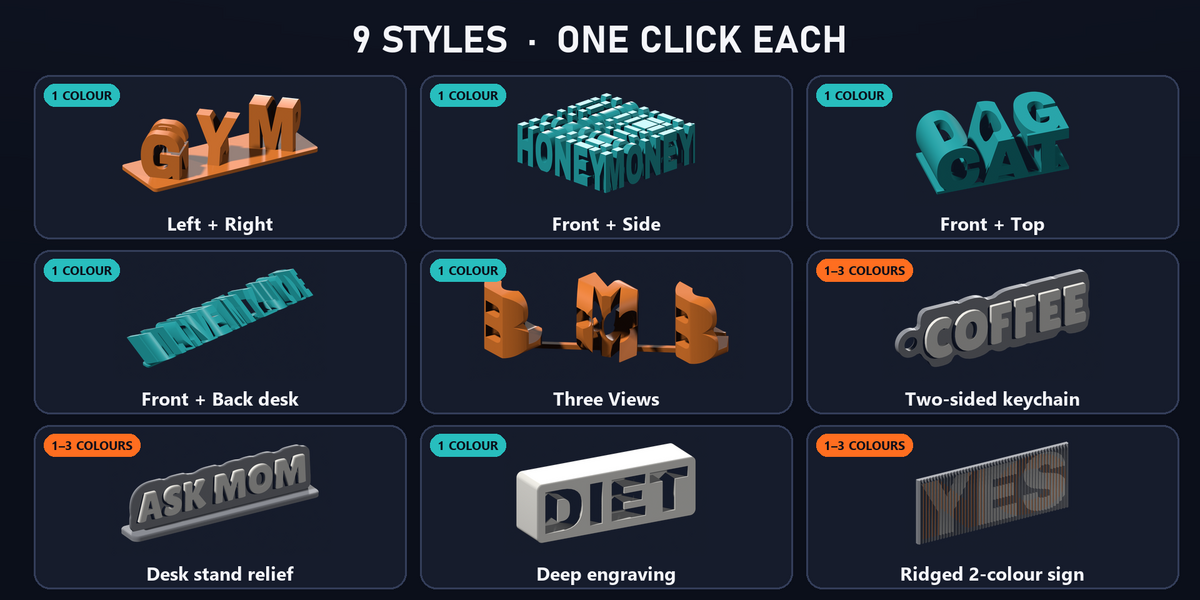
| Style | Reads by | Colours | Notes |
|---|---|---|---|
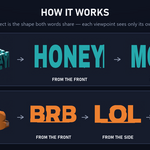
| Left + Right | shadow | 1 | Stand-up sign on a plate. Angle Between Views 40–140°: smaller = stronger illusion, thinner letters. Letters are paired column by column; a shorter word is padded with a bar or a heart. |
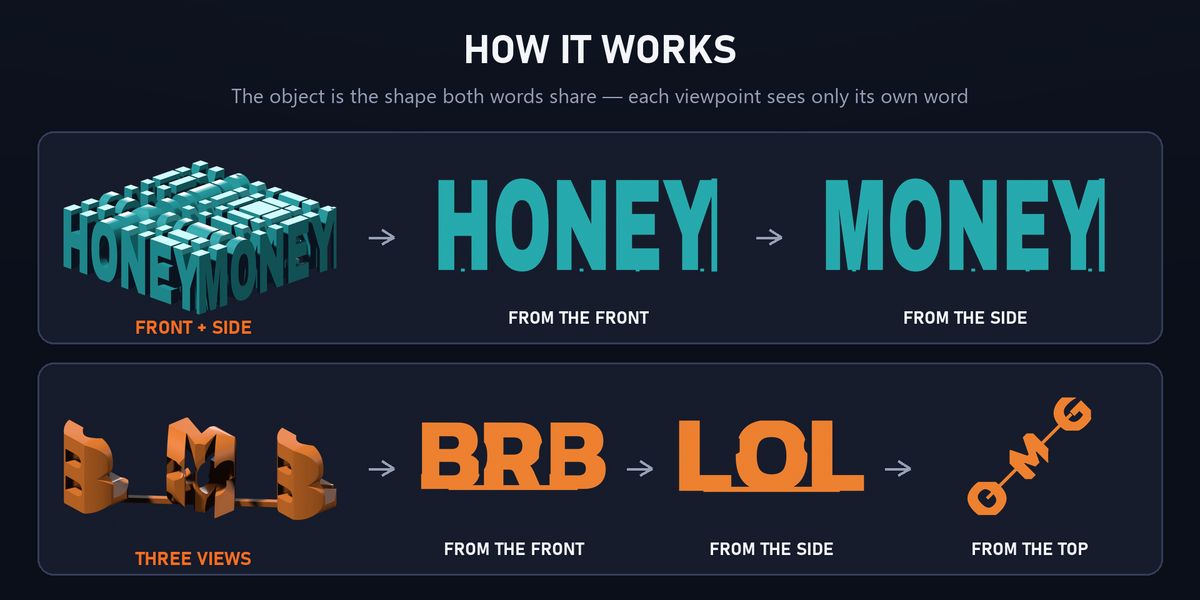
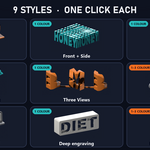
| Front + Side | shadow | 1 | One block; word 1 from the front, word 2 from the right side. Connector Bar keeps every part of both words joined. |
| Front + Top | shadow | 1 | Word 1 from the front, word 2 from above. |
| Front + Back (desk) | shadow | 1 | A desk object: one word from the front, the other from the back, both looking down by Look-Down Angle (15–45°). Straight front/back at eye level is physically impossible for a single silhouette, so viewers look down a little. Great for long phrases. |
| Three Views | shadow | 1 | Front, right side and top read three different words. Lower Top Letter Size if the top view is weak; words of equal length work best. |
| Two-Sided Keychain | colour / relief | 2–3 | Raised word on each face (the back one mirrored so it reads correctly). Plate as rounded rectangle or following the letters; key-ring hole left or top. |
| Desk Stand (relief) | light & shadow / colour | 1–3 | Letter-shaped plate on a foot, rounded letters on both faces. In one colour, side light makes it readable. |
| Deep Engraving | shadow in deep grooves | 1 | Solid block, word 1 cut into the front, word 2 into the back. Middle Wall = clean plaque. Cut Through = light passes where the words cross: put an LED behind it for a lamp. Thicker block = darker grooves (8 mm+ grooves recommended). |
| Ridged Sign | colour | 2 | Vertical ridges: word 1 on the left-facing slopes, word 2 on the right-facing slopes. Needs a two-colour print. |
Panel reference
- Font: bundled fonts (SIL OFL), fonts found on your computer, or Other font file…. The 🔍 button lists installed fonts that contain every letter of your words: use it for Thai, Arabic, Hindi, CJK, etc.
- Font Weight: weight axis of variable fonts (e.g. Noto Sans Thai).
- Stroke Weight: thickens every stroke by this many mm (negative thins). Helps thin fonts print and read.
- Vertical Scale / Letter Spacing / Sink Letters (Left + Right): letter proportions, gap between columns, how deep letters sit in the plate.
- Filler: what fills a column where the shorter word has no letter: bar, heart, or nothing (the lone letter becomes a thin fin).
- Fin Thickness: thickness of parts with no partner at the same height (accents, tone marks).
- Support Posts: connects floating parts (dots, marks) down to what is below them. Leave on for printing.
- Live: rebuild while you edit (about 0.01–0.3 s per rebuild). Turn off for very long words on slow machines and use Generate.
- Readability: per view, how much of the word is visible (readable) and how much unrelated shape it adds (extra). Under 90 % shows a tip.
Export
-
STL: the whole model as one body. With Colour Parts as Separate Files the relief styles also save
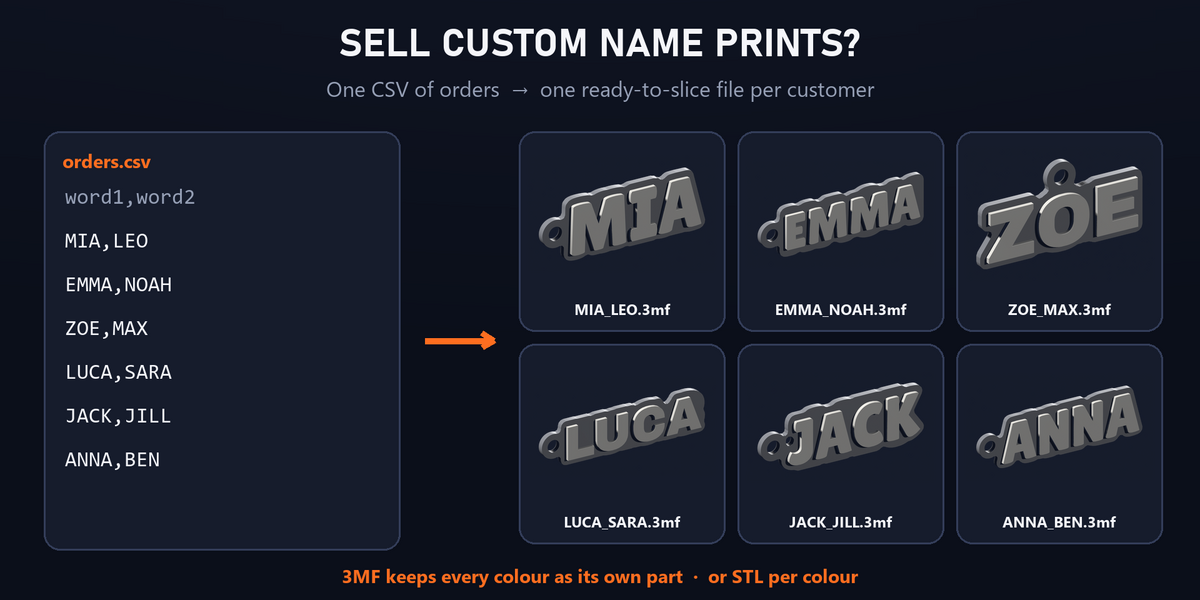
name_plate.stl,name_front.stl,name_back.stl… to load as parts of one object in your slicer. - 3MF: one object made of one named part per colour, colours embedded. In Bambu Studio / Orca / PrusaSlicer, select each part and give it its filament. Single-colour styles export one part.
- File names default to your words (e.g.
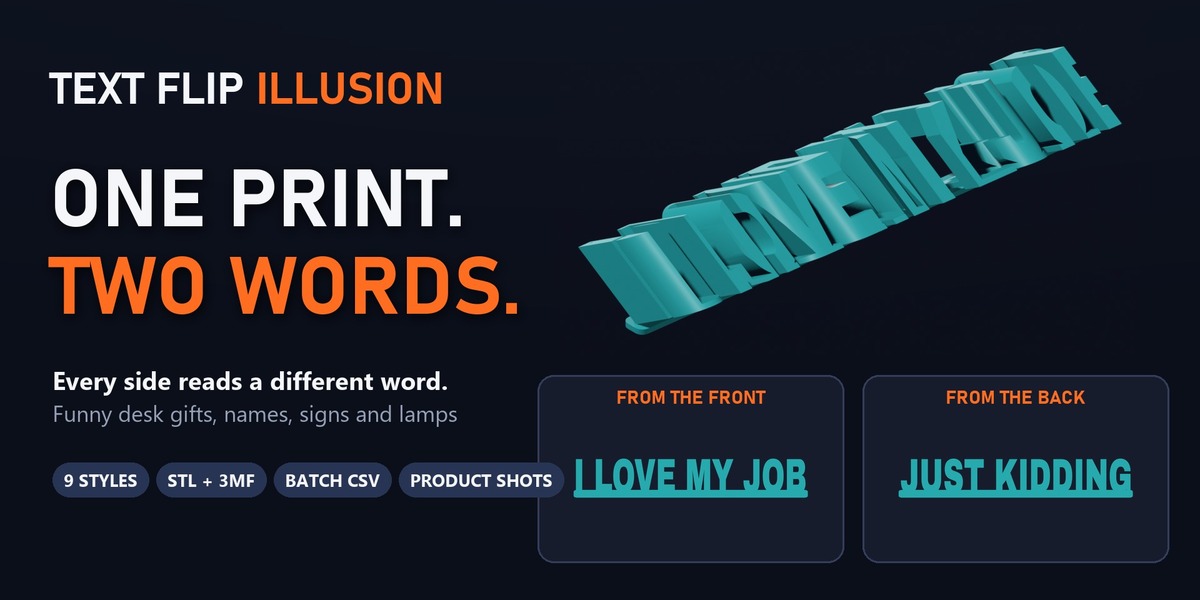
I_LOVE_MY_JOB_JUST_KIDDING.3mf).
Batch from CSV (for shops)
- Set up one model the way you want it (style, font, sizes).
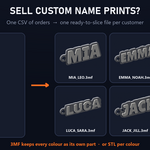
- Make a CSV or TXT: one order per line,
word1,word2(Three Views:word1,word2,word3), optional 4th column = file name. Commas, semicolons or tabs all work; a first line starting withwordis skipped as a header,#lines are comments. -
Batch CSV, pick the file, choose 3MF / STL / both and an output folder (empty = a folder next to the CSV).
Rows with a missing word are skipped and listed in the report; repeated words get
_2,_3… so nothing is overwritten.
word1,word2
MIA,LEO
EMMA,NOAH
I LOVE MY JOB,JUST KIDDING,,office_gift_17
Product shots
Shots renders one PNG per word (from the side it reads, orthographic) plus a 3/4 hero shot, in a temporary studio scene with lights that follow the camera. Your scene is not changed. Choose the folder, width and samples.
Keeping a result
The model is ordinary mesh geometry in the Text Flip Illusion collection (no modifiers, nothing to apply). Each Generate replaces the objects named TextFlip and TextFlip_ plus a part name. To keep one and make another, rename its objects (e.g. TextFlip → Gift_Mia); the next Generate makes new ones.
Printing tips
- Silhouette styles: print standing up as modelled, 0.2 mm layers, 15 % infill is plenty. Letters at least ~20 mm tall read best.
- Left + Right: keep Plate Thickness ≥ 2 mm; brim helps tall thin letters.
- Keychain / stand / ridged: assign colours per part; or pause at the layer where the letters start for single-nozzle printers.
- Engraving lamp: print with a light filament (white / natural PLA) and put a warm LED strip behind it.
Troubleshooting
- "has no letters this font can draw": the font lacks your script. Click 🔍 to find one that has it.
- "This font has no glyph for …": some characters are missing (e.g. an emoji); the model is built without them.
- A view is under 90 %: try a bolder font, more Stroke Weight, a smaller Angle Between Views (Left + Right) or a smaller Top Letter Size (Three Views).
- Updating the add-on on Windows while it is enabled may print "Permission denied" for its libraries: restart the app after updating.
Fonts and licences
-
Bundled fonts (SIL Open Font License 1.1: commercial use and selling prints allowed): Anton, Archivo Black, Bebas Neue, Chakra Petch, Kanit, Lilita One, Mitr, Noto Sans Thai, Prompt, Sarabun. Licence texts:
fonts/OFL_*.txt(one per font) in the add-on folder. - Fonts installed on your computer (found with 🔍 or picked as Other font file…) are not part of this add-on and carry their own licences. Check that a font allows your use (e.g. selling prints) before using it.
The full guide also ships inside every zip as README.md.
What it installs, and uninstalling
- Everything lives in the extension's own folder: the add-on, its bundled fonts and its Python libraries (manifold3d, uharfbuzz/HarfBuzz, fonttools, brotli), installed from the wheels inside the zip. Nothing is downloaded and the add-on makes no network connections.
- It writes files only where you tell it to: STL / 3MF exports, batch output and product-shot PNGs. Product shots use a temporary scene that is removed afterwards.
- No system settings, PATH, registry or other add-ons are changed.
- Uninstall: Preferences › Get Extensions › Text Flip Illusion › Uninstall. This removes the add-on and its libraries. Files you exported stay where you saved them.
- Third-party licences:
THIRD_PARTY_NOTICES.txtin the add-on folder (wheels: MIT / Apache-2.0; fonts: SIL OFL 1.1).
Changelog
1.0.0 — first release
- Nine styles: Left + Right, Front + Side, Front + Top, Front + Back (desk), Three Views, Two-Sided Keychain, Desk Stand (relief), Deep Engraving (wall or cut-through LED lamp), Ridged Two-Colour Sign
- Real text shaping (HarfBuzz) for any script your font has — tested with Latin, Thai, Arabic, Hindi, Japanese, Greek, Cyrillic
- 10 bundled OFL fonts + "Find fonts for these words" scans your installed fonts
- Live update, readability report per view with tips
- 8 presets (desk sign, name cube, desk gift, three words, keychain, desk stand, LED lamp, plaque)
- Export STL (plus one STL per colour) and multi-colour 3MF; batch export from a CSV of names
- Render Product Shots: one image per word + a 3/4 hero, in a temporary studio scene
- Blender 4.2 → 5.2, Windows / macOS (Apple Silicon + Intel) / Linux
Have questions about this product?
Login to message
| Blender Extension Compatible | Yes |
| Published | about 5 hours ago |
| Blender Version | 4.2 - 5.2 |
| Extension Type | Add-on |
| License | GPL |
Discover more products like this
name sign ambigram typography optical-illusion desk gift 3MF dual text 3d printing STL keychain text flip multicolor