Texture Rollers Generator
 SeongminBjorkArt


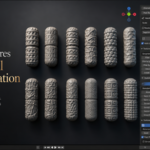
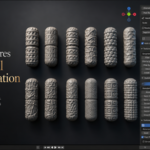
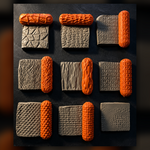
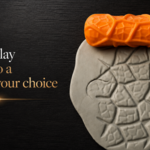
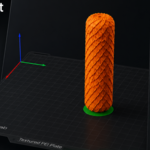
Texture Tools (Clay Rollers) for Blender
Thank you for purchasing Texture Tools!
This add-on allows you to generate high-quality 3D-printable clay texture rollers directly inside Blender. Simply generate your desired texture, export it as an STL, print it, and start creating detailed impressions in clay.
Installation
- Download the ZIP file.
- Open Blender.
- Go to Edit → Preferences → Add-ons.
- Click Install.
- Select the downloaded ZIP file.
- Enable Texture Tools (Clay Rollers).
- The panel will appear in the Sidebar (N Panel).
Getting Started
- Open the Texture Tools panel.
-
Select a tool shape:
- Egg Roller
- Shaft Roller
- Texture Ball
- Choose a texture category.
- Adjust the settings to your liking.
- Click Generate.
- Export the finished model as an STL.
- Slice it in your favorite slicer and print.
Your roller is now ready to use with clay.
Features
- Multiple roller types
- Procedural texture generation
- Random Seed for unlimited variations
- Adjustable texture depth
- Edge smoothing
- High-resolution export
- Print-ready geometry
- Optimized for FDM 3D printing
Recommended Print Settings
- Layer Height: 0.16–0.20 mm
- Wall Count: 3–4
- Infill: 15–20%
- Material: PLA
- Supports: Not Required
Tips
For the sharpest texture impressions:
- Print at a slower outer wall speed.
- Use a clean nozzle.
- Roll with even pressure.
- Slightly moisten clay if necessary.
- Experiment with different scales and depths.
Single User License
By purchasing Texture Tools you receive one (1) Single User License.
You may:
✔ Install and use the add-on on your own computers.
✔ Use the generated models for personal and commercial projects.
✔ Sell physical objects created using this software.
You may NOT:
✖ Share the add-on with friends, colleagues, or online.
✖ Upload the add-on to file-sharing websites.
✖ Redistribute, resell, sublicense, rent, or bundle the add-on.
✖ Claim the software as your own.
One purchase = One user.
If multiple people wish to use the software, each user must purchase their own license.
Support
If you encounter any issues or have suggestions for future features, feel free to get in touch.
Feedback is always appreciated and helps improve future updates.
Thank you!
Thank you for supporting independent software development.
Enjoy creating amazing textures!
Texture Tools – Design. Generate. Print. Sculpt.
 Included
Includes 12 months of
- Support from SeongminBjorkArt
- Product updates
Extend this product’s Support Period +12 months: 50% of product price
Have questions before purchasing?
Login to message
| Published | 2 months ago |
| Blender Version | 4.0 - 5.2 |
| Extension Type | N/A |
| Render Engine Used | Arnold, Blender-Internal, Blender-Game-Engine, Cycles, Eevee, Freestyle, Luxrender, Mental-Ray, Octane, Vray |
| License | GPL |
