 Hisoka852



📖 Overview
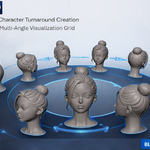
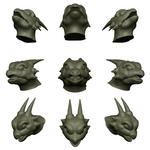
Turnaround is a Blender add‑on designed to generate live‑synced grids of mesh duplicates for quick multi‑angle visualization. Ideal for character modeling, product previews, and design reviews, it streamlines the process of creating turnaround views directly in the 3D viewport.
📦 What it Includes
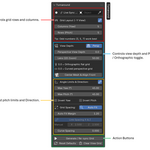
Sidebar panel in View3D > Turnaround
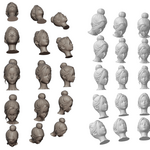
Live sync grid generation with auto‑fit spacing
Linked yaw/pitch angle controls
Perspective depth and lens zoom options
One‑click reset, clear, and re‑sync operators
Alignment tool to center mesh and snap viewport to front view
⚙️ Installation
Download the .zip file from SuperHiveMarket.
In Blender, go to Edit > Preferences > Add-ons > Install.
Select the downloaded .zip and enable Turnaround.
🔍 Where to Find It
Once installed, open the 3D Viewport Sidebar (N‑panel) and look for the Turnaround tab. All controls and operators are available there.
🛠 Recommended Workflow
Select a mesh object as your source.
Use Generate / Re‑sync Grid to create turnaround views.
Adjust grid rows/columns, spacing, and angles for desired layout.
Apply Center Mesh & Align Front for clean viewport alignment.
Reset or clear grids with one click when needed.
⚠️ Safety Notes
Generated duplicates are linked; deleting the source mesh may affect the grid.
Avoid using non‑mesh objects as sources.
Large grids may impact performance on lower‑end systems.
💻 Compatibility
Blender 4.2.0 and above
Works with mesh objects only
Compatible with both orthographic and perspective views
👤 Author
Created by Hisoka852
Have questions about this product?
Login to message
| Blender Extension Compatible | Yes |
| Published | about 2 months ago |
| Blender Version | 4.2 - 5.2 |
| Extension Type | Add-on |
| Render Engine Used | Cycles |
| License | GPL |
Discover more products like this
pitch Visualization turnaround perspective viewport sync grid mesh spacing yaw duplicate auto fit