Viewlink - Easy Navigation
 Playful Pixel



📦 Installation
Using this addon is straightforward. Just follow these steps:
- Download the
.zipfile included with your purchase. - Open Blender, go to Edit → Preferences → Add-ons, and click Install.
- Select the
.zipfile you downloaded and enable the addon.
📍 Addon Location
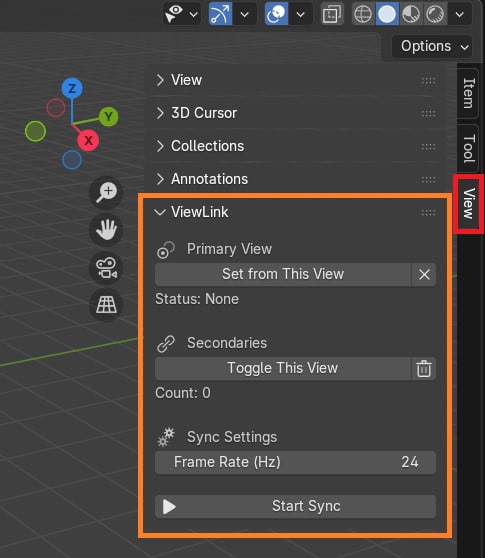
You’ll find the ViewLink panel in the "View" tab of the N-side panel.
🚀 How to Use
- Open the "View" tab in the right-side panel (
Nin the 3D Viewport). - Scroll to the ViewLink section.
- In your Primary Viewport, click "Set from This View".
- In your Secondary Viewports, click "Toggle This View" to link them.
- Hit "Start Sync" to begin syncing.
🔄 To Remove a Viewport
- Click "Toggle This View" again in any secondary viewport to remove it from the sync group.
-
$1
single user license for personal and commercial projects
-
$6
This license is for generous people who want to support the Blender Foundation and the developer. You will receive support priority—nothing less, nothing more. Single User (Personal & Commercial Use) License
Have questions about this product?
Login to message
| Blender Extension Compatible | Yes |
| Sales | 20+ |
| Dev Fund Contributor | |
| Published | about 1 year ago |
| Blender Version | 4.2 - 4.5 |
| Extension Type | Add-on |
| Render Engine Used | Cycles, Eevee |
| License | GPL |

Discover more products like this
3d views navigation animation camera sync viewport blender Workflow interface presentation multimonitor modeling