Wireframe Lens - Inspect Topology Without Switching Modes.
 Salman Naseem



Wireframe Lens - How to Use
Quick Start
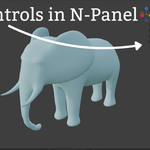
- Press N in 3D Viewport to open sidebar
- Find "Wireframe Lens" tab
- Click "Enable Viewer" button
- Move your mouse - the boundary follows
- Press ESC to exit
Installation
Install from ZIP
- Download
wireframe_lens_v2.1.0_FINAL.zip - Open Blender → Edit → Preferences → Add-ons
- Click
Install...button - Select the ZIP file
- Enable "Wireframe Lens" checkbox
Manual Installation
- Extract ZIP to get
wireframe_lensfolder - Copy to Blender addons directory:
- Windows:
%APPDATA%\Blender Foundation\Blender\[version]\scripts\addons\ - macOS:
~/Library/Application Support/Blender/[version]/scripts/addons/ - Linux:
~/.config/blender/[version]/scripts/addons/
- Windows:
- Restart Blender
- Enable in Preferences → Add-ons
Basic Usage
Opening the Panel
- Press
Nin 3D Viewport - Find "Wireframe Lens" tab
- Click to open panel
Enabling the Viewer
- Click
Enable Viewerbutton - Green circle/box appears at mouse
- Boundary follows your cursor
Controls
- Move Mouse - Position boundary
- Scroll Up - Increase size
- Scroll Down - Decrease size
- S Key - Toggle Circle/Box
- ESC - Exit viewer
Panel Settings
Boundary Shape
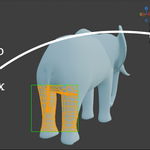
- Circle - Round boundary for organic work
- Box - Square boundary for rectangular areas
Boundary Size
- Range: 50-500 pixels
- Use slider or scroll wheel
- Small (50-100): Detailed inspection
- Large (300-500): Broad overview
Display Filter
- All Objects - Show everything
- Selected Only - Show only selected (faster!)
- Unselected Only - Show only unselected
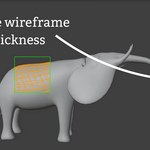
Line Thickness
- Range: 0.5 to 5.0
- Thin (0.5-1.0): Dense meshes
- Thick (2.0-5.0): Better visibility
Colors
- Outline Color - Boundary edge (green default)
- Default Wireframe - Unselected objects (gray)
- Selected Wireframe - Selected objects (orange)
Workflow Examples
Character Retopology
- Select retopo mesh
- Set Display Filter to "Selected Only"
- Move boundary to inspect edge loops
- Base sculpt stays visible
Hard Surface Modeling
- Select pieces you're working on
- Use "Selected Only" filter
- Inspect bevels and curves
- Other objects stay clean
Quality Control
- Keep in Material Preview mode
- Enable Wireframe Lens
- Move boundary around scene
- Check for n-gons and poles
Tips
- Use "Selected Only" for complex scenes
- Orange color = selected objects
- Small boundary for detail work
- Large boundary for overview
- Increase line thickness on 4K displays
Troubleshooting
Boundary doesn't appear
- Check addon is enabled
- Click "Enable Viewer" button
- Move mouse in viewport
No wireframe showing
- Check Display Filter setting
- Try "All Objects"
- Increase Line Thickness
Performance slow
- Use "Selected Only" filter
- Hide unnecessary objects
- Reduce boundary size
Wireframe Lens - About the Addon
What is Wireframe Lens?
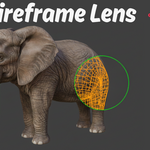
Wireframe Lens is a professional viewport tool for Blender that provides local wireframe inspection without switching viewport modes.
Unlike traditional wireframe viewing that affects your entire viewport, Wireframe Lens creates a movable 2D boundary on your screen that reveals wireframe edges only within its area.
It's like having a magnifying glass that shows you the underlying mesh structure wherever you need it.
The Problem It Solves
Traditional Workflow
- Press Z to switch entire viewport to wireframe
- Lose all material preview and shading
- Check topology
- Press Z again to switch back
- Repeat hundreds of times per project
Wireframe Lens Solution
- Keep viewport in any shading mode
- Enable viewer with one click
- Move boundary with mouse
- See wireframe only where you need it
- No mode switching, no context loss
Key Features
Core Functionality
- 2D screen-space overlay
- Follows mouse in real-time
- Circle and box shapes (toggle with S)
- Perfect edge clipping
- Works in all shading modes
Advanced Features
- Selection highlighting (orange vs gray)
- Display filters (All/Selected/Unselected)
- Adjustable line thickness (0.5-5.0)
- Customizable colors
- GPU accelerated
- Smooth 60 FPS performance
Who Is It For?
Character Artists
- Retopology workflows
- Edge loop inspection
- Mesh density verification
- See sculpt while checking retopo edges
Hard Surface Modelers
- Bevel quality inspection
- Curved surface verification
- Boolean result checking
- Edge flow analysis
Game Asset Creators
- Polygon count verification
- LOD mesh quality checking
- Topology optimization
- Game-ready mesh validation
Technical Artists
- Rigging preparation
- Deformation testing
- Quality assurance
- Topology documentation
What Makes It Unique?
First of Its Kind
Wireframe Lens is the first and only Blender addon that provides localized 2D screen-space wireframe viewing.
No other tool:
- Shows local wireframe (not global)
- Uses 2D screen-space boundary
- Follows mouse in real-time
- Includes selection highlighting
- Has display filters
- Works in any shading mode
Technical Excellence
Advanced Algorithms
- Circular clipping (quadratic intersection)
- Rectangular clipping (Liang-Barsky)
- GPU-accelerated rendering
- Optimized draw calls
Code Quality
- Clean, modular structure
- Comprehensive error handling
- Well documented
- GPL-3.0 licensed
Compatibility
Blender Versions
- Blender 3.0+
- Blender 4.x fully supported
- Blender 5.0 tested and working
Operating Systems
- Windows 10, 11
- macOS (Intel and Apple Silicon)
- Linux (Ubuntu, Fedora, Arch)
Requirements
- GPU with OpenGL 3.3+ support
- No additional dependencies
Developer Information
Name: Salman Naseem
YT: BeingAnimator
Specialization: Blender addon development
Contact:
- Email: [email protected]
- YouTube: youtube.com/BeingAnimator
- Website: salmannaseem.com
- More Addons: superhivemarket.com/creators/salmannaseem07
License
GPL-3.0-or-later
Your Rights:
- Free to use for any purpose
- Free to modify and customize
- Free to distribute
- Commercial use allowed
Conditions:
- Source code must be available
- Modified versions must also be GPL
- Include copyright notices
Why Choose Wireframe Lens?
Unique Value
- Only addon that provides local wireframe viewing
- Proven time-saver in real workflows
- Professional quality
- Active development
- Premium support
Benefits
- Save time on every project
- Reduce workflow interruptions
- Improve topology decisions
- Increase productivity
- Professional results
Testimonials
Character Artist:
"Perfect for retopology. I can see my sculpt AND check edge loops at the same time."
Hard Surface Modeler:
"No more constant Z key pressing. Saves me hours every week."
Technical Artist:
"The selection highlighting is brilliant. Makes QA so much faster."
Copyright (C) 2025 Salman Naseem
BeingAnimator - Professional Blender Addons
Have questions about this product?
Login to message
| Blender Extension Compatible | Yes |
| Sales | 10 |
| Published | 11 months ago |
| Blender Version | 3.1 - 5.2 |
| Extension Type | Add-on |
| Render Engine Used | Eevee, Freestyle |
| License | GPL |
