 Hoa Vu


ZIPLab Pro – Documentation
Installation
- Dowload the addon .zip file
- In Blender, go to Edit > Preferences > add-on > Install
- Select the .zip file and install
- Enable ZIPLab Pro from the addon list (if it's not already enabled.)
Quick Tutorial — Core Functions
🔹 Import ZIP
-
Open Text Editor in Blender.
-
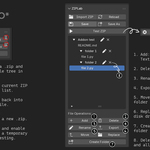
Press N → go to Text > ZIPLab.
-
Click Import ZIP and select a .zip file.
-
The archive contents (folders & files) will appear as a tree view in the panel.
Open Text Editor in Blender.
Press N → go to Text > ZIPLab.
Click Import ZIP and select a .zip file.
The archive contents (folders & files) will appear as a tree view in the panel.
🔹 Reload
-
Click Reload to clear all currently loaded ZIP data.
-
This removes all imported text blocks from Blender and resets the panel to empty.
-
Useful when switching to a new project or ZIP file.
Click Reload to clear all currently loaded ZIP data.
This removes all imported text blocks from Blender and resets the panel to empty.
Useful when switching to a new project or ZIP file.
🔹 Save
-
After editing files, click Save to write changes back into the original ZIP file.
-
All dirty files (marked with a dot • ) will be updated.
-
If the original ZIP cannot be found, an error will be shown.
After editing files, click Save to write changes back into the original ZIP file.
All dirty files (marked with a dot • ) will be updated.
If the original ZIP cannot be found, an error will be shown.
🔹 Save As
-
Click Save As.
-
Choose a new file path and name for the .zip.
-
All current files/folders in the panel will be written into this new archive.
-
Useful if you want to keep the original ZIP untouched while creating a modified version.
Click Save As.
Choose a new file path and name for the .zip.
All current files/folders in the panel will be written into this new archive.
Useful if you want to keep the original ZIP untouched while creating a modified version.
🔹 Test ZIP
-
Click Test ZIP to:
-
Create a temporary copy of the current ZIP in your system’s temp folder.
-
Install it automatically as a Blender add-on.
-
Enable it for immediate testing.
-
While active, the button changes to Stop Test.
-
Click Stop Test to disable and remove the temporary add-on.
Click Test ZIP to:
-
Create a temporary copy of the current ZIP in your system’s temp folder.
-
Install it automatically as a Blender add-on.
-
Enable it for immediate testing.
While active, the button changes to Stop Test.
Click Stop Test to disable and remove the temporary add-on.
Fix Bugs & Update:
- Ver 1.1.0:
- Ver 1.2.0 (21/10/2025)
Support
If the problem persists with the latest version of the add-on, please send me a message with a description of the error you are experiencing via inbox on Superhive. Thanks!
Have questions about this product?
Login to message
| Published | about 1 year ago |
| Blender Version | 4.2 - 4.5 |
| Extension Type | N/A |
| Render Engine Used | Blender-Internal, Cycles |
| License | GPL |
Discover more products like this
blender developer tools Scripting addon development addon Workflow