 Sidigon




Align vertices and objects with perfect precision
Snap to Custom Grid is a lightweight and
efficient Blender addon that allows you to align vertices or object
origins to the nearest point of a customizable grid.
Perfect for
technical modeling, architecture, hard surface design,
or any workflow where clean geometry and accuracy
are essential.
With just one click, you can snap your entire mesh or selected objects to a grid of any size, ensuring flawless alignment along the X, Y, and Z axes.
⚙️ Main Features
-
🔹 Dual Mode:
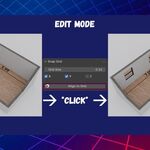
Edit Mode: snap selected vertices.
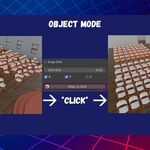
Object Mode: snap the origins of selected objects.
🔹 Axis Toggles: choose which axes (X, Y, Z) to include in the snapping process.
🔹 Custom Grid Size: define your own grid spacing to match your scene scale or workflow.
🔹 Simple and Accessible UI: easily found in the 3D Viewport’s sidebar (N panel) under the “Snap Grid” tab.
🔹 Undo Supported: all actions can be safely undone at any time.
🚀 How to Use
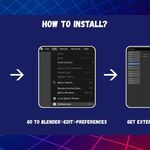
Install the addon via Edit → Preferences → Add-ons → Install...
Enable “Snap to Custom Grid”.
Open the Snap Grid tab in the sidebar (shortcut N).
-
Set your desired grid size and select which axes to snap.
In Edit Mode, select vertices and press Snap to Grid.
In Object Mode, select one or more objects and press Snap to Grid to align their origins.
🧱 Example
A vertex located at X = 4.99 with a
grid size of 1.00 will automatically
snap to X = 5.00.
Result: perfectly
aligned geometry, no rounding errors or subtle offsets.
💡 Ideal For
Architects and technical designers
Hard-surface modelers
Modular asset creators
Any workflow requiring geometric precision
📦 Requirements
Blender 4.2 or newer
Compatible with Windows, macOS, and Linux
No external dependencies
🛠️ Update Log
V1.2 Updated to 4.2 extension system
V1.1 Added toggle buttons to X,Y,Z axis alignment
V1.0 Initial release