 Mona-Ghafourian


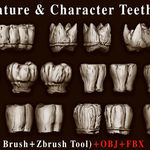
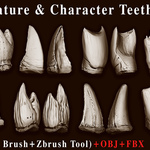
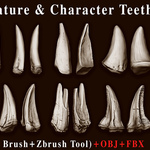
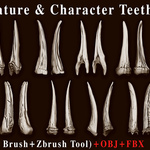
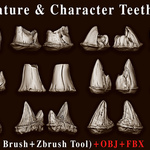
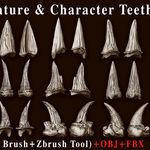
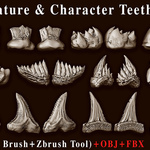
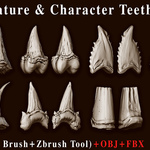
103 Creature & Character Teeth IMM Brush Pack – Vol.15
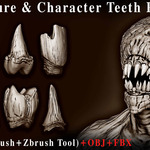
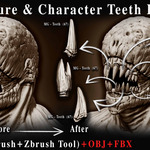
A professional collection of 103 finely crafted Creature & Character Teeth models, designed for ZBrush sculpting, creature design, concept art, game assets and cinematic projects.
ABOUT THIS PACK
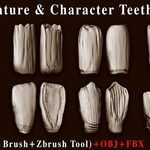
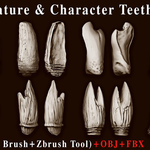
Bring your creatures and characters to life with this extensive collection of 103 Creature & Character Teeth. From sharp fangs and aggressive teeth to rugged and unusual tooth shapes, this pack gives you a wide variety of forms for building unique creature, monster and character designs.
The pack includes 103 ZBrush IMM Brushes, 103 ZBrush Tool (ZTL) files, 103 OBJ files, 103 FBX files and 103 Preview Images. The included Blender Asset Library also provides 103 drag-and-drop assets for Blender's Asset Browser.
WHAT'S INCLUDED
ZBRUSH IMM BRUSHES
Creature & Character Teeth IMM brushes for fast ZBrush sculpting.
ZBRUSH TOOL (ZTL)
Individual ZBrush Tool files for direct use and editing.
OBJ FILES
Individual OBJ models for flexible use in other 3D applications.
FBX FILES
Individual FBX models for easy integration into your workflow.
BLENDER ASSETS
Drag-and-drop assets ready for Blender's Asset Browser.
PREVIEW IMAGES
Preview images for easy browsing and selecting the right teeth.
HOW TO USE
ZBrush IMM Brushes
- Install or load the included ZBrush IMM brushes.
- Select the desired teeth brush from your ZBrush Brush palette.
- Insert the teeth directly onto your model and adjust them as needed.
Blender Asset Browser
- Add the included Asset Library folder through Edit → Preferences → File Paths → Asset Libraries.
- Open the Asset Browser in Blender.
- Drag and drop the desired teeth asset directly into your scene.
Note: All models are ready for immediate use in your projects. The included OBJ and FBX files can also be used independently of the ZBrush IMM brushes.
Compatibility: ZBrush files require ZBrush 2022.0.5 or newer. Blender Asset Library is compatible with Blender 4.0 – 5.2.
OTHER VOLUMES — CREATURE ANATOMY SERIES
MORE 3D ASSETS
Explore more brushes, alphas and 3D assets from our collection.
Need help? Message me — fast support.
✉️ Message Me