3D Motion Props
 Nicolas



Hardware & Software Support
- Blender version: Blender 4.0 or later.
- Windows: Extensively tested on Windows 11 in blender 4.0 or later
- macOS (supported and tested): This add-on is supported and tested on macOS 26 Tahoe for Blender version 5.0.1; earlier versions of Blender may have issues.
Installation
- Open Blender
- *For the latest versions of Blender, simply drag the zip file and click "Install"
- Go to Edit > Preferences
- Go to Get Extensions
- Click Install from Disk and select the 3D Motion Props_V02 zip
- Save preferences
Quick Start
-
Choose the prop
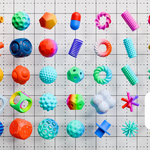
- Click in the thumbnail prop image to display the list of assets and select the one you want.
- Click in add prop to add the asset in the scene
- Recommendation: create a collection to group all the props.*
-
Voxelizer
- Add any mesh, from a simple primitive (Sphere, torus...) or any other geometry you have created or downloaded
- Select that mesh and click on "Apply Geometry Shapes"
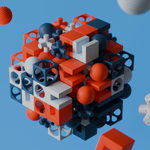
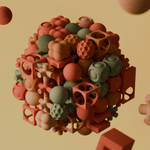
- In the modifiers tab, you can add your prop collection and increase the resolution (number of props instantiated) of both the viewport and the render. Most importantly, check "OG base object" to use your original geometry as the base geometry where the props will be instantiated. Depending on the number of props in your collection, you'll need to adjust the Geometry Qty. value to ensure all your props are displayed.
-
That's all
- You can experiment with the geo node workflow freely.
- Click in the thumbnail prop image to display the list of assets and select the one you want.
- Click in add prop to add the asset in the scene
- Recommendation: create a collection to group all the props.*
- Add any mesh, from a simple primitive (Sphere, torus...) or any other geometry you have created or downloaded
- Select that mesh and click on "Apply Geometry Shapes"
- In the modifiers tab, you can add your prop collection and increase the resolution (number of props instantiated) of both the viewport and the render. Most importantly, check "OG base object" to use your original geometry as the base geometry where the props will be instantiated. Depending on the number of props in your collection, you'll need to adjust the Geometry Qty. value to ensure all your props are displayed.
- You can experiment with the geo node workflow freely.
If you have any questions, please don't hesitate to contact me.
$12.99
Have questions about this product?
Login to message
| Published | 8 months ago |
| Blender Version | 4.0 - 5.0 |
| Render Engine Used | Cycles, Eevee |
| Misc Data | Uvs-Unwrapped, Normal-Mapped, Textured |
| License | Royalty Free |
Discover more products like this
3D Motion 118 Assets 3d asset pack with props 3DMotionGraphics abstract