 MeshMind


Documentation
What's in the Pack
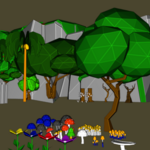
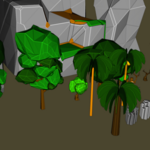
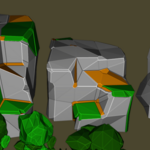
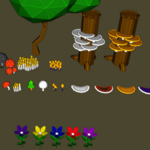
67 low poly environment props, organized into six categories, all sharing a single 256×256 texture atlas.
- Rocks & Cliffs (10): Rock_1–Rock_5, Hexagonal_rockes, Cliff_1–Cliff_3
- Trees (9): Pine_tree, Coconut_tree, Coconut_Tree_with_fruit, Cactus_tree_1–3, Big_tree, Big_tree_1–2, Small_Light_tree, Small_Dark_tree
- Dead Wood (11): Dead_tree, Dead_tree_1–3, Big_Dead_tree, Dead_log_in_soil, Dead_log_in_rock, Tree_stump, Tree_stump_with_moss
- Mushrooms (17): Red, White, Black, Blue, and Poisonous variants in rounded and flat-cap styles, including clustered groups
- Flowers (5): Purple, Yellow, Blue, Red, Violet
- Grass & Ground Cover (15): Short and Tall grass in green, dark green, light green, brown, and withered variants
File Formats Included
- .obj + .mtl — Wavefront OBJ with material definition
- .dae — Collada, for broad DCC/engine compatibility
- .abc — Alembic
FBX and glTF are not included in the current version. If your pipeline needs them, import the OBJ or DAE into your target engine/DCC tool and export from there.
Importing into Blender
- Keep
Low poly game Props.obj,Low poly game Props.mtl, andLowPoly.pngin the same folder - File > Import > Wavefront (.obj)
- Select the .obj file — the material and texture should link automatically
- If the texture doesn't appear, go to the Shading tab, select the Texture_Atlas material, and manually relink the Image Texture node to
LowPoly.png
Importing into Other Software / Game Engines
Use the .dae (Collada) file for the widest compatibility outside Blender. After import, re-apply the LowPoly.png texture manually if your software doesn't read the embedded material path (the original path is a local Windows file path and won't resolve on other machines).
Scale & Axis Orientation
Models use Blender's default Z-up orientation at real-world-ish scale (1 Blender unit ≈ 1 meter). Engines using Y-up (Unity, Unreal) will need the standard axis conversion on import — most importers handle this automatically.
Object Names
Every prop is a separate, individually named object (e.g. Rock_1, Pine_tree, Red_Mushroom), so you can select, move, duplicate, or delete any single piece without affecting the rest of the pack.
Technical Specs
- 67 objects total
- ~35,500 vertices / ~39,900 faces across the full pack
- 1 shared material, 1 texture atlas (256×256)
- Not rigged, not animated
License
This pack is distributed under a Royalty-Free, Personal Use license — see the included LICENSE.txt for full terms. Commercial use requires a separate license.
Support
For import issues, missing textures, or licensing questions, contact:
Meshmind — [email protected]
 Included
Includes 12 months of
- Support from MeshMind
- Product updates
Extend this product’s Support Period +12 months: 50% of product price
Have questions before purchasing?
Login to message
| Published | 3 months ago |
| Blender Version | 3.5 - 5.2 |
| Render Engine Used | Cycles, Eevee |
| Misc Data | Uvs-Unwrapped, Textured |
| License | Royalty Free |
