A2B 5.1 Multichannel RT Audio for Blender GN
 Tommaso Malaisi


# A2B 5.1

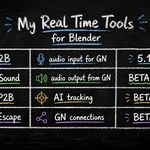
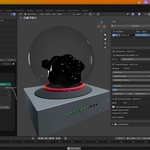
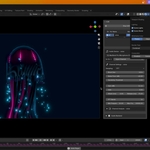
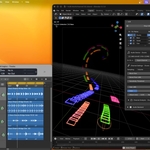
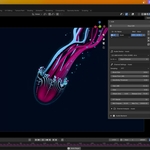
A2B is a Blender extension for realtime audio-driven Geometry Nodes workflows.
The full project name is Audio2Blender, but the extension is presented as A2B throughout the Blender interface and documentation.

## Privacy And Device Access

By using A2B, you grant the extension access to audio input devices connected to your computer, such as microphones, audio interfaces, sound cards, and virtual audio devices.

A2B is designed to process audio locally inside Blender. It does not record, save, transmit, or upload audio data. It does not connect to the internet and does not access user files. Audio analysis runs locally in real time.

## Features

- Realtime multichannel audio capture from physical input channels.
- A channel table for adding, naming, selecting, reordering, enabling, visualizing, and removing A2B channels.
- Per-channel audio device and physical input channel selection.
- Per-channel signal mode:
  - `Volume`: writes a single normalized amplitude value.
  - `FFT`: writes a configurable band vector for spectrum-driven setups.
- Per-channel controls for block size*, dB floor, gain, gate, attack, release, and sensitivity threshold (multichannel audio interface share the same data block size).
- FFT controls for band count and frequency range.
- Optional per-channel visualizer objects.
- Automatic Blender mesh attribute output for direct use in Geometry Nodes.
- Audio backend diagnostics for sounddevice, PortAudio, host APIs, loaded library, and ASIO state where available.

## Experimental Data Analysis

A2B 5.1 adds experimental realtime analysis per channel. These modes are designed for creative control signals, procedural animation, and visual response. They are not intended as forensic audio measurement tools.

Each channel can enable one extra analysis mode:

- `Pitch`: estimates fundamental frequency in Hz and writes the `pitch` attribute. The UI also reports confidence and a stable musical note when detection is reliable.(precise for note but not for octave)
- `Onset`: detects transient energy changes and writes a trigger-like `onset` attribute in the 0-1 range.
- `BPM`: estimates tempo over time and writes the `bpm` attribute, with a confidence readout. To have the correct bpm do not synch atomatically you Geometry Nodes animation!
- `Spectral Flux`: measures frame-to-frame spectral change and writes the `spectral_flux` attribute, usually normalized to 0-1.

Analysis modes include dedicated controls such as pitch range, pitch confidence gate, onset threshold, onset hold time, BPM range, BPM sensitivity, flux normalization, flux threshold, and independent attack/release smoothing.

## Requirements

- Blender 5.1 or newer.
- Windows x64, Windows ARM64, macOS x64, or macOS ARM64.
- An available audio input device.

Required Python wheels are bundled inside the extension package. No separate module package is needed, and no internet connection is required during installation.

Linux is not declared as a supported platform for this release.

## Audio Drivers

On Windows, the best choice for low-latency audio is usually a native ASIO driver provided by your audio interface manufacturer. ASIO, short for Audio Stream Input/Output, is a low-latency audio driver standard developed by Steinberg. It is not included with Windows, and A2B does not install or distribute ASIO drivers.

If your audio interface has an official ASIO driver, install that driver and select the corresponding ASIO device in A2B. If no ASIO driver is available, WASAPI is usually the best Windows fallback.

On macOS, this extra driver choice is normally not needed because macOS audio devices use Core Audio.

## Installation

1. Open Blender 5.1.
2. Drag and drop the A2B extension ZIP into the Blender window.
3. Confirm the installation when Blender asks.
4. Enable A2B if it is not enabled automatically.

You can also install it from Edit > Preferences > Get Extensions > Install from Disk.

## macOS

If macOS blocks microphone access, grant Blender microphone permission in System Settings > Privacy & Security > Microphone.

If Blender still cannot see audio input devices, launch Blender from Terminal:

```bash
/Applications/Blender.app/Contents/MacOS/Blender
```

For a versioned Blender app name, use the matching path:

```bash
"/Applications/Blender 5.1.app/Contents/MacOS/Blender"
```

## Usage

1. Open the 3D Viewport.
2. Open the sidebar and select the A2B panel.
3. Select an input device and channel.
4. Choose `Volume` or `FFT` as the channel signal mode.
5. Adjust gain, floor, gate, smoothing, sensitivity, and FFT settings as needed.
6. Optionally enable Channel Analysis for pitch, onset, BPM, or spectral flux.
7. Press Start Audio Sampling.

A2B creates scene data that can be used directly in Geometry Nodes.

Recommended setup for experimental analysis:

- Use `Volume` as the channel signal mode when you only need `pitch`, `onset`, `bpm`, or `spectral_flux`.
- Use `FFT` only when you also need spectrum bands for that channel.

Analysis attributes are scalar values. In `FFT` mode, the channel mesh has one point per band, so the same analysis value is repeated across all points. This is useful only if your Geometry Nodes setup needs both FFT bands and analysis data on the same mesh.

Signal output:

- `Volume` mode writes the `a2b` attribute as a single normalized value.
- `FFT` mode writes the `a2b` attribute as one value per FFT band.
- `FFT` mode writes additional attribute for audio spectrum range (min_f, max_f) and the number of the splitting bends (bands)

Experimental analysis output:

- `pitch`: estimated pitch in Hz.
- `onset`: transient trigger in the 0-1 range.
- `bpm`: estimated tempo.
- `spectral_flux`: spectral change over time.

## Uninstall

1. Go to Edit > Preferences > Get Extensions.
2. Open A2B.
3. Use the extension menu and select Uninstall.

A2B is self-contained. There is no separate `audio2bl_modules.zip` package to uninstall.

## License

A2B is licensed under the GNU General Public License v3 or later.
See `LICENSE.txt` for the full license text.

The A2B and Audio2Blender names and associated branding are not covered by the GPL license. See `BRANDING.txt`.

## Third-Party Licenses

A2B includes or depends on the following open-source components:

- sounddevice, MIT License.
- PortAudio, MIT-style license.
- cffi, MIT No Attribution License.
- pycparser, BSD 3-Clause License.

Bundled audio binaries:

- Windows `sounddevice` wheels bundle PortAudio DLLs, including a standard build and an ASIO-enabled build used by `sounddevice` when ASIO support is requested.
- macOS `sounddevice` wheels bundle a universal `libportaudio.dylib`.
- These bundled binaries provide the PortAudio host API layer only. They do not include audio interface manufacturer drivers.
- On Windows, A2B does not install or distribute vendor ASIO drivers. A compatible ASIO driver must already be installed at system level to be detected and used.

See `THIRD_PARTY_LICENSES.txt` for third-party license details.

Copyright (C) 2026 Tommaso Malaisi.
Have questions about this product?
Login to message
| Blender Extension Compatible | Yes |
| Dev Fund Contributor | |
| Published | 6 months ago |
| Blender Version | 5.1 |
| Extension Type | Add-on |
| Render Engine Used | Cycles |
| License | GPL |

Discover more products like this
realtime interactive animation blender Music Visualizer Multichannel simulation audio geometry nodes sound