Addon Collections Manager for Blender
 RealDevCode






📘 Documentation
Learn how to use Addon Collections Manager to organize Blender addons, create custom addon groups, and switch workflows faster with a clean and optimized workflow system.
📦 Installation
Go to Edit → Preferences → Add-ons → Install and select the Addon Collections Manager ZIP file.
⚙️ Main Features
- Create unlimited addon collections
- Enable and disable addon groups addon instantly
- Quick access shortcut inside Blender preferences
- Create custom workflow setups
- Add more addons to existing collections
- Rename addon collections anytime
- Lightweight and beginner-friendly interface
- Fast Blender workflow optimization
🎯 Workflow Usage
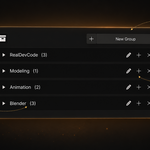
- Open Addon Collections using the quick shortcut button
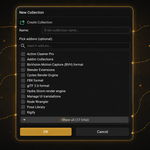
- Select addons from the Blender addon list
- Enter a custom collection name
- Create addon groups instantly
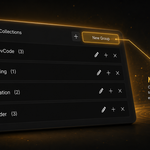
- Manage existing addon collections easily
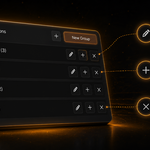
- Add or remove addons anytime
- Rename collections for better organization
📦 Collection Management
- Create multiple addon workflow setups
- Organize Blender addons efficiently
- Switch between addon collections faster
- Reduce manual addon management
- Keep Blender workspace clean and organized
- Improve productivity for different projects
🛡️ Safe Workflow
- 100% offline workflow
- No tracking or data collection
- No internet access required
- Designed for safe Blender workflows
💡 Tips
- Create separate addon collections for different projects
- Use workflow-based addon setups for faster productivity
- Keep only necessary addons enabled for cleaner workflows
- Organize addons into custom categories for easier management
- Rename collections clearly for better project organization
Have questions about this product?
Login to message
| Blender Extension Compatible | Yes |
| Dev Fund Contributor | |
| Published | 5 months ago |
| Blender Version | 4.2 - 5.2 |
| Extension Type | Add-on |
| Render Engine Used | Cycles, Eevee |
| License | GPL |
Discover more products like this
organization pipeline addon collections Addon manager Addon Organizer blender-utility blender addon productivity ui tools presets blender tools Workflow