Advanced Masks Bundle

Every release, newest first
Advanced Vertex Paint Pro 1.2.0, RGB Mask Master 1.0.1 — 18 October 2026
Advanced Vertex Paint picks any color you like, not just red, green and blue, and its card explains itself: rest the pointer on any button to see what it does. RGB Mask Master is unchanged.
Added
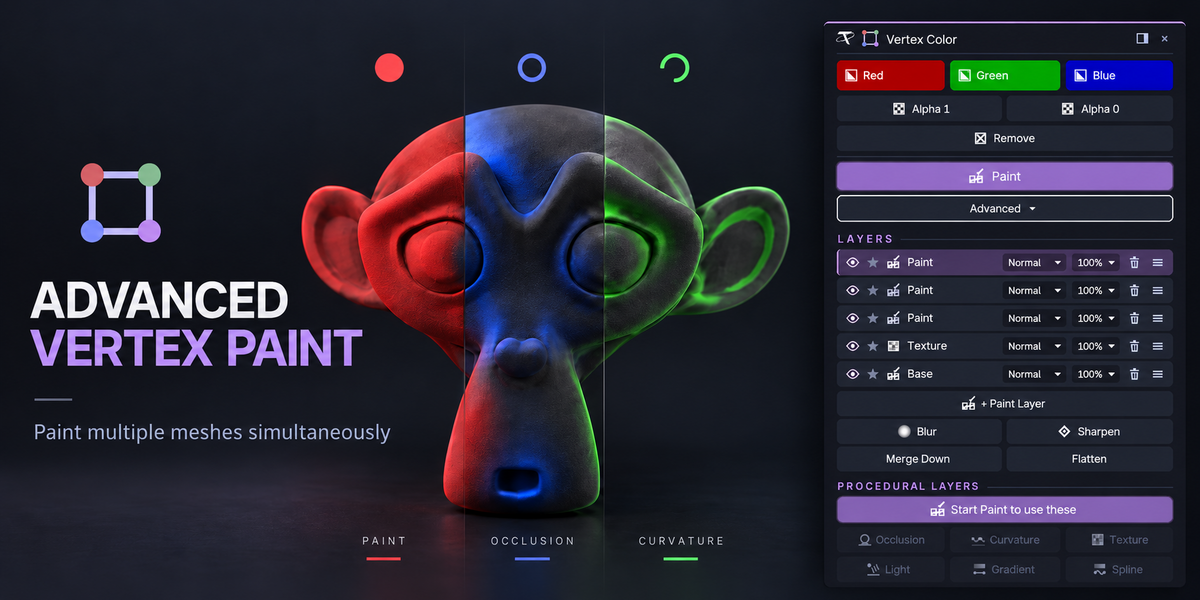



Any color, alpha included. Beside Red, Green and Blue there is now a Custom button that shows your own color, and an eyedropper that opens a color picker: drag the wheel, set the brightness and the Alpha, or click the swatch to type exact values or a hex code. Custom fills the selection with it, on every mesh at once like the other buttons, and while painting it sets the brush.





Your own two colors in every gradient. Gradient and Spline get Start and End swatches: pick exactly the color for each end of the line, see-through included. Red, Green and Blue switch back to the presets.






A Custom color for the procedural layers. Occlusion, Curvature, Texture and Light each get a Custom swatch; on a layer its alpha sets how strongly it covers, and Edit brings it back.


Rest on a button: see what it does. Every control on the card explains itself: leave the pointer on one and a box opens beside the card with a sentence and a small looping animation of it happening to a mesh.


Getting Started. The first time, the card shows the three steps at the top; the one you are on lights up, and Got it hides them. New preferences under Help: Getting Started, Explanations, Animated Drawings and Explanation Delay.

Fixed
In-between colors fill exactly, in Edit Mode and Object Mode, on byte and float color attributes alike.

Two Blender add-ons. Substance 3D Painter is optional and not included; no network access.
Advanced Masks Bundle
Every release, newest first
Advanced Vertex Paint Pro 1.2.0, RGB Mask Master 1.0.1 — 18 October 2026
Advanced Vertex Paint picks any color you like, not just red, green and blue, and its card explains itself: rest the pointer on any button to see what it does. RGB Mask Master is unchanged.
Added
Any color, alpha included. Beside Red, Green and Blue there is now a Custom button that shows your own color, and an eyedropper that opens a color picker: drag the wheel, set the brightness and the Alpha, or click the swatch to type exact values or a hex code. Custom fills the selection with it, on every mesh at once like the other buttons, and while painting it sets the brush.

Your own two colors in every gradient. Gradient and Spline get Start and End swatches: pick exactly the color for each end of the line, see-through included. Red, Green and Blue switch back to the presets.

A Custom color for the procedural layers. Occlusion, Curvature, Texture and Light each get a Custom swatch; on a layer its alpha sets how strongly it covers, and Edit brings it back.
Rest on a button: see what it does. Every control on the card explains itself: leave the pointer on one and a box opens beside the card with a sentence and a small looping animation of it happening to a mesh.

Getting Started. The first time, the card shows the three steps at the top; the one you are on lights up, and Got it hides them. New preferences under Help: Getting Started, Explanations, Animated Drawings and Explanation Delay.

Fixed
In-between colors fill exactly, in Edit Mode and Object Mode, on byte and float color attributes alike.
Two Blender add-ons. Substance 3D Painter is optional and not included; no network access.
Advanced Masks Bundle
Every release, newest first
Advanced Vertex Paint Pro 1.2.0, RGB Mask Master 1.0.1 — 18 October 2026
Advanced Vertex Paint picks any color you like, not just red, green and blue, and its card explains itself: rest the pointer on any button to see what it does. RGB Mask Master is unchanged.
Added
Any color, alpha included. Beside Red, Green and Blue there is now a Custom button that shows your own color, and an eyedropper that opens a color picker: drag the wheel, set the brightness and the Alpha, or click the swatch to type exact values or a hex code. Custom fills the selection with it, on every mesh at once like the other buttons, and while painting it sets the brush.

Your own two colors in every gradient. Gradient and Spline get Start and End swatches: pick exactly the color for each end of the line, see-through included. Red, Green and Blue switch back to the presets.

A Custom color for the procedural layers. Occlusion, Curvature, Texture and Light each get a Custom swatch; on a layer its alpha sets how strongly it covers, and Edit brings it back.
Rest on a button: see what it does. Every control on the card explains itself: leave the pointer on one and a box opens beside the card with a sentence and a small looping animation of it happening to a mesh.

Getting Started. The first time, the card shows the three steps at the top; the one you are on lights up, and Got it hides them. New preferences under Help: Getting Started, Explanations, Animated Drawings and Explanation Delay.

Fixed
In-between colors fill exactly, in Edit Mode and Object Mode, on byte and float color attributes alike.
Two Blender add-ons. Substance 3D Painter is optional and not included; no network access.
Included
Includes 12 months of
- Support from Tachyon Studio
- Product updates
Extend this product’s Support Period +12 months: 50% of product price
Have questions before purchasing?
Login to message
| Blender Extension Compatible | Yes |
| Published | 3 days ago |
| Blender Version | 3.3 - 5.2 |
| Extension Type | Add-on |
| License | GPL |
Discover more products like this
gamedev layers edge wear mask baking ambient occlusion Substance painter vertex paint curvature vertex color Texture Painting rgb mask game assets