 NovaStrikes


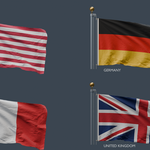
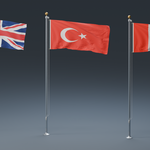
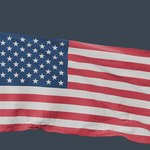
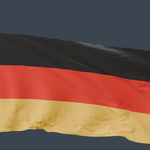
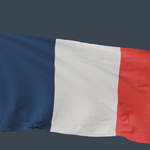
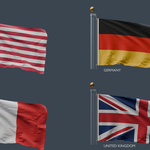
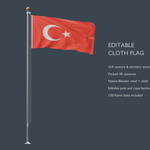
Animated Flagpole with 254 4K Country & Territory Textures
Add an animated flag to architectural visualizations, outdoor environments, public spaces, and cinematic scenes with this editable Blender flagpole asset.
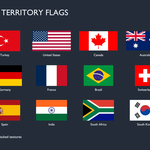
The package combines a detailed pole assembly, a high-resolution cloth flag, and 254 interchangeable country and territory artworks. Change the flag’s appearance without downloading another model or rebuilding the scene.
The native Blender project includes a 150-frame cloth animation bake, driven by Blender’s built-in Wind and Turbulence force fields. All 254 flag textures and the supplied animation cache are embedded in the main .blend file.
Main Features
254 country and territory flag artworks supplied as packed 4K textures.
One reusable flag and pole assembly with interchangeable country materials.
Native Blender Cloth simulation with editable Wind and Turbulence force fields.
150 frames of baked animation included for immediate playback.
High-resolution cloth mesh with subdivision for smooth fabric folds.
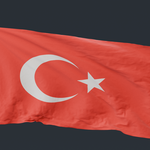
Procedural fabric shading with weave detail, fiber variation, and stitched hem relief.
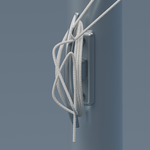
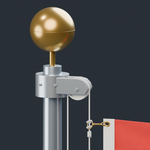
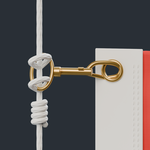
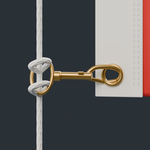
Detailed pulley, rope, clips, eyelets, cleat, finial, and ground collar.
Editable geometry and materials in the native Blender project.
Self-contained main file with embedded textures and animation cache.
No third-party add-on required to use the native Blender asset.
Flag Materials and Texture Library
The included material library provides 254 named country and territory designs, making it easy to find and replace the current artwork.
Examples include the United States, United Kingdom, Canada, Germany, France, Turkey, Pakistan, India, Japan, Australia, Brazil, South Africa, Switzerland, and many more.
Each country material uses the shared fabric shader, helping maintain a consistent textile appearance when switching designs.
The flag shading includes:
Fine woven surface relief.
Subtle fiber and dye variation.
Matte fabric roughness.
Stitched edge detailing.
A small amount of light transmission for backlit scenes.
The 4K images provide the flag artwork; additional textile detail is generated procedurally inside Blender.
Native Wind-Driven Cloth Animation
The flag uses Blender’s built-in Cloth modifier and force fields. Its motion is computed through cloth simulation.
The included setup provides:
A pinned hoist edge that holds the flag beside the pole.
A Wind force field for directional airflow.
A Turbulence force field for variation.
Editable cloth settings.
An embedded 150-frame animation bake.
To create a different movement, delete the existing bake, adjust the wind direction, strength, turbulence, or cloth settings, then rebake the simulation.
The supplied animation is not a seamless loop. Frames 1–150 include the cloth settling and waving. Repeating the timeline may produce a visible transition between the last and first frames.
Pole and Attachment Details
The pole assembly includes modeled components suitable for both wider scene placement and supporting detail views:
Tapered metal mast.
Brass ball finial with an assembly seam.
Covered top pulley housing.
Grooved pulley wheel.
Two separated halyard runs.
Braided rope surface detail.
Brass swivel clips with gate components.
Reinforced white fabric heading.
Open brass eyelets.
Modeled heading stitches.
Cleat with continuous rope turns and retaining wrap.
Metal ground collar.
These components remain editable in the Blender project, allowing you to adjust materials and adapt the assembly to your scene.
Mesh and Scale
The cloth’s simulation mesh contains 13,824 quads, with subdivision applied after the Cloth modifier to smooth the rendered surface.
At render subdivision level 2, the cloth surface contains approximately 221,184 quads before thickness is added.
The complete pole assembly is approximately 8.675 meters tall. The original cloth dimensions are approximately 4.2 × 2.1 meters, giving it a 2:1 aspect ratio.
This is a high-resolution visualization asset. It is not supplied as an optimized real-time game asset.
Changing the Flag
In the native Blender file:
Select the flag mesh.
Open Material Properties or the Current File Asset Browser.
Find the desired country material.
Replace the existing flag material.
All 254 country materials are included in the main file.
Material swaps retain the supplied 2:1 cloth shape. Country-specific proportions are not applied automatically. Square flags and other aspect ratios require a geometry adjustment and a new simulation bake.
Non-rectangular artwork, such as Nepal’s flag, uses transparency on the rectangular cloth surface rather than a separately tailored simulation mesh.
File Formats
Primary file:
.blend— the editable Blender project containing the native cloth setup, force fields, materials, packed country textures, and embedded animation bake.
Additional supplied exports:
.abc— Alembic.fbx— FBX.glb— binary glTF.objwith.mtl— Wavefront geometry and material definitions.ply— Polygon File Format.stl— STL mesh.usdc— binary USD
The Blender file is the primary supported version. Blender’s Cloth modifiers, force fields, and procedural shader setup are Blender-specific. Exchange formats do not preserve every native feature, and their animation and material capabilities vary.
Use the .blend file when you need the complete editable simulation and country-material library.
Suggested Uses
Architectural exterior renders.
Government and civic environments.
Schools, campuses, and institutional scenes.
Hotels and commercial developments.
Stadiums and sporting venues.
International event visualizations.
Outdoor cinematic scenes.
Background environment dressing.
Compatibility and Included Setup
The native project was tested in Blender 5.2. Preview images were rendered in Cycles.
The main .blend file was reopened independently to verify that its packed flag images and embedded cloth animation work without the original external texture or cache folders.
Compatibility with older Blender versions has not been verified.
AI Assistance Disclosure
AI assistance was used during development for Blender scripting and parts of the production workflow. The seller directed the project, reviewed the results, supplied visual references, identified issues, and guided revisions.