Animator’S Glove Suite
 RIGITOON STUDIOS


Animator’s Glove Documentation
Introduction
Animator’s Glove is a native hand gesture modal operator for Blender. It replaces traditional bone manipulation with an intuitive, node-based puppeteering system. By blending custom target poses in real-time, you can create fluid, natural hand animations simply by moving your mouse.
🚀 Quick Start Guide
-
Installation:
In Blender, go to
Edit > Preferences > Add-ons.Click
Install...and select the.zipfile.Search for Animator’s Glove and enable it.
-
Setup:
Select your character's Armature and enter Pose Mode.
Open the Animation tab in the N-panel (sidebar).
-
Configure Poses:
Load a preset
.jsonor capture poses into the 7 available slots.
-
Puppeteer:
Click Start Puppeteering.
Move your mouse within the radial HUD to blend poses.
Right-Click or press ESC to confirm and exit.
🎨 Feature Overview
1. The Puppeteering Modal (HUD)
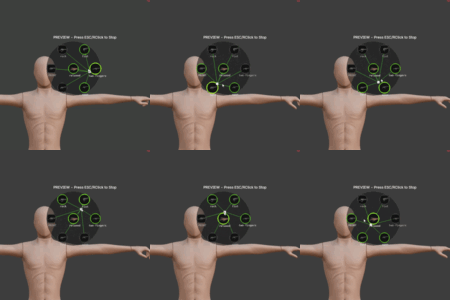
The radial system appears directly in the 3D viewport during operation.
7-Node Radial System: Features 1 center node and 6 outer nodes.
Dynamic Blending: Intelligently calculates bone rotations based on cursor proximity to nodes.
Visual Feedback: Green lines indicate active influence; line thickness represents the current weight.
Customization: Displays captured icons and slot names for instant recognition.
2. N-Panel Interface
Found under the Animation tab, organized into three functional sections:
Preset Management
Load/Save Preset: Store poses, names, and icons in
.jsonformat for use across different characters and projects.
Custom Pose Assignment
Active Slot: Select which of the 7 nodes to edit.
Capture Pose: Saves current viewport hand rotations to the active slot.
Capture Icon: Renders a thumbnail of the current viewport for the HUD.
-
Mirroring Tools:
Mirror R->L/Mirror L->R: Symmetrically transfer poses.Mirror Mode: Toggle between
COPYandFLIPto match your rig's standards.
Run Setup
Target: Select
Both,Left, orRighthands.Fingers Only: Excludes hand/forearm bones to layer gestures over existing arm animations.
-
Blend Mode:
Two-Node: Blends only between the two closest nodes (cleaner).Multi-Node: Blends across all nearby nodes (smoother).
Auto-Key (Record): Drops keyframes during mouse movement. Automatically starts timeline playback.
3. Post-Recording Polish
Clean Keyframes: Removes redundant keys based on a user-defined threshold.
Smoothing: Iteratively reduces jitter from mouse movements.
🛠️ Customization & Workflow
Creating a Library
Manually pose the hand in the viewport.
Select a slot (e.g., Slot 1) and click Capture Pose.
Frame the hand and click Capture Icon.
Repeat for other slots and Save Preset.
Finger Capture (AI Module)
Requires the Finger Capture module:
Click Install MediaPipe (first-time setup).
Select an image containing a hand gesture.
Click Capture Pose from Image to extract and apply rotations to your rig.
⚙️ Technical Details
| Category | Compatibility / Info |
| Blender Versions | 3.0, 5.1+ |
| Rig Systems | Mixamo, Daz, Cascadeur, etc |
| Retargeting | Use the Retargeting Module for custom bone names |
| Data Format | Raw Quaternions in .json |
| Interpolation | Native NLERP blending (prevents gimbal lock) |
📚 Video Tutorials
❓ FAQ
The HUD isn't showing up.
Ensure you are in Pose Mode with an Armature selected. Check for conflicts with other modal-based addons.
The hands are twisting awkwardly.
Toggle your Mirror Mode (COPY vs FLIP). Ensure bones are set to Quaternion rotation mode.
How do I save the performance?
If Auto-Key is on, keyframes are saved live. Press ESC or Right-Click to stop the session and finalize the data.
Version 1.0.0 | Maintainer: Rigitoon Studios
Have questions about this product?
Login to message
| Blender Extension Compatible | Yes |
| Published | 5 months ago |
| Blender Version | 3.0 - 5.1 |
| Extension Type | Add-on |
| Render Engine Used | Blender-Internal, Eevee |
| License | GPL |
Discover more products like this
finger animated hand 3d animation 3D Character Animation animated hands animation