 孙堪伟
孙堪伟



📦 Installation
Recommended
Drag-and-drop the downloaded .zip file straight into any Blender window – done.
Classic steps
Edit → Preferences → Add-ons → Install… → pick the .zip → Enable “Animax Rotator”.
🎯 What it does
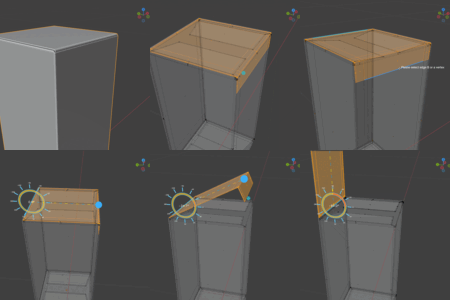
Turns any selected faces into an animatable rotation pivot.
One click creates the hinge, handle and driver; rotate interactively or key-frame the angle.
🚀 How to use
Select faces
Edit mode → select at least one face.
Launch
Press Alt + `` (grave accent) or hit “Edge Selection Modal” in the side-panel (N → “Rot”).
Pick axis & handle
Click an edge = rotation axis
Click a vertex / second edge = handle point
Rotate
Drag the colored ring
Click any tick-mark for snap angles
Hold Shift for slow, precise moves
Finish
Enter = confirm, Esc = cancel.
Angle slider now appears in the “Rot” panel – key-frame it anytime.
💡 Tips
Ctrl + Z undoes the last rotation step.
Turn on “Animation Recording” in the panel before key-framing.
Avoid applying transforms or changing topology after recording – it breaks the cache.
Have questions about this product?
Login to message
| Sales | 40+ |
| Published | 11 months ago |
| Blender Version | 4.0 - 5.0 |
| Extension Type | N/A |
| Render Engine Used | Cycles, Eevee |
| License | GPL |