Apex Modeler Pro
 Team Blender



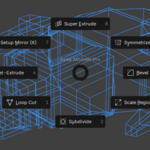
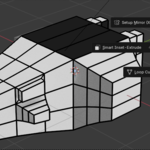


Apex Modeler Pro - Official Documentation (v1.0) Apex Modeler Pro is a professional-grade modeling toolkit designed to eliminate repetitive keystrokes. It transforms standard mesh operations into fluid, mouse-driven Modal Tools. Developed specifically to handle the architectural changes in Blender 5.0.1, it offers a rock-solid workflow for hard-surface artists and concept designers.
- Installation & Setup Rapid Install (Scripting Tab) Open Blender. Switch to the Scripting workspace. Click New, paste the provided Python code into the editor. Click Run Script. Permanent Install Save the code as a .py file (e.g., apex_modeler_pro.py). In Blender, go to Edit > Preferences > Add-ons. Click Install..., select your file, and enable the checkbox.
- Global Shortcut Ctrl + . (Period): Calls the Apex Modeler Pie Menu. Context: You must be in Edit Mode with one or more Faces selected.
- The Radial Interface (Tool Breakdown)
The menu is designed for muscle memory, using the 8 standard radial slots:
Slot Tool Name Mouse/Scroll Logic
West (Left) Smart Inset-Extrude X-Axis: Inset Thickness
Y-Axis: Extrude Depth North (Top) Super Extrude Y-Axis: Height
X-Axis: Taper (Scaling)
Scroll: Iterations (Steps) North-West Setup Mirror (X) Instantly adds Mirror Modifier with Clipping Enabled. North-East Symmetrize Mesh Destructive one-click symmetry across the World Origin. South (Bottom) Snap Slice (X/Y/Z) Submenu to bisect mesh perfectly through the center. East (Right) Bevel Standard Edge Bevel tool. South-West Loop Cut Standard Loop Cut & Slide tool. South-East Scale Region Standard Scale tool for selected regions. - Advanced Pro Features 🛡️ Selection Shield™ Technology Blender 5.0.1’s undo system can sometimes reset or "bleed" selections during modal operations. Selection Shield automatically captures your intended face indices at the moment of activation. Even if the internal undo-loop tries to select the whole mesh, the addon forces the transformation only on your chosen targets. 🎯 Intelligent Normal Tracking Unlike standard extrusion which often moves along a fixed axis, Apex Modeler Pro calculates the Average Face Normal of your selection. This allows you to extrude complex curved panels or slanted surfaces in their natural "outward" direction with pixel-perfect precision. 🚫 Hardware Event Shield Optimized for high-end workstations. The addon includes a filter that ignores non-standard hardware interrupts (like 3D-mice or tablet noise—Blender Event 171). This prevents console spam and ensures zero input lag during modeling.
- Workflow Strategies The "Perfect Start" Sequence When starting a new asset (like a sci-fi vehicle): Select half your mesh and delete it. Press Ctrl + . -> Setup Mirror (X). Select a face -> Smart Inset-Extrude. Move mouse Right then Up to create a recessed panel instantly. Mechanical Detailing Use the Super Extrude for bolts, pipes, or radiators: Select a face -> Ctrl + . -> Super Extrude. Push mouse Up for height. Scroll Up to add 5 or 10 steps. Move mouse Left/Right to create a tapered, organic, or mechanical "stepped" look.
- Requirements & Stability Version: Blender 5.0.1 Experimental (and later). Optimization: Ensure Object Scale is applied (Ctrl+A > Scale) for accurate Inset/Taper values. Confirmation: All modal tools are confirmed with Left-Click and cancelled with Right-Click/ESC.
$10
Have questions about this product?
Login to message
| Published | 4 months ago |
| Blender Version | 3.0 - 5.0 |
| Extension Type | N/A |
| Render Engine Used | Cycles, Eevee |
| License | GPL |
Discover more products like this
#b3d #Blender #3DModeling #Blender3D #BlenderAddon #GameDev #DigitalArt #CGI