 Sunyifan


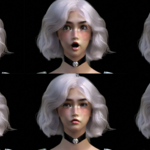
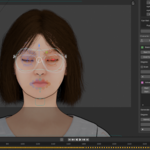
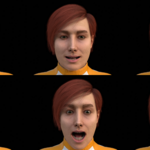
🧿 AutoEye Animator
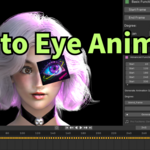
AutoEye Animator is a powerful, easy-to-use Blender addon that brings your character's eyes to life — automatically.
Whether you're creating a film-quality close-up or stylized character animation, AutoEye Animator generates realistic, human-like eye motion in seconds. No need to manually keyframe every blink or glance — just set your rig, click, and animate.
✨ Key Features
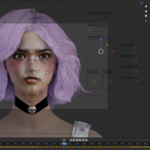
✅ Automatic Eye Animation: Natural eye movement based on real-world oculomotor behavior — including micro-saccades, subtle shifts, fixational motion, and blinks.
✅ Supports Multiple Rig Types: Fully compatible with Rigify, Auto-Rig Pro, Faceit, Human Generator, or any custom rig that includes an eye master control bone.
✅ One-Click Workflow: Simply set the control bones and hit “Generate Animation.” No keyframes required.
✅ Blinking & White-Eye Motion: Automatic blinking (every 3–4 seconds), and optional upward eye-roll to simulate thinking states.
✅ Emotion-Driven Gaze (Advanced Mode): Add emotional intervals to change eye movement intensity, blinking rate, and even pupil dilation based on mood.
✅ Non-destructive: Works with your existing rig. No need to rebind or modify your model.
✅ Automatic Eye Animation: Natural eye movement based on real-world oculomotor behavior — including micro-saccades, subtle shifts, fixational motion, and blinks.
✅ Supports Multiple Rig Types: Fully compatible with Rigify, Auto-Rig Pro, Faceit, Human Generator, or any custom rig that includes an eye master control bone.
✅ One-Click Workflow: Simply set the control bones and hit “Generate Animation.” No keyframes required.
✅ Blinking & White-Eye Motion: Automatic blinking (every 3–4 seconds), and optional upward eye-roll to simulate thinking states.
✅ Emotion-Driven Gaze (Advanced Mode): Add emotional intervals to change eye movement intensity, blinking rate, and even pupil dilation based on mood.
✅ Non-destructive: Works with your existing rig. No need to rebind or modify your model.
🎥 How It Works
AutoEye Animator mimics how real human eyes move, based on neuroscience and animation principles:
Fixational motion (tiny vibration when staring)
Small saccades (subtle gaze adjustments)
Microsaccades (localized scanning)
Blinking
Eye roll / scan-up
🧭 Quick Start Guide
Here's a step-by-step overview of how to use AutoEye Animator:

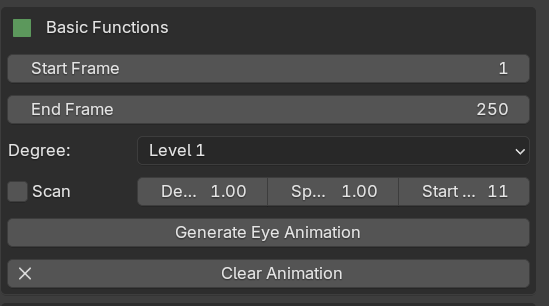
🔹 1. Basic Setup
Select your character and armature.
Choose your rig type (Rigify, Auto-Rig Pro, Faceit, Custom).
Set the eye master bone.
Define eye movement range (horizontal & vertical limits).
Select the eyeball mesh.
(Optional) Select a Pupil Shape Key for emotion-driven dilation.
Choose animation start and end frames.
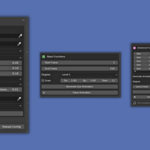
Click Generate Eye Animation under "Basic Functions".
💡 Tip: Adjust "Intensity" to control how dynamic the eye movements are. Smaller movement ranges = more exaggerated motion.
Select your character and armature.
Choose your rig type (Rigify, Auto-Rig Pro, Faceit, Custom).
Set the eye master bone.
Define eye movement range (horizontal & vertical limits).
Select the eyeball mesh.
(Optional) Select a Pupil Shape Key for emotion-driven dilation.
Choose animation start and end frames.
Click Generate Eye Animation under "Basic Functions".
💡 Tip: Adjust "Intensity" to control how dynamic the eye movements are. Smaller movement ranges = more exaggerated motion.
🔹 2. Blinking & Scan Mode
Enable Scan Mode to make the eyes roll upward (e.g., when the character is thinking).
Customize blink strength, speed, and frame offset.
Blinking is random and natural — no extra rigging required.
Enable Scan Mode to make the eyes roll upward (e.g., when the character is thinking).
Customize blink strength, speed, and frame offset.
Blinking is random and natural — no extra rigging required.
🔹 3. Multi-Character Workflow
Working in a scene with multiple characters?
Use Save Character Settings to store rig setups.
Use Clear Settings to start with a new character.
Previously saved settings can be instantly restored.
🔹 4. Emotion-Driven Mode (Advanced)
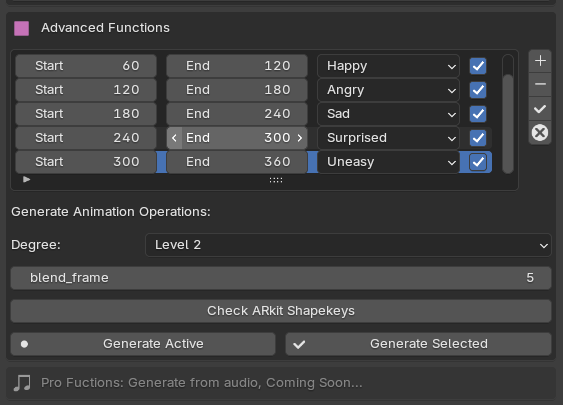
AutoEye Animator supports emotional gaze shifts over time. Here's how:
Add a pupil shape key: Set value to 1, enter Edit Mode, resize pupil, set min value to -1.
In the Advanced Panel, define emotional intervals (start & end frames).
Choose to generate single or multiple emotion sections.
Adjust intensity and smooth blending between sections.
✨ Example: Sad eyes blink slower with less motion. Angry eyes shift more rapidly with narrower pupils.
🔹 5. Rig Compatibility Overview
🔧 Requirements
Blender 3.6 or later
A rigged character with separate eye control bones (e.g. eyeball_LookAt_master)
(Optional) Face with ARKit shape keys
(Optional) Shape keys for pupil control
Blender 3.6 or later
A rigged character with separate eye control bones (e.g. eyeball_LookAt_master)
(Optional) Face with ARKit shape keys
(Optional) Shape keys for pupil control
📌 Why Use AutoEye Animator?
Manual eye animation is one of the most tedious and subtle parts of character performance. With AutoEye Animator, you can:
Save hours of keyframing
Avoid uncanny, robotic eye motion
Get studio-level eye performance in just a few clicks
💬 Support & Updates
Your purchase includes free updates and priority support. Found a bug? Want to suggest a feature? We're here to help.