Auto Importer & Organizer
 JMS Tools


Why do some objects overlap or look misaligned in the grid?
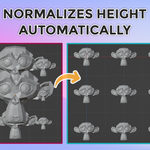
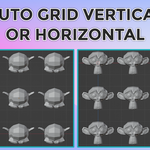
This can happen depending on the grid configuration and object distribution. For example, using a column count that does not match the number of objects per row, combined with Horizontal or Vertical grid modes, may cause objects to stack or overlap visually. Adjusting the number of columns, grid spacing, or switching grid orientation usually resolves this behavior.
Why does Normalize Height not produce identical results for all models?
Normalize Height works by scaling objects based on their bounding box height.
If your selection contains very different shapes (for example: tall thin objects mixed with wide flat ones), visual proportions may still differ.
This tool works best with assets of similar type and proportions.
Why are some assets imported larger or smaller than expected?
Different file formats (FBX, OBJ, GLTF, STL) may use different unit scales depending on how they were exported.
This is normal behavior and not an addon error.
You can use the Normalize Height tool or Apply Scale to standardize object size after import.
Armatures, Empties and Object Hierarchies
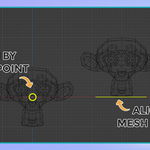
Imported assets may contain Armatures, Empties, or parent-child hierarchies that affect grid placement. This can result in offsets, incorrect scaling, or overlapping when changing the number of columns. For best results, use direct mesh objects whenever possible, make sure objects have clean transforms and correct origins, and avoid using Empties as the main object. These limitations are known and planned to be improved in future updates.
$7
Have questions about this product?
Login to message
| Blender Extension Compatible | Yes |
| Published | 9 months ago |
| Blender Version | 4.0 - 5.0 |
| Extension Type | Add-on |
| Render Engine Used | Cycles |
| License | GPL |