Auto Organizer
 Daniel Yosef





Can I use it inside an existing scene that already has collections?
Yes. With "Merge with Existing" enabled, the addon will reuse collections that already share the same name instead of creating duplicates. You can also set a parent collection name so everything is placed neatly inside an existing structure.
Will it affect my render or viewport performance?
No. Moving objects between collections has zero effect on render output or performance. The addon is lightweight and only runs when you press a button - it does not run continuously in the background.
Can I run it on only selected objects?
Yes. Enable "Only Selected" in the settings and the addon will organize only the objects you have selected in the viewport, leaving everything else untouched.
What Blender versions are supported?
Auto Organizer supports Blender 3.0 and above, including Blender 4.x. All major features are compatible across this range.
How does the smart keyword detection work?
The addon reads your object names and matches them against a built-in library of keywords. An object named "Oak_Tree_01" is automatically placed in a Foliage sub-collection, "Apartment_Block" goes to Architecture, and so on - no manual tagging required. Enable Advanced Sorting to activate this.
Will it clutter my scene if I only have a few objects?
Not at all. The "Skip Empty Types" setting ensures collections are only created when you actually have objects of that type in your scene.
Can I customize the collection names and colors?
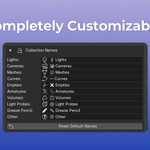
Yes. You can define your own names for every category in the panel or preferences. Color-tagging can also be toggled on or off to suit your visual style.
Does it work with linked libraries or overrides?
The addon is designed for local objects. It can see linked objects, but Blender's API restrictions may prevent moving them into new local collections unless they are made local first.
Can I revert the organization if I don't like it?
Absolutely. The built-in "Delete All" button safely moves all objects back to the Scene Collection and removes all auto-created collections, leaving your scene exactly as it was.
Does this addon delete or modify my objects?
No. The addon only changes which collection an object belongs to. It does not touch your geometry, modifiers, materials, or any object data. It is a purely organizational tool.
$8
Have questions about this product?
Login to message
| Published | 7 months ago |
| Blender Version | 5.0 |
| Extension Type | N/A |
| Render Engine Used | Arnold, Blender-Internal, Cycles, Eevee |
| License | GPL |
Discover more products like this
collections organization utility automation materials productivity Scene Management outliner helper cleanup Workflow management