 Prospero Utilities




Simple, Beautiful Autosave Addon For Blender
I work on Blender projects on my old MacBook. And whenever I try to do something even remotely heavy, Blender crashes and I lose hours of work.
So, I decided to give Blender a proper, modern Autosave utility, like literally every other modern software. Backup Engine doesn't stay hidden in files you can't find, and there's no freezing while you work. Just a super clean addon that lives in the sidebar and saves your bacon every once in a while.
Demo Video
Features
Enable Autosave With 1 Click
Don't go squirreling around in Edit > Preferences! There's just one checkbox to turn Backup Engine on or off.
Interval Save
Choose to save a new version however long you want. Choose a long interval like 10 minutes if you're doing light tasks, or every 30 seconds for safety.
Keep Old Versions
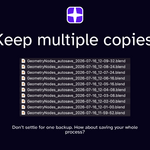
Backup Engine doesn't just keep one autosave! Choose how many iterations of your project to keep saved -- older ones will be automatically cleaned to keep your hard drive clear.
Choose Filenames
Choose how you want Backup Engine to name your files. Go for a simple numerical sequence (autosave4.blend) or a date-time option (autosave-at10-15.blend).
Idle Check
Backup Engine will never, ever, interrupt your simulation or render (and that's a promise!). Idle Check ensures that you're working on a task that won't be disrupted by an autosave for a set period of time before it tries to save a file.
Compress Autosaves
Short on disk space? Backup Engine can automatically compress your autosaved files to cut down on storage space. It'll unzip them if they're needed.
Purge Old Autosaves
Choose to get rid of autosaves older than a set number of days -- another feature that keeps your storage clear.
Notify on Autosave
Does what it says! A discreet popup will appear at the bottom of the screen whenever a save is made.
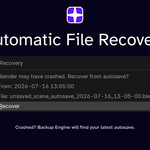
Automatic Recovery
When you restart Blender (like after a crash), a window will automatically popup and ask you whether you want to retrieve your latest autosave. No need to search through your file system.
Force Autosave
Press this button before you're about to do something with a high crash risk, like a big render or simulation. A new autosave will be immediately saved.
Last Autosave & Autosave Counter
Shows you when the file was last saved and how many copies you've saved.