 Skava
Skava


BakeStation — Documentation
v1.1.0 · Blender 3.2 + · Windows / macOS / Linux · Cycles for baking
1. Install
- Download
the archive from your purchase page, install via Add-ons preferences. - Press
Nin the 3D Viewport → BakeStation tab.
2. Quick start
- Open the Queue panel.
- Select your low-poly object in the viewport and click Add (+). It populates the active item's Low Poly slot.
- (Optional) Drag a high-poly source into the High Poly slot. Leave empty for single-object bakes.
- In the Output panel pick output directory, resolution, format.
- In the main panel pick an engine preset (Unity URP / Unreal / Godot / glTF / Generic).
- Click Bake all.
2a. Auto-pair by name
If your scene already follows the _high / _low convention (or .hp / .lp, _hi / _lo), click Auto-pair by name. BakeStation scans the scene, matches every pair by base name, and populates the queue in one click. Scope can be limited to Selected or Active collection.
2b. Quick preview
Before committing to a 4K production batch, click Quick preview on the active item. It bakes Base Color + Normal + AO at 256px with 4 samples in ~10-30 seconds — enough to sanity-check the cage and UVs.
2c. Naming tokens
The Naming field in the Output panel accepts a template with these tokens:
-
{name}— the queue item name -
{suffix}— the engine preset's suffix (e.g._BC,_ORM) -
{engine}— preset key (unreal,unity_urp, …) -
{pass}— raw pass name (normal,ao, …) -
{res}— resolution number -
{tile}— UDIM tile (when UDIM is enabled)
Examples: T_{name}{suffix} → T_chest_BC.png. {name}_{engine}_{res}{suffix} → chest_unreal_2048_BC.png.
2d. Save / Load queue
Save queue writes the entire batch configuration to a .json file: engine preset, naming, resolution, samples, cage offset, every queue item with its map toggles, and the object names of every high / low slot. Load queue restores it into the current .blend. Objects that no longer exist appear with empty slots and a warning lists their names.
3. The queue
Each row is a self-contained bake task with its own high/low pair, name, UDIM toggle, cage toggle, and per-map toggles. Disable rows with the checkbox instead of removing them. Add selected as items creates one row per selected mesh — useful for batching dozens of props.
4. Auto cage
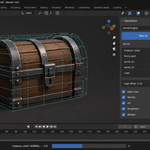
Toggle Use auto cage per item. When the bake runs, BakeStation duplicates the low poly and pushes vertices outward along their normals by the global Cage offset distance. The cage is used as the ray-cast envelope so high-poly detail is captured cleanly.
To preview / tune the cage manually: click Generate Cage in the queue panel. Inspect it in the viewport (it appears as a wireframe). Adjust the offset and regenerate. If the cage crosses concave geometry (visible as overlapping triangles), reduce the offset.
5. Engine presets and channel packing
| Preset | Outputs | Normal format |
|---|---|---|
| Unity URP / BiRP | _BaseMap, _Normal, _Mask, _Emission | DirectX (green flipped) |
| Unity HDRP | _BaseColor, _Normal, _Mask | OpenGL |
| Unreal Engine | _BC, _N, _ORM, _E | DirectX |
| Godot 4 | _albedo, _normal, _orm, _emission | OpenGL |
| glTF 2.0 | _baseColor, _normal, _metallicRoughness, _occlusion, _emissive | OpenGL |
| Generic | One file per pass (8 maps) | OpenGL |
Channel packing is done in linear space with numpy after all raw passes are baked, so the math stays correct.
6. UDIM tiles
Enable UDIM on a queue item whose low poly's UVs span multiple unit squares (1001, 1002, …). BakeStation detects every tile that has UV coverage, shifts each tile's UVs into [0,1] in turn, bakes it, and writes the result as asset_normal.1001.png, asset_normal.1002.png, … This is the convention recognised by Mari, Houdini, Substance Painter, and Unreal's virtual texturing.
7. Map types
- Base Color — Cycles diffuse, color pass only (no light contribution).
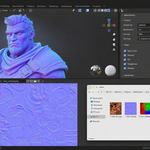
- Normal — tangent space, optionally green-flipped for DirectX.
- Roughness — direct Roughness BSDF input.
- Metallic — Cycles has no native Metallic bake. BakeStation reroutes the Metallic input through a temporary Emission node, bakes EMIT, restores the material — fully automatic.
- AO — Cycles AO with the configured samples. 32-64 is usually enough; for hero assets bump to 128-256.
- Emission — Cycles EMIT pass.
- Displacement — Cycles POSITION pass (world-space). Use as a height proxy or convert downstream.
- Curvature — derived from Geometry → Pointiness, routed through a temporary Emission node. Useful for masks and edge wear.
- Material ID — one distinct hue per material slot. Drop into Substance Painter / Mari as a mask source.
- Random ID — random colour per object instance, driven by Object Info → Random. Mask individual bricks on a wall or leaves on a plant.
7a. Preview sphere render
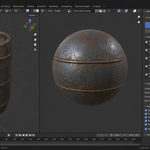
Toggle Render preview sphere in the Output panel. After each item finishes, BakeStation renders a 512×512 PBR sphere with the baked maps applied to a neutral dark background and saves it as _preview.png. Drop these into your portfolio or social posts without setting up a render scene yourself.
8. Metadata sidecar
After every batch, BakeStation writes _bakestation.json next to the textures. It lists the preset used, normal format, resolution, and the path of every output file. Drop the JSON into your asset database alongside the textures so a tech artist (or future-you) knows what they're looking at.
9. Troubleshooting
"Bake fails: object has no material slots" — assign at least one material to your low poly before adding it to the queue. The temporary image node has to live somewhere.
"Normal map looks inverted in Unreal" — pick the Unreal preset, not Generic. The Unreal preset green-flips the normal automatically. If you already shipped a Generic bake, you can flip green in Photoshop / GIMP or re-bake with the Unreal preset.
"Black halos around my mesh" — your cage is too tight. Bump Cage offset up by 20-50 %. If the issue persists, generate the cage manually, sculpt out the trouble vertices, and re-bake with the custom cage selected.
"UDIM tiles bake to the wrong file names" — verify your UV islands are actually in the integer ranges 1001/1002/… (i.e. UV coords roughly in [0,1], [1,2], …). UVs that land in [0.5, 1.5] are interpreted as tile 1001 + 1002 boundary and may bake to both files. Pack islands cleanly inside each tile.
"AO is too dark / too light" — AO is sampled from the world. Hide background objects you don't want occluding the asset (or move them to a hidden collection) before baking.
"Auto-pair found no pairs" — the matcher needs both halves to share an exact base name with a recognised suffix. chest_high + chest_low works, but chest_HIGHPOLY + chest_lowpoly doesn't. Rename the high to chest_high or add another suffix variant.
"Naming template produces a weird filename" — an unknown token (e.g. {material}) falls back to {name}{suffix} silently. Stick to the documented tokens: {name} {engine} {pass} {suffix} {res} {tile}.
"Load queue says objects are missing" — the JSON references object names that don't exist in the current .blend. Either rename your objects to match, or re-link the high/low slots manually after loading.
"Preview sphere is pitch black" — at least Base Color must be baked. If you only baked Normal + Roughness, the sphere has no diffuse colour. Enable Base Color in the queue item.
10. Limitations
- Cycles must be the active render engine while baking (BakeStation does not auto-switch and will refuse if it isn't).
- Cancelling mid-bake leaves a temp image node behind in the material; re-running clears it. Granular cancel-at-pass-boundary is planned for v1.1.
- Per-tile UDIM baking is sequential — 100 tiles × 5 passes is 500 bakes, plan your batches accordingly.
- Displacement is baked as the Cycles POSITION pass, not true tangent-space height. Adequate as a height proxy; full height-from-cage baking is planned for v1.1.
- Preview sphere only renders for non-UDIM single-tile bakes (a sphere can't usefully visualise tiled UV layouts).
11. Support & License
Through marketplace messaging. GPL-3.0. Textures you bake are yours to ship in any commercial project.
Changelog
1.1.1 — Saving and loading a bake queue no longer throws a Python traceback when the file path is empty or points at a folder. It now says «Choose a file to save the queue to», creates the folder if it is missing, and reports a plain message if the disk refuses the write.
Have questions about this product?
Login to message
| Published | about 2 months ago |
| Blender Version | 3.2 - 5.2 |
| Extension Type | N/A |
| Render Engine Used | Cycles, Eevee |
| License | GPL |
Discover more products like this
asset cage json preset channel pack preview ao Game normal map random ID auto-pair material id naming template