Batch Export Selected
 alexdepario
in Import & Export


Do I need to apply scale and transforms before exporting?
It is recommended to apply transforms (Ctrl + A -> All Transforms) before running the batch export to ensure rotation, scale, and origins transfer cleanly to external game engines or 3D software.
Will it overwrite existing files in the export folder?
If a file with the same object name already exists in the destination folder, it will be overwritten. Make sure your destination directory is clear or contains backup files if needed.
Which file formats are supported?
The add-on supports OBJ, FBX, STL, glTF (.gltf / .glb), Collada (.dae), and PLY.
Does Batch Export Selected export each object into a separate file?
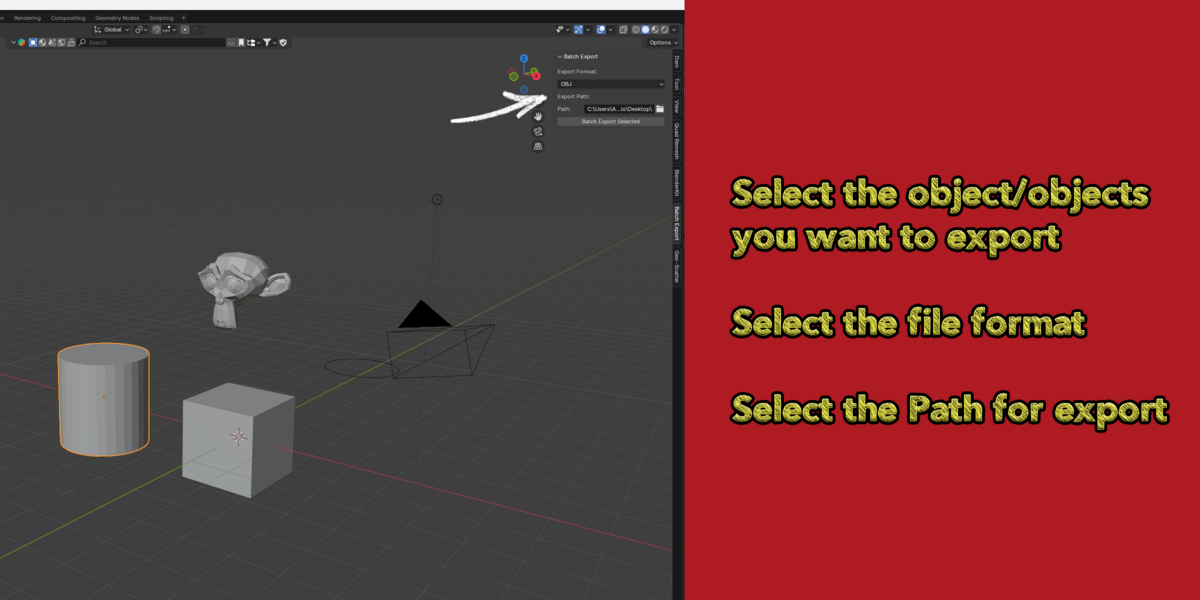
Yes. It iterates through all currently selected objects in your scene and saves each one as an individual file, using the object's name for the output filename.
Have questions about this product?
Login to message
| Blender Extension Compatible | Yes |
| Published | almost 2 years ago |
| Blender Version | 4.3, 4.2, 4.1, 4.0, 3.6, 3.5, 3.4, 3.3, 3.2, 3.1, 3.0 |
| Extension Type | Add-on |
| License | GPL |

alexdepario
Discover more products like this
bulk-export batch-export multi-export asset exporter gltf exporter game asset export pipeline automation export selected fbx exporter