Beautiful Betta Fish – Realistic Rigged Animation Asset
 3D Subject


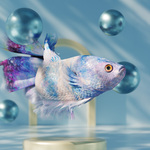
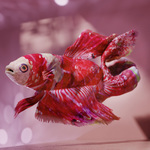
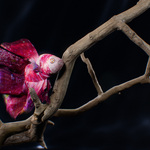
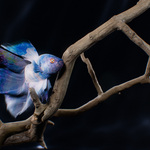
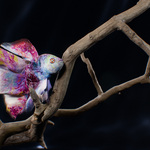
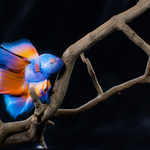
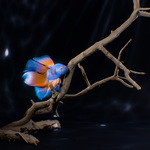
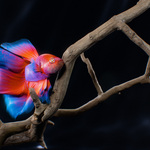
Rigged Betta Fish Asset for Blender 4.2+
This asset is a professional-quality, rigged Betta (Siamese fighting) fish created for animation work in Blender 4.2+. It uses cloth simulation for realistic fins and includes an optional workflow with the free Wiggle 2 add-on for easy secondary motion. Perfect for promotional animation, product reels, advertising, motion graphics, DOOH/FOOH, and more.
Take this asset and create something beautiful!
Requirements (recommended)
Blender 4.2+ — the asset was created in Blender 4.2 and tested in 4.5.
Wiggle 2 add-on (optional, not mandatory) — makes automatic secondary motion easier but is not required for the asset to functionality. Download: https://github.com/shteeve3d/blender-wiggle-2
Files included
Betta_Fish_SCENE.blend — demo scene (350 frames) with additional scene assets lighting, example animation, and render setup.
Betta_Fish_APPEND.blend — clean file for appending. Append the ”Betta - Append” collection into your scene to bring in the fish rig with all necessary objects.
Animation workflow — recommended order
Animate in Pose Mode using FK controllers.
Bake Wiggle Bones (if using Wiggle 2).
Bake Cloth Physics for fins.
Add optional manual animations on side fins, lips, or other detail controls.
(Short notation: Pose Mode >> Bake Wiggle Bones >> Bake Cloth Physics >> optional additional animation)
Quick start
Before animating: set Simplify → Viewport = 0 for smooth playback and easy keyframing. This makes animation previewing faster.
To use the rig in another scene: File → Append → Betta_Fish_APPEND.blend → Collection → Betta - Append.
Core controls come from the FK Main Bones Collection:
ROOT-Spine — base position & rotation (can be constrained to a motion path/curve).
FK-Spine — drives the spine; a single FK-Spine animation can be expanded using Wiggle 2.
Test short segments first to see how motion propagates before doing long takes.
Using Wiggle 2 (optional)
Wiggle 2 is an optional add-on that automates and amplifies secondary motion (useful for realistic tail and fin action). It is not required — the asset works fully without it.
Basic Wiggle 2 workflow (recommended):
Animate your main FK controls (e.g. FK-Spine).
Open the N-panel → Animation → Wiggle 2 and enable the add-on. Playback will show extra motion applied by Wiggle 2 (it may appear chaotic initially).
Select bones from the Wiggle Bones Simulated Only Collection. In the Wiggle 2 panel: click Reset Physics, disable Loop Physics (unless you're creating a loop), enable Overwrite Current Action, set timeline length, then click Bake Wiggle.
After baking, you can safely disable Wiggle 2 to improve scene responsiveness.
Cloth simulation (fins)
Switch to Object Mode.
In the Outliner unhide the Betta_cloth collection.
Select any object with _cloth suffix, go to Physics → Cloth, open the Cache panel and click Bake All Dynamics.
After baking, hide the Betta_cloth collection.
Return to Pose Mode. Select the Head & Cloth bone from Properties, open Bone Properties → Custom Properties and enable Cloth ON for that bone.
Disable Simplify to view the full simulation.
Important tip: Always leave at least 20 frames at the start of your animation as a “warm-up” for the cloth simulation. The fins begin in a perfectly straight pose, and it takes about 20 frames for the simulation to naturally bend and settle into a realistic shape.
Materials & customization
5 fish color presets are included. Materials are named using the pattern:
BETTA_ (for example: BETTA_pink, BETTA_colorfull, etc.).
To change the color, select the fish object in Object Mode, open the Material tab and pick the desired BETTA_ material.
Eyes: the eye object has 2 prepared materials.
Materials are highly editable, with many procedural features for easy customization.
Several UV maps are included for adding custom texture detail and decals.
License & distribution
This asset:
✔ You may use this asset commercially in animations, films, games, and other projects.
❌ You may not resell, redistribute, or repackage any part of this asset as a standalone product.
Wiggle 2 add-on:
Wiggle 2 is published under GNU GPL v3 — free and open source. It is not included with this asset and must be downloaded separately from the author’s repository: https://github.com/shteeve3d/blender-wiggle-2
Support & contact
If you have any problems or questions, email: [email protected]
Thank you for using the Betta Fish asset — show me what you create!
Have questions about this product?
Login to message
| Published | 11 months ago |
| Blender Version | 4.2 - 4.5 |
| Render Engine Used | Cycles |
| Misc Data | Uvs-Unwrapped, Rigged, Animated, Normal-Mapped, Textured |
| License | Royalty Free |
Discover more products like this
betta fish 3d model cloth simulation animated-fish creature rig underwater rigged fish cycles render Motion design Blender asset wiggle bones realistic fish