 JB FX
JB FX
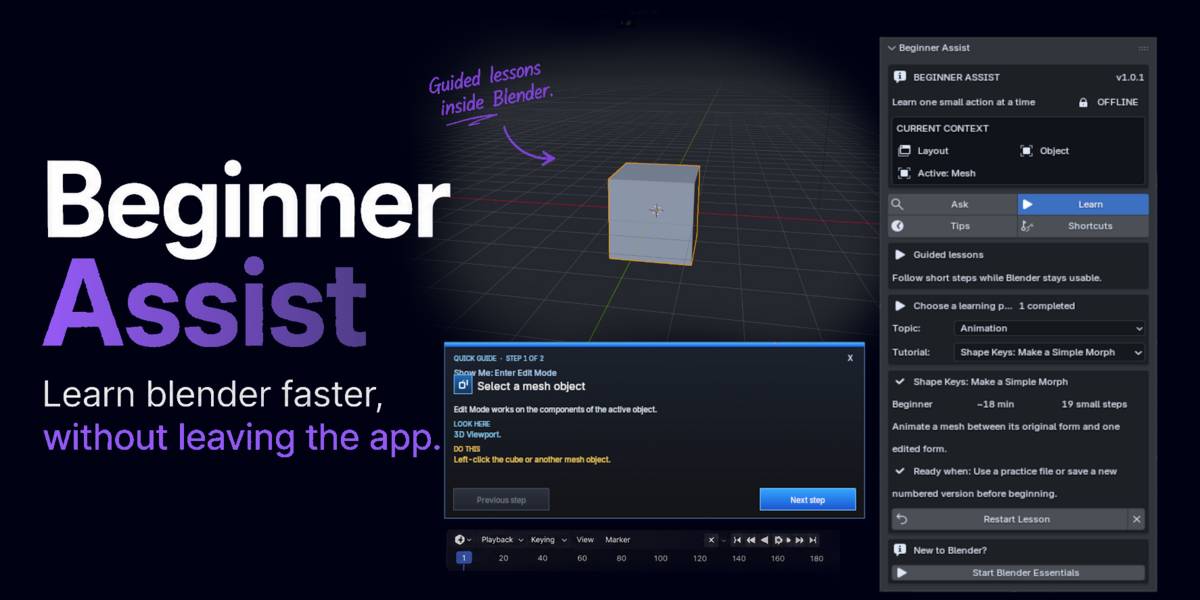



Beginner Assist 1.0.1 — Quick Documentation
An offline learning and troubleshooting assistant for Blender 5.2 LTS. No account, API key, internet connection, telemetry, or scene upload is required.
Installation
- Download the Beginner Assist ZIP. Do not extract it.
- Open Edit → Preferences → Extensions.
- Choose Install from Disk and select the ZIP.
- Enable Beginner Assist if requested.
- Open the 3D Viewport, press N, and select Assist.
Disable or remove an older Beginner Guide build before installation. Restart Blender if its interface remains loaded.
The four sections
Describe a problem and press Enter. Search runs locally. Selected answers can start a short Show Me guide. Inspect starts a read-only Scene Doctor check.
Choose a lesson and press Start. Blender remains interactive while the lesson is visible. Use Previous, Next, Close, Check My Step, Where?, More Help, and Common Mistake. Progress is saved.
Choose Today's Tip or Random Tip. Tips appear temporarily, do not capture input, and never open without a request.
Search commands or filter by editor, mode, workspace, global context, or the complete active keymap. Custom bindings are indexed progressively.
Tutorial controls
- Previous / Next: move manually between steps.
- Check My Step: perform supported read-only verification.
- Where?: redraw or focus the current target.
- More Help / Common Mistake: reveal optional detail.
- Copy I'm Stuck Report: copy context for a support request.
Step checks do not change the scene or advance the lesson automatically.
Quick troubleshooting
Assist tab missing
Confirm the extension is enabled, put the pointer over the 3D Viewport, press N, and select Assist. Remove an older Beginner Guide build and restart Blender if necessary.
Callout cannot find a target
Use the workspace named in the lesson, make the relevant object visible, clear Outliner filters, expand collapsed collections, open the required Properties tab, and press Where? again.
Search result is not relevant
Use a short symptom such as “pink textures,” “object disappeared,” “render is black,” or “keyframes not working.” Current Blender context can influence ranking.
Shortcut list is loading
Wait briefly for active-keymap indexing. Refresh once if a recently changed custom binding is missing.
Privacy and safety
- All packaged help and checks run locally.
- No account, API key, telemetry, or scene upload.
- Scene Doctor and Check My Step are read-only.
- No automatic fixes or generated repair code.
Updates, removal, and support
Install updates from Preferences → Extensions → Install from Disk. Remove the previous version first if Blender reports a duplicate module. Uninstalling Beginner Assist does not alter project geometry.
For support, include Blender version, operating system, Beginner Assist version, active workspace and mode, expected result, observed result, and the copied I'm Stuck report when available.
-
$49.95
One user Complete Beginner Assist add-on All tutorials, search, tips, and shortcuts Standard product support
-
$239.75
- Everything in Individual - Coverage for up to five internal users - Shared onboarding checklist - Two named support contacts
-
$739.25
Everything in Team 5 Coverage for 15–20 internal users Priority compatibility triage
 Included
Includes 12 months of
- Support from JB FX
- Product updates
Extend this product’s Support Period +12 months: 25% of product price
Have questions before purchasing?
Login to message
| Blender Extension Compatible | Yes |
| Published | about 2 months ago |
| Blender Version | 4.3 - 5.2 |
| Extension Type | Add-on |
| Render Engine Used | Cycles, Eevee |
| License | GPL |
