 baddor
Pro Hair Suite — Documentation
Hair card to Blender Hair Curves conversion toolkit for Blender 4.5–5.1
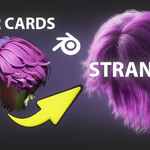
Pro Hair Suite converts hair card geometry into clean, editable Hair Curves while preserving strand flow and enabling full grooming inside Blender’s native system. It is designed for game-ready assets, VFX workflows, and marketplace hair conversion.
This page covers installation, workflow, conversion tools, grooming behavior, limitations, and troubleshooting.
Requirements
Blender 4.5 – 5.1 (tested versions)
Hair Curves system enabled
Works best with hair card based assets
Recommended: clean or semi-clean UV hair cards (rectangular layouts preferred)
Installation
Open Blender
Go to Edit → Preferences → Add-ons
Click Install
Select the Pro Hair Suite ZIP
Enable the addon checkbox
Open the N-panel → Pro Hair Suite tab
Quick Start Workflow
Select one or more hair card objects
Ensure object scale is applied (Ctrl + A → Scale)
Open Pro Hair Suite panel
Click Convert to Curves
Curves are generated and attached to the original hairstyle shape
Run Auto Root Alignment (recommended step)
Begin grooming using Blender Hair Curves tools
Standard workflow order:
Convert → Align → Groom → Simulate → Finalize
Core System Overview
Hair Card to Curves Conversion
The core system converts mesh strips (hair cards) into curve strands by analyzing:
Card direction (UV or mesh flow)
Surface orientation
Strand grouping based on geometry clustering
The result is a Hair Curves object that follows the original hairstyle layout.
Best results come from:
consistent card direction
rectangular UV islands
non-overlapping or lightly overlapping geometry
Auto Root Alignment
Fixes inconsistent strand direction after conversion.
This tool:
forces root-to-tip consistency
corrects flipped strands
normalizes curve direction across the entire hairstyle
When to use:
Always immediately after conversion.
Mesh → Curves Mode
Converts generic mesh geometry into curve strands.
Useful for:
guide generation
stylized grooming setups
rebuilding broken hair assets
This mode does NOT reconstruct hair detail — it converts existing geometry structure.
Grooming Integration
Once converted, curves behave like native Blender Hair Curves:
Supported tools:
Comb
Smooth
Puff
Length edits
Sculpt tools
No re-rigging or re-binding required.
Strand Simulation
Adds motion behavior using Blender Hair Curves physics.
Supports:
secondary motion
strand follow-through
wind interaction
animated grooming tests
Simulation remains non-destructive.
Wind System
Procedural wind influence applied to curves.
Typical use cases:
cinematic shots
character animation
environmental motion tests
Can be layered with simulation settings.
Important Behavior (UPDATED / FIXED)
1. Scale Must Be Applied Before Conversion
If object scale is not applied:
strand direction may break
curve density may be inconsistent
simulation may behave incorrectly
2. Conversion Uses Mesh Flow + UV Direction
Pro Hair Suite prioritizes:
UV direction (if available)
Mesh edge flow
fallback geometric orientation
This means:
bad UVs = less predictable strand direction
clean UV cards = best results
3. Hair Cards Are Interpreted, Not Rebuilt
The addon does NOT generate new hair geometry.
It:
interprets existing cards
converts them into curves
preserves structure as much as possible
4. Root Alignment is NOT optional in real workflows
Even if conversion looks correct:
small directional errors accumulate
grooming becomes inconsistent later
Limitations (MORE ACCURATE)
1. Poor Card Direction
If hair cards are not consistently oriented:
curves may flip locally
strand flow may split in clumps
Fix: re-orient cards or re-run alignment
2. Broken or merged cards
Overlapping or welded cards may:
generate shared curves
reduce strand separation accuracy
3. Extreme low-density cards
Very low geometry density results in:
fewer generated curves
simplified hairstyle output
4. Simulation depends on Blender system
Hair physics quality depends on:
Blender version
scene scale
curve resolution
Troubleshooting
Curves look messy after conversion
→ Run Auto Root Alignment
→ Check card direction consistency
Hair flows backwards or mixed direction
→ UV direction is inconsistent
→ Re-orient cards or re-run alignment
Missing strands or sparse output
→ Increase source mesh density
→ Check card segmentation
Simulation behaves strangely
→ Apply scale
→ Rebuild curves after conversion
Hair doesn’t follow head properly
→ Check surface attachment and deformation mode in Blender
Support
If something behaves unexpectedly, contact support before leaving a review.
Most issues come from:
source mesh quality
UV direction
unapplied transforms
Support Email:
[email protected]
License
Pro Hair Suite is released under the GNU General Public License v3 (GPL v3).
This means:
usage is allowed
modification is allowed
redistribution is allowed under GPL terms
Roadmap
v1.2
Improved UV direction detection
Better handling of complex hair card stacks
Stability improvements for dense assets
Future
Faster conversion pipeline
Better strand clustering for messy assets
Improved simulation presets
Pro Hair Suite v1.1 — by Baddor
Have questions about this product?
Login to message
Discover more products like this
3DHair BlenderHair BlenderAddon blenderaddons hairgrooming #HairSimulation Haircards HairStyling hairaddon haircurves