 Titus


-Blender version -
- 2.xx, 3.xx, 4.xx
- Addon Versions -
- 017 - for Blender 2.xx - 3.xx
- 018 - for Blender 4.xx - ...
- OS -
- Windows only
- Installation -
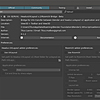
- Blender->Edt->Preferences->Add-ons->Install from file…
- Define paths to applications. (Without selecting executable files - just folder path)
- Usage -
Everything is automatic:
- Select mode (New or Edit), select channel for edit
- Send to UVLayout or RizomUV
- Do UVs
- When finishing in:
- UVLayout - press “Send” button
- RizomUV - press shortcut “Ctrl+S” or Save the file
- That's all. You will receive UVs automatically and the application will be closed(not Blender).
-Support-
Find on -> https://blenderartists.org/t/blender-headus-uvlayout-rizomuv-b2ruvl
Thank you very much!
Have questions about this product?
Login to message
