Break It Any Way - Disintegrate: Reversible Disintegration, Shatter & Dissolve Vfx
 Rasheed's Edit




Full manual
Every setting, each with a clip showing what it does: break-it-any-way.pages.dev
Install
Blender 4.5 or newer: Edit › Preferences › Get Extensions, open the menu at the top right and choose Install from Disk…, then pick break_it_any_way.zip. The FX tab appears in the 3D viewport sidebar (press N).
Quick start
- Select your mesh and press Add to Selected in the FX tab. A character in several parts can be done in one click from its collection instead, and every part shares one controller and one scale.
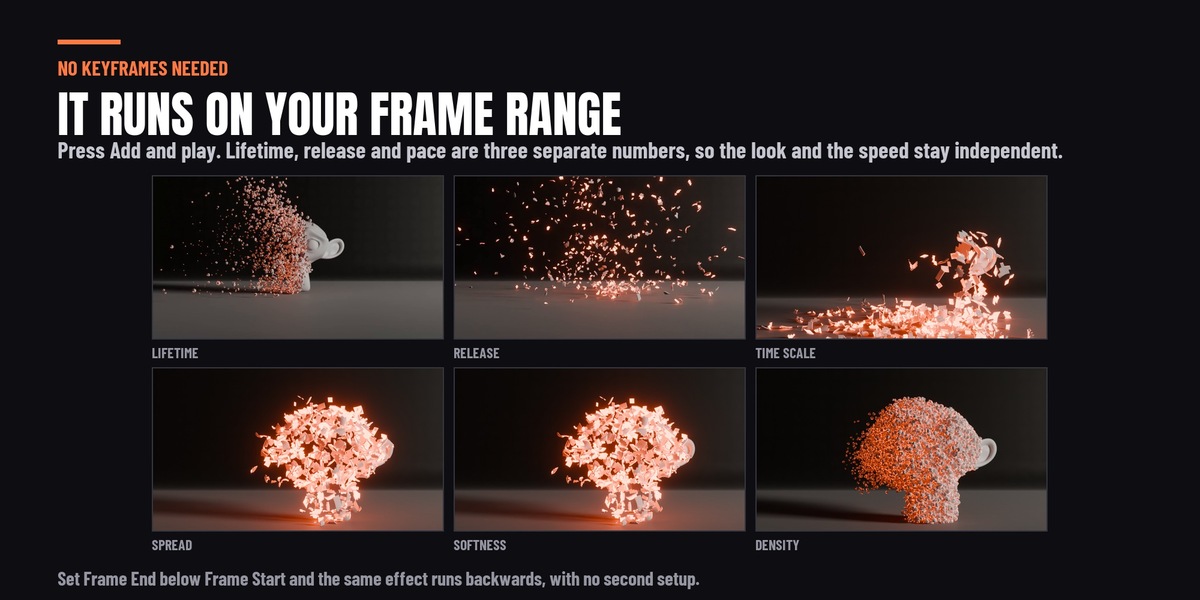
- Play the timeline. The effect runs over your scene's frame range straight away, with no keyframes. Put Frame End below Frame Start and the object assembles out of its own debris instead.
- Move the controller empty to aim it. The dissolve starts wherever the empty is and spreads from there. Parent it to a hand, a bone or a moving object and the front follows.
Where everything is
Every setting lives in the FX tab, in nine sections: Setup, Effect, Timing, Pieces, Front, Motion, Fields, Collision and Look. A greyed row does nothing with your current settings, and the panel says why underneath it.
Good to know
- A new effect has no gravity. Gravity ships at zero, so the debris drifts rather than falls. Set it in Motion before you expect Floor or Keep Debris to land anything.
- The glowing edge is on by default. New effects render their debris with the included glow material; set its colour and brightness with Glow Color and Glow Strength in Look. To use a material of your own, pick it in Debris Material, or untick Override Material to keep the object's. Use Glow Material puts the glow back.
- Keep Debris stops pieces fading and shrinking. Size Curve, Shrink and Opacity Curve do nothing while it is on.
- Chunks uses real pieces. Make them with Fracture Into Chunks in Setup, or point Fragment Collection at your own. Fracturing again replaces the old pieces rather than piling up new ones.
- Collision is a simulation. Play it from the start rather than scrubbing into the middle. To run a collision shot backwards, use Bake Appear (reversed) in Setup, which writes an Alembic cache.
- Long bright streaks in a Cycles render? That is Cycles' motion blur on a dense cloud of debris, not the effect. Turn motion blur off and they go.
-
$15
 Included
Includes 12 months of
- Support from Rasheed's Edit
- Product updates
Extend this product’s Support Period +12 months: 50% of product price
Have questions before purchasing?
Login to message
| Blender Extension Compatible | Yes |
| Published | 1 day ago |
| Blender Version | 4.5 - 5.2 |
| Extension Type | Add-on |
| Render Engine Used | Cycles, Eevee |
| License | GPL |
Discover more products like this
Dissolve reassemble shatter fracture cell fracture thanos debris disintegration Disintegrate teleport reverse materialize