C4D2Blender
 Carpediego






📘 Documentation – C4D2Blender
🔹 What is C4D2Blender?
C4D2Blender is an addon that automates the transfer of 3D scenes from Cinema 4D to Blender, making your workflow faster, smoother, and cleaner. It’s designed for artists who prefer to render in Blender but create in Cinema 4D.
🚀 Features
-
🧠 Automatically detects and imports the latest exported scene
-
🧱 Restores modifiers (e.g. Subdivision Surface)
-
🎨 Reapplies original blender materials
-
🎥 Preserves cameras and hierarchy
-
🧹 Cleans duplicate meshes and materials
-
📂 Smart collection organization
-
🖥️ Custom UI panel with console-style
-
🌐 Built-in update checker to stay current
🔧 How to Install in Blender
-
Download the
C4D2Blender_Blender.zipfile.. -
In Blender, go to
Edit > Preferences > Add-ons Click Install and choose the zip file.
-
Enable the addon by checking C4D2Blender.
-
Access it from the N-Panel > C4D2Blender tab.
🔧 How to Install in Cinema4D
Download and unzip the
C4D2Blender_Cinema.zipfile.Place in
Plugins Folder.Restart Cinema4D.
-
Access it from Extensions > C4D2Blender.
🔩Before use
Configure Cinema4D this way Edit > Preferences > Import/Export > FBX Export
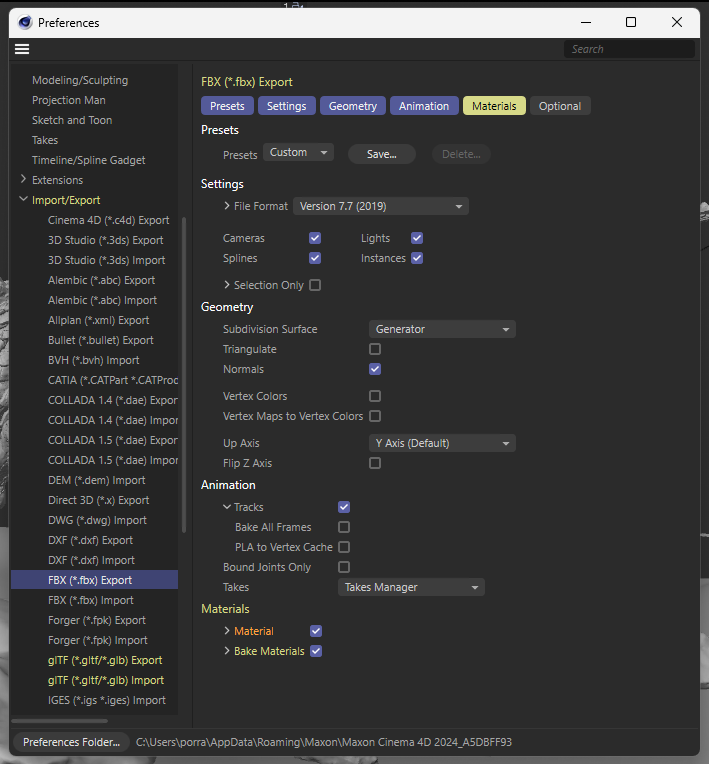
Optionally you can check Selection Only to export only the selected objects and not the entire scene.
📁 Folder Setup (Recommended)
To ensure the addon works correctly:
-
Export from Cinema 4D and import from Blender using the same folder (default C:\C4D2Blender).
Use an SSD drive preferably.
🧩 Compatibility
-
Blender 3.0 and above
-
Cinema 4D R21 or newer.
Have questions about this product?
Login to message
| Blender Extension Compatible | Yes |
| Sales | 10+ |
| Published | about 1 year ago |
| Blender Version | 3.0 - 5.1 |
| Extension Type | Add-on |
| Render Engine Used | Cycles, Eevee |
| License | GPL |
Discover more products like this
Cinema 4D to Blender C4D Animation Import c4d C4D Import cinema4d-to-blender C4D Export cinema4d 3D importer #C4DToBlender C4D to Blender C4D Blender Bridge