CardCutter: Nanite-Ready Foliage Generator
 Philipp Russo


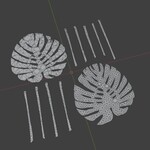
Hier ist die komplett formatierte Dokumentation, optimiert für Marktplätze wie Superhive. Der Text ist in Markdown formatiert, was die Standard-Formatierung für die meisten Plattformen (und auch für .md Files) ist.
Du kannst den Inhalt unten einfach kopieren.
🌿 CardCutter: Official Documentation
Turn textures into optimized 3D meshes – instantly.
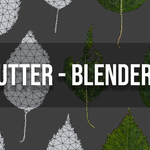
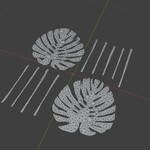
CardCutter is a Blender addon that takes a black and white image (mask) and converts it into a 3D mesh. White areas become the mesh, black areas are removed. It is designed to bridge the gap between simple planes and heavy geometry, making it essential for Unreal Engine 5 Nanite workflows to reduce overdraw.
key Features
Auto-Detection: Detects outlines from your mask image.
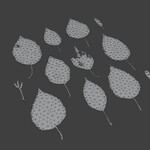
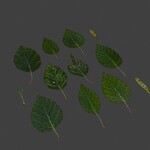
Atlas Support: Automatically creates separate mesh objects for disconnected islands (perfect for leaf atlases).
Optimized Topology: Triangulates the mesh with optimized distributions.
Game Ready: "High Quality Optimization" mode for Nanite-dense clusters.
Presets: Fast, Balanced, and High Quality workflows.
📦 Installation
Download: Download the
.zipfile from your dashboard. Do not unzip it.Open Blender: Go to
Edit→Preferences.Install: Select the Add-ons tab and click the
Install...button (top right).Select File: Navigate to where you downloaded the file, select it, and click Install Add-on.
Enable: Search for "CardCutter" in the list and check the box to enable it.
Where to find it?
In the 3D Viewport, press N to open the Sidebar. You will see a new tab labeled CardCutter.
🚀 Quick Start Guide
Prepare Mask: Create a B&W image (White = Mesh / Black = Empty). Save as PNG or TIF.
Open Panel: Open the CardCutter tab in the N-Panel.
Load Image: Click the folder icon next to Mask Image and select your file.
Generate: Click the
Generate / Updatebutton.Done! Your mesh (or multiple meshes if using an atlas) will appear in the viewport.
⚙️ Settings Explained
1. Mask Section
Mask Image: Path to your image file.
Use Alpha: Check this if your transparency is stored in the Alpha Channel (common for PNG/TIF). Uncheck for standard B&W images.
Max Resolution: Limits processing size. Lower (e.g., 512/1024) is faster; Higher is more detailed.
2. Outline Section
Threshold: Determines the cutoff between black and white (0.0 to 1.0).
-
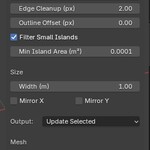
Edge Cleanup: Smooths jagged pixel edges.
0: Sharp/Pixelated2-3: Recommended Smoothness
Outline Offset: Expands (+) or shrinks (-) the mesh outline. Useful for padding.
Filter Small Islands: Removes noise or tiny disconnected artifacts.
Min Island Area: The size threshold for the filter above.
3. Size & Output
Width (m): The physical width of the resulting mesh in meters.
Mirror X/Y: Flips the generated mesh.
-
Output Mode:
Update Selected: Overwrites the active mesh (great for tweaking).New Object: Always creates a fresh copy.
4. Mesh Quality (The Important Part)
Triangle Size (m): The target size for triangles. Smaller number = More detail = Higher Polycount.
-
Quality Preset:
Fast: For background assets/previews.
Balanced: Standard game-ready density.
High Quality: Dense, for hero assets.
High Quality Optimization: Enable this for Nanite assets. It improves topology uniformity and reduces jitter.
🎓 Tips & Best Practices
Working with Atlases (Multiple Leaves)
If your texture has multiple separate leaves, CardCutter automatically detects them.
Result: Each leaf becomes a unique object named
Island_0,Island_1, etc.Workflow: You can select a single island, adjust its specific settings (like Edge Cleanup), and click Update. Only that specific leaf will update!
Troubleshooting "No Outline Found"
Check Alpha: Toggle the "Use Alpha" checkbox.
Threshold: Try moving the Threshold to 0.3 or 0.7.
Contrast: Ensure your mask is pure Black and White, not subtle grays.
Nanite Optimization
For the best results in Unreal Engine 5:
Set Preset to High Quality.
Enable High Quality Optimization.
Set Edge Cleanup to 2 or 3.
This creates the dense, uniform triangles that Nanite requires to prevent shading artifacts.
❓ FAQ & Troubleshooting
Q: My mesh edges are too jagged/blocky.
A: Increase Edge Cleanup to 2 or 3 and ensure Resample Boundary is on in Advanced Options.
Q: The generation is very slow.
A: Lower the Max Resolution to 1024 or increase the Triangle Size (e.g., from 0.005 to 0.02).
Q: The mesh disappears when I click Update.
A: Ensure you haven't filtered it out with "Filter Small Islands". Also, check that your Threshold isn't set too high (erasing the white parts).
Q: I wanted one mesh, but got 10.
A: This is a feature! CardCutter splits disconnected parts. You can select them all and press Ctrl+J to join them if you need a single object.
📜 Technical Info
Blender Version: 4.0+
Algorithms: Uses Marching Squares for detection and Constrained Delaunay Triangulation (CDT) for mesh generation.
License: GPL (Code) / Royalty Free (Included Assets)
Support: If you encounter bugs, please check the Blender Console for error messages before contacting support.
Happy Creating! 🎨
Have questions about this product?
Login to message
| Sales | 10+ |
| Published | 9 months ago |
| Blender Version | 4.4 |
| Extension Type | N/A |
| Render Engine Used | Cycles |
| License | GPL |
Discover more products like this
3d foliage AdvancedFoliage alpha foliage Atlas blender to unreal engine