 baolongshen


📦 Collection Copier | 1-Click Cross-File Transfer for Blender
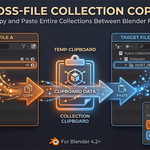
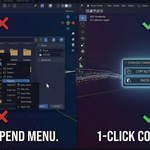
Stop wasting time digging through the File > Append menu! Experience true, seamless "Copy & Paste" for entire collections across different Blender projects.
🎯 The Pain Point
In Blender, the native Ctrl+C / Ctrl+V only copies selected objects. If you are dealing with complex collection hierarchies, pasting them into a new file often results in a disorganized mess. Moving a complete studio setup or a heavy product asset from one file to another usually forces you to use the tedious Append function—wasting your time and breaking your creative flow.
✨ The Solution
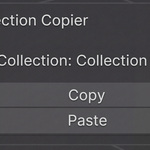
Collection Copier completely solves this! It adds two highly accessible buttons to your 3D Viewport sidebar (N-Panel), allowing you to transfer entire collections between different Blender windows and projects instantly, just like copying plain text.
🚀 Perfect For:
E-commerce & Product Rendering: Instantly move your high-poly product models into different studio lighting setups for main images and detail pages without rebuilding any hierarchies.
Kitbashing & Scene Assembly: Quickly grab assets, lights, or cameras from your library files and paste them directly into your active working scene.
Complex Project Management: Keep your files organized while easily migrating data between iterations.
E-commerce & Product Rendering: Instantly move your high-poly product models into different studio lighting setups for main images and detail pages without rebuilding any hierarchies.
Kitbashing & Scene Assembly: Quickly grab assets, lights, or cameras from your library files and paste them directly into your active working scene.
Complex Project Management: Keep your files organized while easily migrating data between iterations.
💎 Core Features
Instant Cross-File Transfer: Click "Copy" in File A, click "Paste" in File B. It's that fast.
100% Data Preservation: All materials, modifiers, constraints, light properties, and parent-child relationships within the collection are perfectly preserved.
Clean & Silent: Uses your system's temporary directory for seamless background data transfer. No junk files are left on your hard drive.
Instant Cross-File Transfer: Click "Copy" in File A, click "Paste" in File B. It's that fast.
100% Data Preservation: All materials, modifiers, constraints, light properties, and parent-child relationships within the collection are perfectly preserved.
Clean & Silent: Uses your system's temporary directory for seamless background data transfer. No junk files are left on your hard drive.
🛠️ How to Use
Select the target collection in the Outliner.
Press N in the 3D Viewport to open the sidebar -> Tool tab.
Click Copy.
Open your other Blender project and click Paste!
Select the target collection in the Outliner.
Press N in the 3D Viewport to open the sidebar -> Tool tab.
Click Copy.
Open your other Blender project and click Paste!
⚙️ Compatibility
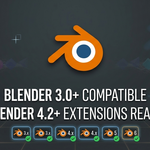
Blender 3.0+ & Blender 4.2+ (Extensions Ready)
Lightweight Python script, Plug & Play.
Blender 3.0+ & Blender 4.2+ (Extensions Ready)
Lightweight Python script, Plug & Play.
