 Skava
Skava


ColliderKit — Documentation
v1.1.1 · Blender 4.2 LTS and later · Unity / Unreal 4-5 / Godot 4 · Windows / macOS / Linux
1. Install
- Download the add-on ZIP (do not unpack).
- Edit → Preferences → Add-ons, press the arrow button in the top right corner, choose Install from Disk, pick the ZIP, enable ColliderKit.
- Press N in the 3D Viewport → ColliderKit tab.
After installing, press N in the 3D Viewport: a tab named ColliderKit appears in the sidebar.
2. Quick start
- Select the source mesh.
- Sidebar → ColliderKit → pick engine + shape type.
- (Optional) toggle Mirror, Group in Collection, Validate Fit.
- Click Generate Collider.
3. Shape types
| Shape | How | Best for |
|---|---|---|
| Box | AABB of evaluated mesh | Crates, simple props |
| Sphere | Bounding sphere | Round props |
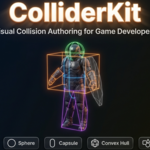
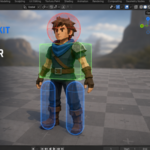
| Capsule | Auto-aligned to longest axis | Characters, columns |
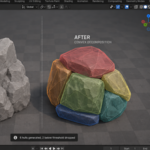
| Convex Hull | Hull of evaluated mesh, interior stripped | Weapons, rocks |
| Decimated Mesh | Triangulated + collapse-decimated | Concave props |
Box / Sphere / Capsule use the evaluated mesh — Subdivision, Mirror, Shape Keys all contribute.
4. Engine naming
| Engine | Naming | Collection |
|---|---|---|
| Unreal | UBX_ / USP_ / UCP_ / UCX_ | Unreal_Colliders |
| Unity | the object_col | Unity_Colliders |
| Godot 4 | the object-col | Godot_Colliders |
5. Symmetry mirror
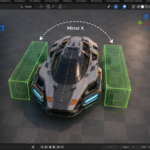
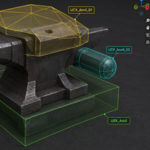
Enable Mirror Collider + axis (X / Y / Z). The addon generates the primary collider, then a mirrored copy. Both are then named by the engine convention with an index — for Unreal UCX_Name_01 and UCX_Name_02 (UBX_, USP_, UCP_ for box, sphere and capsule); checked by importing the FBX into Unreal Engine 5.8, which attached both to the mesh. The flip is baked into the mesh — coordinates negated along the axis, normals recalculated to face outward — so the copy keeps a positive scale.
6. Fit validator
Post-generation AABB containment check. Warns if the collider overshoots source bounds by more than 1% of the mesh diagonal. Common causes: too-aggressive Decimate ratio, Sphere on a tall mesh (use Capsule).
7. Compound colliders
Add Compound Shape stacks another collider on the same source (auto-indexed). Remove Last drops the most recent. Merge Compound → Single Hull unions every collider's vertices and computes one convex hull from the union.
8. Convex decomposition
Splits a concave mesh into N convex hulls via recursive bisection.
- Max Hulls — upper bound on pieces (default 4).
- Volume Threshold — drops hulls below this fraction of total volume (default 0.05).
9. Batch generation
Generating colliders one object at a time is where a level goes wrong — the prop you forgot is the prop that falls through the floor. Batch Generate Colliders runs the current shape settings over every mesh in the batch scope at once.
- Batch Scope — the selected meshes, or the whole scene.
- Name Pattern — an optional filter, so a scope of "whole scene" can still mean "only the meshes whose names match".
- Replace Existing — removes an object's previous colliders before making new ones, instead of stacking a second set on top of the first.
Remove Colliders clears every collision shape from the active object, and Remove Last Compound Shape takes back the last shape added to a compound group.
10. Physics materials
A collider carries how the surface behaves, not just its shape. Pick a Material Preset and the friction, bounciness and density sliders fill with the preset's values (table below); pick Custom to set them by hand. Assign Physics Material writes them onto every collider of the active object.
| Preset | Friction | Bounce | Density |
|---|---|---|---|
| Concrete | 0.8 | 0.05 | 2.4 |
| Metal | 0.4 | 0.2 | 7.8 |
| Wood | 0.5 | 0.3 | 0.7 |
| Rubber | 0.95 | 0.85 | 1.1 |
| Glass | 0.2 | 0.1 | 2.5 |
| Ice | 0.05 | 0.05 | 0.9 |
| Flesh | 0.6 | 0.1 | 1.0 |
11. Collider statistics
The statistics panel lists each collider on the active object with its vertex and face count — a convex hull that came out at 400 vertices is a collider that will cost you at runtime, and the number is the only way to see it before the engine does.
12. Visual style
- Wire display, per-shape color tint (Box green, Sphere red, Capsule blue, Convex yellow, Mesh purple).
- Non-selectable + non-renderable.
- Toggle Collider Visibility hides / re-shows every collider in the scene.
- Show In Front draws them over the geometry they wrap, so a tight shape is still visible.
- Toggle Collider Selection Lock keeps them out of the way of box-select while you keep modelling.
- Refresh Collider Display re-applies these display settings to colliders made earlier or appended from another file.
13. Troubleshooting
"Could not generate collider: empty mesh" — source has no vertices after modifiers.
"Collider overshoots source bounds by X%" — see section 6.
Decimated Mesh is jagged — raise the Decimate ratio closer to 1.0.
14. Limitations
- Built-in decomposer is recursive bisection, not VHACD.
- Physics materials stored as custom props; engine reads them via its own import script.
- Decimated Mesh pre-pass has a 50-iteration / 3-second hard cap.
15. Changelog
v1.1.1 — maintenance release. Minimum Blender is now 4.2 LTS. The package ships the full licence text and an updated README. No changes to the tools.
v1.1.0
- New: Batch Generate Colliders over the selection or the whole scene, with an optional name filter and Replace Existing.
- New: physics materials — seven presets filling friction, bounciness and density, applied to every collider of the object.
- New: collider statistics — vertex and face count per shape.
- New: display controls — visibility toggle, show in front, selection lock, and a refresh that re-applies them to colliders made earlier.
- New: Remove Colliders and Remove Last Compound Shape.
v1.0.0 — initial release.
16. Support & License
Through marketplace messaging. GPL-3.0. Colliders you generate are yours to ship in any commercial project.
Have questions about this product?
Login to message
| Published | 3 months ago |
| Blender Version | 4.2 - 5.2 |
| Extension Type | N/A |
| Render Engine Used | Arnold, Blender-Internal, Blender-Game-Engine, Cycles, Eevee, Freestyle, Luxrender, Mental-Ray, Octane, Vray, Yafaray |
| License | GPL |
Discover more products like this
godot gamedev Asset Pipeline Game Engine hard surface collision compound convex hull mesh tools bounding box collider capsule