 Jade
Jade


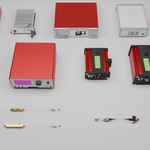
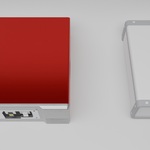
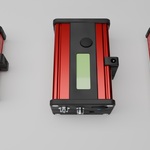
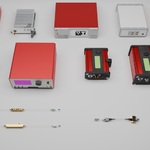
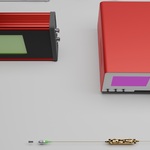
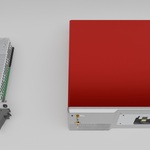
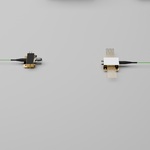
This official documentation covers file contents, hardware asset catalogue, software compatibility, operation guide, mesh‑material settings and best‑practice workflow for your Optoelectronic Laboratory Equipment Blender Asset Library, accessible for all prospective buyers and end‑users.
1. Package Overview
This asset collection is specially designed for optics‑engineering, photonics and laser‑research practitioners to build photorealistic optical‑path laboratory scenes for journal paper illustrations, group‑meeting presentations, project renderings and experimental schematic artwork.
All laboratory instruments are modelled at a 1:1 realistic scale, with fine‑scale mechanical details including adjustment knobs, fiber‑optic interfaces, cable ports and built‑in display panels. Pre‑configured industrial PBR materials are supplied for fast rendering. Every piece of equipment is saved as an independent Blender source file for flexible scene assembly.
2. Complete Asset Inventory (13 Core Optoelectronic Devices)
2.1 Transceiver Devices
- Digital reference transmitter
- Ultrafast detector module
- Fiber‑coupled photodetector
- High‑speed optical‑receiver module
- Ultrafast optical receiver
2.2 Modulator and Drive Hardware
- Intensity modulator
- Phase modulator
- Benchtop electro‑optic modulator driver
- Bias‑voltage controller
2.3 Measurement & Analysis Instruments
- Fourier‑transform spectrometer
- Wavelength meter
- Digitally‑tunable band‑pass filter
2.4 Optical Amplifier
- Fiber amplifier
-
3. System & Version CompatibilityNative file format: .blend Blender project source fileMinimum supported software version: Blender 5.0 or all newer official releasesNo third‑party add‑ons, plugins or external texture resources are required. All mesh geometry, surface textures and material parameters are self‑contained within each asset file.4. Mesh and Material SpecificationOptimized medium‑poly geometry: sufficient surface detail to satisfy top‑tier academic publication standards, without excessive polygon count that lags preview and rendering speed.Fully‑unlocked editable material parameters. Users are permitted to tweak roughness, metallic value, transparency, panel screen colour and surface gloss. Two common visual styles (photorealistic laboratory look and clean minimalist schematic style) can be quickly switched.
5. Step‑by‑Step User Instructions
- 1.Unzip your downloaded asset package to your local folder. All thirteen laboratory devices are stored as independent
.blenddocuments. - 2.Launch your compatible Blender build. Open the instrument files you require.
- 3.Copy‑paste your chosen hardware models into your main optical‑scene project.
- 4.Arrange fiber routes, bench layout and device placement to construct your custom experimental light‑path setup.
- 5.Adjust material properties, add laboratory lighting and carry out your final render for thesis figures, presentation slides or research demonstration graphics.
-
6. Usage Tips for Photonics Researchers
- 1.Keep each optical component separate when arranging your layout, to make later‑on layout adjustment convenient.
- 2.Lower material metallic‑roughness values if you need clean‑looking schematic‑style diagrams.
- 3.Enable soft laboratory‑style diffused lighting to bring out premium‑quality realistic renders for journal‑standard illustrations.
-
7. TermsAll assets are permitted for your non‑commercial and commercial academic‑research rendering work. Mesh files shall not be redistributed, resold, shared online or repackaged into competing 3‑D asset packs.
- 1.Unzip your downloaded asset package to your local folder. All thirteen laboratory devices are stored as independent
$19.99
Have questions about this product?
Login to message
| Published | about 2 months ago |
| Blender Version | 5.0 - 5.2 |
| Render Engine Used | Cycles |
| License | Royalty Free |

Discover more products like this
,Scientific research modeling optics ,Scientific research drawing