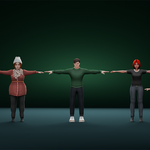
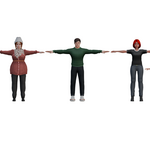
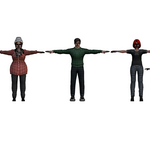
Complete 3D Family Character Pack - 7 Low Poly Models Multi-Generation Family
 blenderustad


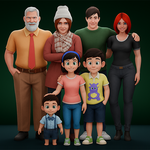
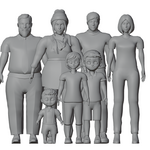
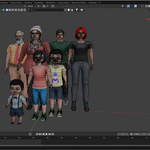
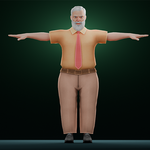
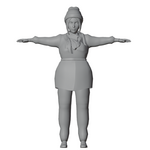
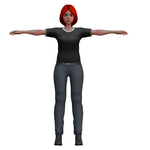
Package Contents
Files Included:
- ✅ Complete Family Pack .blend file - All 7 characters in one scene
- ✅ Individual Character Files:
- Grandfather.blend / Grandfather.fbx
- Grandmother.blend / Grandmother.fbx
- Father.blend / Father.fbx
- Mother.blend / Mother.fbx
- Daughter.blend / Daughter.fbx
- Brother.blend / Brother.fbx
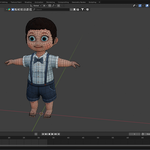
- Baby_Boy.blend / Baby_Boy.fbx
Quick Start Guide
Using in Blender:
-
Open Complete Scene:
- Open
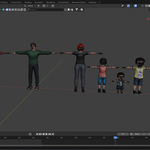
All Charactersblendto see all characters together - All characters are in A-pose, ready for rigging
- Each character has organized naming: Body, Costume, Hair, etc.
- Open
-
Import Individual Characters:
- File > Append or File > Link
- Navigate to individual character .blend files
- Select the character collection you need
- Click "Append" or "Link"
-
Working with Collections:
- Each character is organized in its own collection
- Body parts are separated for easy editing:
- Body (main mesh)
- Costume (clothing)
- Hair
- Accessories (shoes, beard, etc.)
Using in Other Software (Unity, Unreal, etc.):
-
Import FBX Files:
- Drag and drop .fbx files into your project
- Materials may need to be reassigned
- Textures are embedded in the Blender files
-
For Game Engines:
- Import the FBX version
- Set up materials using your engine's workflow
- Add rigging system (Humanoid rig for Unity, etc.)
- Scale: Models are in real-world scale
Tips & Best Practices
For Animation:
- ✓ Characters are in A-pose for easy rigging
- ✓ Clean topology with good edge flow
- ✓ Use Auto-Rig Pro, Rigify, or manual rigging
- ✓ Body parts are separated for clothing swaps
For Rendering:
- ✓ Materials use Principled BSDF shader
- ✓ Adjust colors in the Base Color node
- ✓ Use HDRI lighting for best results
- ✓ Recommended render engine: Cycles or Eevee
For Game Development:
- ✓ Consider adding LODs for optimization
- ✓ Bake textures if needed for performance
- ✓ Characters work well at 1:1 scale
- ✓ Add collision meshes as needed
Customization Guide
Changing Colors:
- Select character mesh
- Go to Shading workspace
- Find Material nodes
- Adjust Base Color for clothing/skin tones
Swapping Clothing:
- Hide or delete costume mesh
- Model new clothes or import from other packs
- Parent to body mesh or rig
Facial Expressions:
- Add shape keys for expressions
- Use Blender's sculpt mode
- Or apply modifiers for variations
Technical Requirements
Minimum:
- Blender (recommended: latest version)
- 4GB RAM
- Any 3D software supporting FBX import
For Game Engines:
- Unity 2020.3+ or Unreal Engine 4.27+
- FBX import capability
Common Issues & Solutions
Problem: Materials look wrong after import
- Solution: Reassign materials in your target software
- Textures may need to be re-linked
Problem: Scale is too large/small
- Solution: Scale characters uniformly to fit your scene
- Models are in real-world scale (meters)
Problem: FBX missing textures
- Solution: Export textures from Blender files manually
- Re-apply in your target software
Problem: Need rigging
- Solution: Use Auto-Rig Pro, Rigify, or Mixamo
- Clean topology makes rigging straightforward
Workflow Examples
Example 1: Architectural Visualization
- Import All Characters
.blend - Position characters in your scene
- Adjust poses (manual or use pose assets)
- Render with your arch-viz scene
Example 2: Game Development
- Import individual FBX files
- Set up as Humanoid rig (Unity) or skeletal mesh (Unreal)
- Apply animations from marketplace or custom
- Add to game scene
Example 3: Animation Project
- Open individual .blend file
- Apply rigging system (Rigify recommended)
- Create animation
- Render in Blender or export
File Organization Tips
Your_Project/
├── Assets/
│   ├── Characters/
│   │   ├── Family_Pack/
│   │   │   ├── Grandfather/
│   │   │   ├── Grandmother/
│   │   │   ├── Father/
│   │   │   ├── Mother/
│   │   │   ├── Daughter/
│   │   │   ├── Brother/
│   │   │   └── Baby_Boy/
Support & Updates
- For questions or issues, contact through SuperHive messaging
- Check for updates regularly
- Join our community for tips and showcase
License Information
- ✅ Commercial use allowed
- ✅ Modify and edit as needed
- ✅ Use in games, films, renders
- ❌ Cannot resell or redistribute as-is
- ❌ Cannot share source files
Enjoy creating with your new family characters! 🎨👨👩👧👦
Have questions about this product?
Login to message
| Published | 12 months ago |
| Blender Version | 2.6x - 4.5 |
| Render Engine Used | Cycles, Eevee |
| Misc Data | Uvs-Unwrapped, Textured |
| License | Royalty Free |

Discover more products like this
game ready family characters cartoon family characters pack 3d family character models blender low poly family pack 3d models grandparents 3d models cartoon family models bundle blender character pack bundle family 3d models for games parents and children 3d characters multi generation family 3d pack blender family character collection