Composition Director Pro
 Steven Seidler (Blendscapes3D)



# Composition Director Pro
**Cinematic framing in one click.** Stop guessing where to put your subject. Pick a shot size, click a composition button, get a perfectly framed camera with rule-of-thirds, golden ratio, or fibonacci spiral guides — plus a 0–10 score telling you exactly what's wrong.
## What it does
| Feature | What it does |
|---|---|
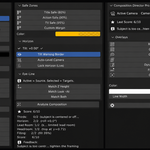
| **7 Composition Overlays** | Rule of Thirds, Golden Ratio, Golden Spiral (4 rotations), Diagonals, Dynamic Symmetry, Fibonacci Grid, Center Cross — drawn live in the camera view |
| **8 Aspect Ratio Letterboxes** | 16:9, 2.39:1 Cinemascope, 2.35:1, 4:3, 1:1 Square, 9:16 Mobile, 21:9 Ultrawide, IMAX 1.43:1 — auto-syncs render resolution |
| **9 Smart Shot Sizes** | Extreme Close-Up through Extreme Wide + Two-Shot + Over-Shoulder — math-correct subject filling based on your camera lens & sensor |
| **14 Shot Angle Presets** | Eye-Level, Low-Angle, High-Angle, Worm's Eye, Bird's Eye, Dutch 15°/25°/45°, Profile, 3/4 View, Hero Shot, POV, Establishing, Reaction |
| **Composition Score 0–10** | Analyzes thirds, horizon, lead-room, headroom, frame-fill — gives 1-sentence feedback with concrete fix suggestions |
| **Safe Zones** | Title-Safe (80%), Action-Safe (90%), TV-Safe (95%), Custom — broadcast-standard inset rectangles |
| **Horizon Lock** | Live tilt-display + auto-level + persistent depsgraph lock that keeps the horizon flat while you animate |
| **Eye-Line Matcher** | Match Z-height (and look-at) across multiple cameras for cinematic cuts |
## Install
1. Download `CompositionDirectorPro-1.0.0.zip` from your purchase receipt
2. In Blender: **Edit → Preferences → Get Extensions → drop-down (top-right) → Install from Disk**
3. Pick the `.zip`
4. Open a 3D Viewport → press **N** → click the **Composition** tab
Requires **Blender 4.2 or later**. Tested through 5.1.
## Usage
### Quick cinematic frame
1. Switch your viewport to camera view (numpad-0)
2. Select your subject object(s)
3. N-Panel → **Composition** tab → **Smart Frame** → click **Close-Up** (or any other shot size)
4. Camera repositions to fill the frame with subject on the left third — done
### Add composition guides
1. **Overlays** sub-panel → toggle **Rule of Thirds** (or any other overlay)
2. Adjust color and line width
3. Combine multiple overlays for advanced composition (e.g. Spiral + Thirds together)
### Set cinematic aspect
1. **Aspect Ratio** sub-panel → click **2.39:1 Cine**
2. Render resolution updates to match (e.g. 1920×803)
3. Black letterbox bars appear in the camera view
### Apply a Dutch angle
1. Select subject
2. **Shot Library** → click **Dutch 25°**
3. Camera tilts exactly 25° while keeping the subject framed
4. Click **Auto-Level Camera** to undo the tilt without losing your framing
### Score your composition
1. Frame your shot, select the subject
2. **Composition Score** → click **Analyze Composition**
3. See 0–10 score + breakdown (Thirds / Horizon / Lead Room / Headroom / Filling)
4. Read the 1-sentence feedback: "Subject is too central — shift to a rule-of-thirds intersection"
### Match eye-lines across cameras
1. Set the source camera as the active scene camera
2. Select all target cameras (multi-select with shift)
3. **Eye-Line** → **Match Z Height** (or Look-At, or Both)
## Configuration
**Edit → Preferences → Add-ons → Composition Director Pro**
- **Insert Keyframes When Framing** (default: OFF) — auto-keyframe camera transform when applying smart-frame or shot presets
- **Default Overlay Opacity** (default: 0.6)
- **Default Overlay Line Width** (default: 1.5 px)
- **Tilt Warning Threshold** (default: 1.0°) — angle above which the red horizon-warning border appears
## Compatibility
- Blender **4.2** through **5.1+**
- Windows, macOS, Linux (pure Python — no compiled binaries)
- Works with EEVEE, Cycles, and Workbench
- Non-destructive: all overlays are draw-handler GPU passes; nothing is baked into your scene data
## Pairs perfectly with
- **Camera Director Pro** — cinematic camera setups, lens library, shake
- **Light Director Pro** — cinematic 3-point rigs, HDRI, atmosphere
Bundle all three for a complete cinematography toolkit.
## Support
Email: [email protected]
## License
GPL-2.0-or-later. See `LICENSE`.
$8.49
Have questions about this product?
Login to message
| Blender Extension Compatible | Yes |
| Published | 5 months ago |
| Blender Version | 4.2 - 5.1 |
| Extension Type | Add-on |
| Render Engine Used | Blender-Internal |
| License | GPL |
Discover more products like this
BlenderCompositingTools Blender Scene Composition compositor