Construction Site Interior Environment
 Desertsage


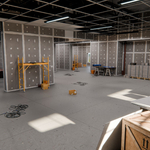
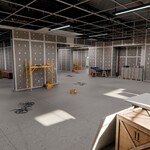
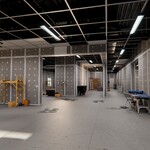
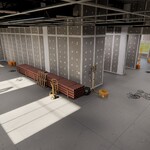
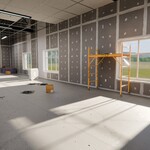
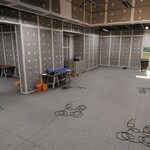
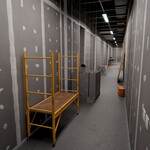
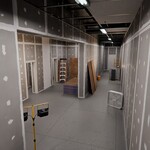
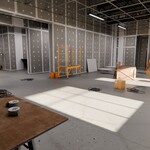
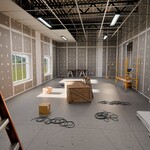
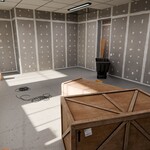
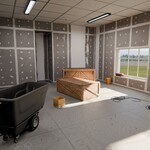
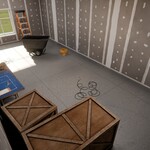
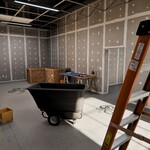
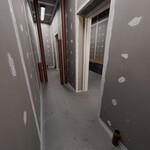
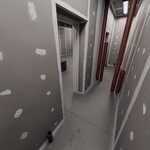
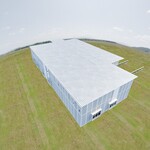
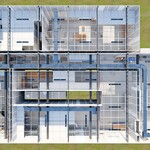
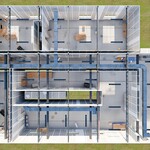
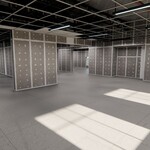
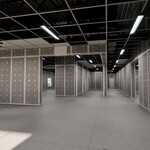
Thank you for purchasing the Construction Site Interior Scene.
This package contains a fully furnished and optimized construction-themed interior environment created specifically for Blender.
The scene has been designed to provide high visual quality while maintaining strong viewport and render performance through extensive use of collection instancing, optimized texture usage, reusable materials, and efficient scene organization.
Important
This package was designed primarily for Blender workflows.
While the included assets and scene can be exported to other DCC applications and game engines, several Blender-specific material techniques are used throughout the project to improve realism, variation, and performance.
These material systems may require adjustment when imported into other software packages.
Every asset in the scene utilizes physically based rendering (PBR) textures, allowing the environment to be successfully transferred to other applications, although visual results may vary slightly depending on the target renderer.
Scene Layout
This environment is an INTERIOR ONLY construction site scene.
Included areas consist of:
• Main construction room
• Secondary construction room
• Hallway
• Small bathroom
The environment was designed to represent an active interior construction project with a large collection of tools, equipment, materials, and temporary site furnishings.
No exterior building geometry is included.
Included Files
Construction Site Interior_Optimized.blend
This is the primary production-ready scene file.
This version contains:
• Collection instancing workflows
• Optimized texture usage
• Scatter systems
• Performance-focused scene organization
• Render-ready lighting setup
Recommended for:
• Rendering
• Editing
• Layout modifications
• General Blender use
This is the recommended file for all Blender users.
Construction Site Interior_Empty.blend
An architectural-only version of the environment.
This file contains:
• Building architecture only
• Walls
• Doors
• Windows
• Structural elements
This file does NOT contain:
• Props
• Fixtures
• Construction equipment
• Scatter assets
Useful for:
• Custom scene population
• Alternative construction layouts
• Faster project startup
Construction Site Interior_Baked.blend
A fully realized version of the scene.
This version contains:
• No collection instances
• No instancing dependencies
• Fully unique geometry
Recommended only for:
• Exporting to other DCC software
• External engine workflows
• Compatibility purposes
This file is included primarily as a convenience for users who require traditional geometry workflows.
For normal Blender usage, the Optimized file should always be preferred.
Scene Statistics
Construction Site Interior_Optimized
Vertices: 179,399
Faces: 167,617
Construction Site Interior_Baked
Vertices: 612,012
Faces: 561,549
Construction Site Interior_Empty
Vertices: 27,065
Faces: 29,001
Blender Compatibility
The environment was created in Blender and is intended for Blender-based workflows.
All included scene files have been configured for modern Blender versions.
Because several materials utilize Blender-specific techniques, visual parity in other DCC applications may require additional setup.
Scene Organization
The primary scene structure is organized into several top-level folders.
This documentation refers specifically to:
Construction Site Interior_Optimized.blend
00_SCENE
Contains global scene elements.
Cameras
Includes 17 pre-configured camera angles positioned throughout the environment.
These cameras can be used for:
• Portfolio renders
• Product previews
• Marketing images
• Scene exploration
Lights
Contains the area light setup used throughout the environment.
HDRI Backdrop
Because this is an interior scene, a large spherical backdrop has been placed outside the structure to create visual depth and exterior parallax.
This setup provides a lightweight solution for exterior visibility through windows.
For maximum realism, users may wish to replace this backdrop with:
• Custom exterior geometry
• High-resolution HDRI environments (32K recommended)
01_ARCHITECTURE
Contains all structural building elements.
Examples include:
• Doors
• Windows
• I-Beams
• Walls
• Ceiling elements
• Architectural trim
These collections make up the physical building structure.
02_FIXTURES
Contains all scene props and construction equipment.
Examples include:
• Pallets
• Buckets
• Ladders
• Scaffolding
• Tools
• Construction lighting
• Material stacks
• Storage containers
This folder represents the majority of the scene dressing and environmental storytelling.
03_GEO_NODES
Contains the floor scatter system.
The scene utilizes a lightweight Geometry Nodes setup that randomly distributes small construction debris and props across floor surfaces.
Unlike large procedural environments, this system has no exposed controls and is intended primarily as a finished production solution.
Users familiar with Geometry Nodes may easily modify the network if desired.
04_INSTANCES_DISABLED
This folder contains the source geometry used throughout the entire scene.
The environment relies heavily on collection instancing to improve performance and simplify editing.
If you wish to modify:
• A wall section
• A ladder
• A pallet
• A construction prop
You should edit the corresponding source mesh located in this folder.
Changes made to source assets will automatically update all instances throughout the environment.
This folder also contains source assets used by the Geometry Nodes scatter system.
05_HIDDEN_DISABLED
Contains scene utility objects.
Scene Utilities
Includes control objects used by various material and shader systems throughout the project.
These objects help drive procedural variation and material consistency.
It is generally recommended that these objects remain unchanged.
Optimization Workflow
The scene has been heavily optimized to balance visual quality and performance.
Optimization methods include:
• Collection instancing
• Shared material workflows
• Texture size optimization
• Reusable geometry systems
• Efficient scene organization
Texture Strategy
To reduce memory consumption and improve viewport performance, texture resolutions have been assigned based on asset importance and screen presence.
Assets may utilize:
• 1K textures
• 2K textures
• 4K textures
Larger hero assets receive higher texture budgets while smaller supporting assets utilize reduced texture resolutions.
This optimization significantly reduces memory usage while maintaining visual quality.
FBX Asset Library
Included with this package is a complete FBX asset library.
Unlike the optimized Blender scene, all exported FBX assets include dedicated 4K texture sets.
For example:
A tape roll inside the optimized Blender scene may utilize a 1K texture set for performance reasons.
The corresponding FBX export includes a full 4K texture set.
This allows users to selectively replace assets with higher-resolution versions when needed.
Collection Instancing
Most objects in the environment are collection instances.
Benefits include:
• Faster viewport performance
• Lower memory usage
• Easier asset management
• Global asset editing
Because instances are used extensively throughout the environment:
Individual placed instances cannot be edited directly.
Users wishing to create unique variants should:
Realize the instance
Convert to editable geometry
Modify as required
Hero Asset Library
One of the primary features of this package is the included library of 40+ reusable construction assets.
These assets can be used independently in other projects and environments.
Included assets:
• Construction Scaffolding
• Foldable Work Table
• Trash Cart
• PVC Pipe Pallet
• PVC Pipe A
• PVC Pipe B
• Plywood Pallet
• Plywood A
• Plywood B
• Plywood C
• Cinderblock Pallet
• Cinderblock A
• Cinderblock B
• Cinderblock C
• Bucket
• Wire Bundle Ledge A
• Wire Bundle Ledge B
• Wire Bundle Ledge C
• Wire Bundle x5
• Power Drill
• Caulk Gun
• Measurement Square
• Tape Roll
• Blueprint Flat
• Blueprint Rolled
• Tape Measure
• Light Switch Double
• Electrical Outlet
• Clipboard
• Hardcase V1
• Hardcase V2
• Dolly
• Tool Box
• Folding Chair
• Folding Ladder
• Box Fan
• Small Construction Light
• Medium Construction Light
• Pallet
• Rectangular Crate
• Small Rectangular Crate
• Square Crate
• Industrial Door
These assets are provided both within the environment and as standalone FBX exports.
Rendering Information
The scene has been configured for both:
• Eevee
• Cycles
Render settings have been optimized to balance:
• Visual quality
• Performance
Users are encouraged to adjust:
• Samples
• Denoising
• Ray tracing
• Bounce counts
based on their specific hardware and production requirements.
Final Notes
This environment was designed as a production-ready interior construction site focused on:
• High visual quality
• Efficient rendering
• Modularity
• Asset reusability
• Flexible customization
The combination of:
• Collection instancing
• Optimized texture workflows
• Reusable construction assets
• Organized scene management
allows the environment to function both as a complete scene and as a valuable construction asset library for future projects.
Have questions about this product?
Login to message
| Dev Fund Contributor | |
| Published | 5 months ago |
| Blender Version | 4.5 - 5.1 |
| Render Engine Used | Cycles, Eevee |
| Misc Data | Uvs-Unwrapped, Low-High-Resolution, Normal-Mapped, Textured |
| License | Creative Commons |
Discover more products like this
contractor workspace construction site interior renovation project unfinished building interior construction jobsite environment construction materials construction asset pack realistic environment industrial interior construction scene building interior renovation site architectural visualization work in progress