Crater Generator
 Alternative Pack


Crater Generator — Documentation
GPU-accelerated procedural craters for Blender. Physically realistic for both kinetic impact and explosion craters, with real hydraulic erosion.
Installation
Blender 4.2+
Drag and drop crater_generator-1.0.0.zip directly onto Blender's window. Confirm the install dialog.
Blender 3.6 – 4.1
Edit > Preferences > Add-ons > Install... → select the zip → enable the checkbox.
After install, open the 3D Viewport, press N, and look for the Crater Generator tab on the right sidebar.
Quick Start
- Add a subdivided plane to your scene
Add > Mesh > Plane, then in Edit Mode subdivide it (recommended: 200+ cuts for clean craters). - Select the plane and place the 3D cursor where you want the impact
Shift + Right-clickin the viewport. - Open the sidebar (N) → Crater Generator tab.
- Adjust mass, velocity and angle of incidence as needed.
- Click Generate Crater.
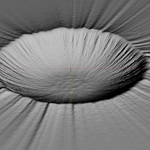
The crater forms exactly under the 3D cursor. Repeat to stack multiple impacts on the same terrain.
Key Parameters
| Parameter | Effect |
|---|---|
| Mass | Projectile mass in kg. Bigger = larger crater. |
| Velocity | Impact velocity in m/s. Drives kinetic energy. |
| Angle | Incidence angle (90° = vertical). Off-axis impacts produce elongated craters. |
| Density | Projectile material (stony ~3500, iron ~7800, comet ~1000). |
| Seed | Procedural variation. Same parameters + different seed = different crater. |
| Erosion | Run hydraulic erosion pass after impact. |
Multi-Impact Presets
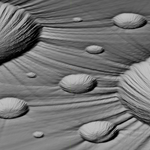
The sidebar includes one-click presets for common scenarios:
- Cluster — tight group of small craters
- Shower — wide-spread meteor field
- Storm — chaotic mix of sizes
Presets spawn at the 3D cursor. Set Meteors count and Spread before clicking Simulate.
Tips
- Higher subdivision = better detail. A 1024×1024 subdivided plane handles 4K displacement; 2048+ for production renders.
- Use Cycles for final renders (full geometry deformation, raytraced shadows in the crater).
- EEVEE works for previz/animation but lacks the deep shadow detail.
- The deformed mesh is standard Blender geometry — UV-unwrap, sculpt, paint, or export as FBX/GLB/OBJ.
- For animation, use Animate Impact instead of Simulate — it bakes the deformation as shape keys.
Troubleshooting
Crater doesn't appear → make sure the plane is subdivided (Edit Mode → Subdivide). A flat 4-vert plane has no geometry to deform.
Crater is in the wrong position → check the 3D cursor position. Snap it to a vertex with Shift+S > Cursor to Selected.
GPU error on register → your GPU may not support the required compute shader version. Tested on NVIDIA (CUDA/OptiX), AMD (OpenCL), Apple (Metal). Update your graphics drivers.
Warning "Extension was not detected" on Blender 3.6–4.1 → ignore it. The legacy installer doesn't read the manifest, but the addon works fine.
Physics Models Used
- Schmidt-Holsapple Pi-group scaling (impact + explosion craters)
- McGetchin ejecta thickness power law
- Verlet integration (atmospheric trajectory)
- Stream Power Law (drainage-based erosion)
- Beyer 2015 particle hydraulics
- Musgrave 1989 thermal/talus erosion
Support
Issues, feature requests, contact: c[email protected]
Crater Generator v1.0.0 — Alternative Pack © 2026 — GPL-3.0-or-later
Have questions about this product?
Login to message
| Blender Extension Compatible | Yes |
| Sales | 10+ |
| Dev Fund Contributor | |
| Published | 5 months ago |
| Blender Version | 5.0 |
| Extension Type | Add-on |
| Render Engine Used | Cycles, Eevee |
| License | GPL |
Discover more products like this
nuclear meteorite explosion crater 3d explosion Generator procedural hole meteor