Cutout Craft
 Revolution VFX Studio


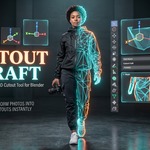


✂️ Cutout Craft — Official User Guide & Documentation
Welcome to Cutout Craft! This guide covers installation, workflows, and advanced features for Blender 4.2+ and 5.x.
🚀 1. Installation
- In Blender, go to Edit > Preferences > Get Extensions (or Add-ons).
- Click the top-right arrow and select Install from Disk....
- Select
cutout_craft-v1.0.0.zipand click Install. - The addon is ready! You will find the Cutout Craft panel in the 3D Viewport right sidebar (press
Nkey).
⚡ 2. Workflows & Features
A. The 1-Click Drag & Drop Workflow (Fastest)
- Drag any photo or PNG from your computer directly into Blender's 3D Viewport.
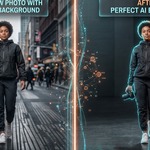
- If the photo has a background (JPG / solid / complex photo), check [x] AI Background Removal.
- Click the prominent [ ⚡ Convert Dragged Image to Cutout ] button.
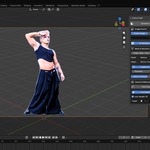
- The addon automatically cuts out the subject, creates an optimized 3D mesh standing on the floor, and deletes the temporary reference.
B. Camera View Drag & Drop
- You can even drag images while looking through your active camera (
Numpad 0). Cutout Craft automatically calculates the 3D ground position in front of your lens and creates the cutout mesh facing your shot.
C. Multi-File Batch Importer
- In the sidebar under
Image Source, select Batch Folder. - Click Select Multiple Images... to pick 5, 10, or 20 photos at once with
ShiftorCtrl. - Cutout Craft converts all images and arranges them in a clean grid at your 3D cursor.
📏 3. Real-Time Controls & Billboard
- Responsive Height: Select your cutout mesh and move the Height slider to scale your character in real-time (default: 1.80m).
- 3D Thickness: Toggle Enable 3D Thickness to give your cutout subtle physical depth.
-
Live Camera Tracking: Toggle Live Camera Tracking to add a non-destructive
Locked Trackconstraint so your billboards dynamically track your active camera without tipping over.
⚙️ 4. Technical Specs & Compatibility
- Supported Engines: Cycles and EEVEE Next.
- Supported OS: Windows, macOS (Apple Silicon & Intel), Linux.
- AI Model: U²-Net (Apache License 2.0, 100% offline local inference via bundled ONNX Runtime).
Cutout Craft by Revolution VFX Studio
Next-Generation 3D & VFX Tools for Blender
Have questions about this product?
Login to message
| Blender Extension Compatible | Yes |
| Dev Fund Contributor | |
| Published | about 2 months ago |
| Blender Version | 4.2 - 5.2 |
| Extension Type | Add-on |
| Render Engine Used | Cycles, Eevee |
| License | GPL |