 Revolution VFX Studio


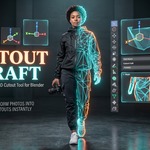


✂️ Cutout Craft — Turn Any Photo or PNG into a 3D Billboard Mesh in 1-Click!
Tired of manually opening Photoshop to remove backgrounds, dealing with massive transparent plane overdraw, or manually rigging camera-tracking constraints for your 2D cutouts?
Cutout Craft is the ultimate, lightning-fast 1-click solution for architects, environment artists, VFX matte painters, and game developers in Blender 4.2+ and 5.x.
⚡ Why Cutout Craft?
- 🖱️ Instant Drag & Drop: Drag ANY image (PNG, JPG, WebP) directly from your desktop into the 3D Viewport — even inside Camera View (
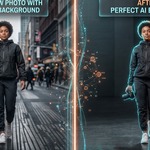
Numpad 0). Hit Convert and watch it turn into a clean 3D mesh standing on the floor in under 1 second. - 🧠 Built-in Local AI Background Removal: Powered by a local neural network (U²-Net). It removes messy photo backgrounds, street clutter, and complex environments instantly. 100% offline, private, with zero subscription fees.
- 📐 Tight Silhouette Meshes (Zero Overdraw): Automatically traces and tessellates the subject contour into a lightweight, optimized mesh. Say goodbye to slow render times and glitchy transparent shadows caused by giant flat square planes!
- 🦶 Ground-Anchored Pivot Point: Automatically places the origin right at the feet/base of your subject so assets snap cleanly onto terrains, floors, and surfaces without sinking.
- 🎥 Smart Billboard & Live Camera Tracking: 1-click real-time
Locked Trackconstraint keeps your characters and vegetation facing the camera without weird tipping or tilting. - 📏 Responsive Real-Time Controls: Adjust height (default 1.80m) and 3D solid thickness with live interactive sliders that update selected meshes in real-time in the viewport.
- 📁 Batch Multi-Image Importer: Select dozens of photos at once and populate an entire architectural scene in seconds.
- 🎨 Cycles & EEVEE Next Ready: Automatic material setup with Principled BSDF nodes properly linked and ready for production rendering.
🛡️ AI & Local Processing Transparency
Cutout Craft includes an optional AI Background Removal feature powered by the open-source U²-Net neural network (Apache License 2.0).
- 100% Local Processing: Inactive by default, runs entirely on your local machine via bundled ONNX Runtime wheels.
- Zero Cloud / Zero Telemetry: No images or personal data are ever sent over the internet.
- No API Keys or Subscriptions: Works completely offline and unlimited.
📖 Quick Start Guide
-
Drag & Drop Workflow:
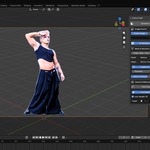
- Drag any photo or transparent PNG from your file manager directly into Blender's 3D Viewport.
- If the photo has a background (JPG / solid / complex photo), check [x] AI Background Removal.
- Click the prominent [ ⚡ Convert Dragged Image to Cutout ] button.
- Your original empty reference is deleted and your 3D cutout mesh appears upright on the ground!
-
Batch Import:
- Under
Image Source, selectBatch Folderand click Select Multiple Images... to pick multiple files at once.
- Under
-
Live Camera Tracking & Real-Time Height:
- Select your cutout mesh, adjust the Height slider to scale in real-time, or toggle Live Camera Tracking to have it smoothly follow your active camera.
❓ Frequently Asked Questions (FAQ)
Q: Does the AI background removal require an internet connection or paid subscription?
A: No! The neural network runs 100% locally on your computer using bundled ONNX Runtime wheels. It is completely private, offline, and unlimited.
Q: Does it work with raw JPG photos without alpha transparency?
A: Yes! With the AI Background Removal option enabled, the AI automatically detects the subject (people, plants, objects, vehicles) and extracts a clean silhouette.
Q: What if my image is already a transparent PNG?
A: Simply leave the AI Background Removal box unchecked, and Cutout Craft will trace the original alpha channel contour with pixel-perfect precision.
Q: Is it compatible with EEVEE Next and Cycles in Blender 4.2+ and 5.x?
A: Yes, 100%. Materials are set up using modern Principled BSDF standards with correct alpha blending for both render engines.
Developed with precision by Revolution VFX Studio
Next-Generation 3D & VFX Tools for Blender